
GForce Software Minimonsta2
Professional music gear - detailed information and where to buy
GForce Software
Minimonsta2
Product Info
* Prices may vary. Check retailer for current pricing and availability.
Product Description
- Minimonsta2 - Boldly Going Where No Mini Has Gone Before When GForce first released it
- the original Minimonsta gained heavy praise from fans and critics alike for providing an extraordinarily accurate sonic replication of the legendary Model D®. But it went much further
- augmenting the simplicity of the original design with a host of new features that allowed the deeply familiar tones to be pushed into previously unexplored sonic realms. Minimonsta2 retains the fundamental architecture at the heart of its predecessor
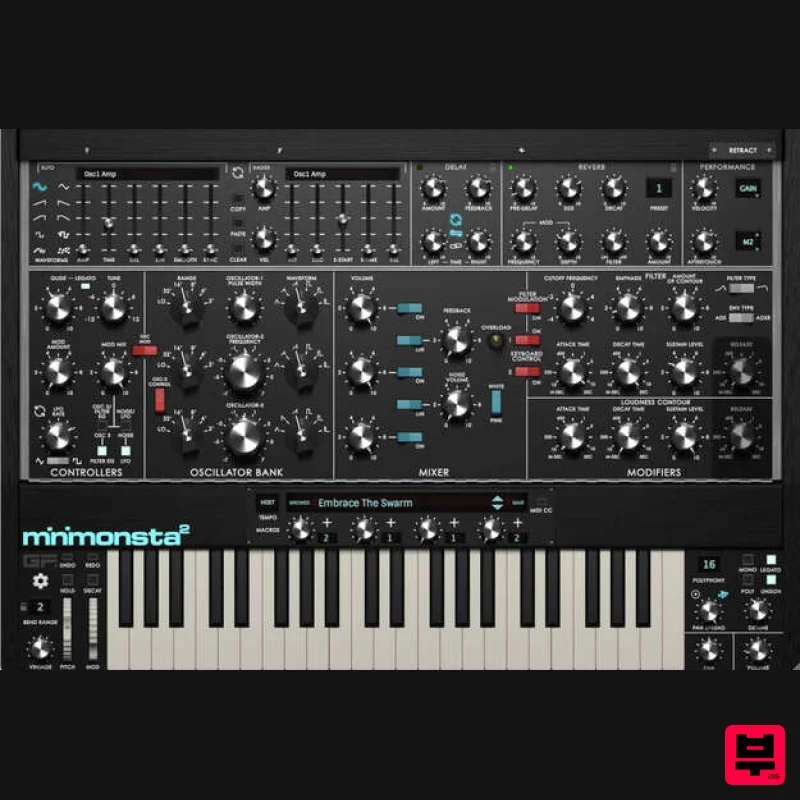
- but builds on this in ways that extend its sonic and musical capabilities into a uniquely deep & musical instrument and sets it apart from other Mini. New In Minimonsta2 a new fully resizable UI
- an improved audio engine
- a powerful new Preset Browser
- over 300 new presets
- a new Reverb effect
- a Vintage control for adding subtle analogue imperfections
- four programmable Macros
- selectable 4-stage envelopes
- an alternative bass-preserving ladder filter
- PWM for OSC1 and much more. These powerful new features give Minimonsta2 an authentic experience that’s designed for the modern setup. [Mini]monsta True to the original Model D®
- the heart of Minimonsta2 provides the full original feature set with precise waveforms
- a beautifully accurate resonant filter
- snappy ADS envelope generators and the wonderful Mini loop-feedback function. Using just these classic parameters
- Minimonsta2 has a huge tonal palette that ranges from fat to fierce
- and searing to sizzling. However
- there’s so much more here
- as a plethora of additions turn a beautifully realised Mini into a truly unique Monsta. [Monsta]mini Using GForce's unique X-Modifier technology
- the scope of sound modulation possibilities is immense. An intuitive X-LFO and X-ADSR section provides you with the ability to create extensive modulations of almost every parameter
- allowing you to create hugely complex
- yet musical
- sounds. First click on the knob for the synth parameter that you wish to modulate
- you’ll see blue selection corners surround the slider or knob to indicate it is the target for the X-LFO and X-ADSR. Then apply an X-LFO amount via the X-LFO Amp slider and/or an X-ADSR amount via the Amp knob. You’ll see a blue glow surround the knob
- as you turn up the amp values
- it’ll glow more. So
- while the tone and character at the heart of the synth remains authentic to the original
- the additional features turn it into a true sonic Monsta with no equivalent. Inspiration At The Speed Of Sound Minimonsta2 features GForce's new
- highly flexible preset browser
- giving you the power to organise your sounds in a way that suits your workflow. With extensive tagging
- sorting and search possibilities
- it’s now quick and easy to find the presets you want. Talking of presets
- GForce have got them by the bucketload. They’ve included more than 300+ brand new production-ready presets. You can also access 500 legacy presets
- which have all been categorised and tagged for easy navigation. With a total of over 800 presets
- inspiration is just moments away. Features Analog modelling of the legendary ‘Model D’ [New] Fully-scalable UI [New] Powerful Preset Browser [New] Over 800 presets including 300+ new presets [New] Alternative bass-preserving ladder filter [New] Alternative 4-stage envelopes [New] Matrix Reverb effect [New] Vintage knob for authentic analog imperfections [New] Four programmable Macros for easy manipulation of sounds [New] Programmable Aftertouch and expanded Velocity controls for extra playability [New] Pulse Width Control & Modulation for VCO1. All original features including 3 oscillators and the famous 4-pole
- 24dB/octave filter Monophonic
- polyphonic
- legato and unison trigger modes Vast modulation options via X-Modifiers Pan spread for wide stereo sounds System Requirements Mac Minimonsta2 is a virtual instrument in the following formats: Intel & Apple Silicon Native. Standalone Application AudioUnit AAX VST2 VST3 The Minimum System Requirements are as follows: Intel or Apple Silicon Mac macOS 10.13 or above Windows Minimonsta2 is a virtual instrument in the following formats: Standalone Application VST VST3 AAX The Minimum System Requirements are as follows: 2GHz CPU with 2GB RAM Windows 7 and above Registration Please register your plugin with GForce Software to get access to: Download links Reg code (different from the one provided by Plugin Boutique and needed when you first open the product.) 1. Head to www.gforcesoftware.com/account/#my_instruments
- or click 'Download' from within your Plugin Boutique User Account. 2. Log in
- or register for a new account. 3. Once logged in to your account
- click 'View My Instruments'. 4. On the right-hand side of the page
- select your purchased plugin from the dropdown list
- then enter your Activation Code
- which is listed under 'Serial Number' within your Plugin Boutique User Account. 5. Underneath the heading 'My Instruments'
- click 'View Instrument'. 6. Click 'Download' on the correct version for your OS. Installation Mac 1. Double-click the downloaded .pkg file
- then double click on the icon marked 'Double Click to Install.pkg'. 2. Click 'Continue'. 3. Click 'Continue'. 4. Click 'Agree'. 5. Select the items you would like the install
- then click 'Continue'. 6. Click 'Install'. 7. Once installation has completed
- click 'Close'. 8. Locate your License Code
- found on the right-hand side of the page within your GForce Account > 'View Instrument' 9. Launch your DAW
- and open a copy of Minimonsta 2. Enter your License Code
- as blurred out above
- into the box. Click 'Register'. 10. Installation is completed. Enjoy your plugin! Windows 1. Launch the downloaded .exe file. Click 'Next'. 2. Click 'I accept the agreement'
- then click 'Next'. 3. Click 'Next'. 4. Select the plugin versions you would like to install
- then click 'Next'. 5. Click 'Next'. 6. Click 'Next'. 7. Click 'Install'. 8. Once installation has completed
- click 'Finish'. 9. Locate your License Code
- found on the right-hand side of the page within your GForce Account > 'View Instrument' 10. Launch your DAW
- and open a copy of Minimonsta 2. Enter your License Code
- as blurred out above
- into the box. Click 'Register'. 11. Installation is completed. Enjoy your plugin!
Additional Information
About the GForce Software Minimonsta2
The GForce Software Minimonsta2 combines traditional design with modern performance for Synth enthusiasts.
Why Choose the GForce Software Minimonsta2?
- •Authentic GForce Software craftsmanship and design
- •Versatile sound suitable for multiple musical genres
- •Professional build quality and reliable performance
- •Part of GForce Software's respected Synth lineup
Compare & Explore
Browse our complete selection of GForce Software instruments or explore other Synth options. Use our comparison tools to find the perfect match for your musical style and budget.
Similar Products

discoDSP OB-Xd
Synth
$30
OB-Xd is based on the Oberheim OB-X. It attempts to recreate its sound and behavior, but as the original was very...

discoDSP Discovery Pro
Synth
$30
discoDSP’s Discovery was one of the company’s first and finest efforts. Heavily inspired by Clavia’s Nord Lead...

Thenatan Audio Poizen VST
Synth
$30
Thenatan and Global Audio Tools have teamed up again to bring music makers across the globe a jam packed powerful tool...

AngelicVibes ELITE PIANIST
Synth
$30
Your next go-to virtual instrument. Real piano recordings with unique sound and effects 50 high-quality presets for...

ThaLoops Templetone
Synth
$30
The Ultimate Hip-Hop Production Plugin – Featuring a Vast Collection of Hip-Hop Sounds. Choose between wild drums,...

discoDSP Discovery
Synth
$30
Discovery is a virtual analog Nord Lead 2 inspired synthesizer featuring multi-layering, a morphing engine, high...

discoDSP OPL
Synth
$30
The OPL is a digital sound synthesis chip developed by Yamaha in the mid 1980s. Among other products, it was used in...

Reflekt Audio Xonex
Synth
$30
Xonex is a futuristic plugin that we have used time and time again to make a variety of beats. Xonex has offered me a...
Frequently Asked Questions
The GForce Software Minimonsta2 stands out for its exceptional GForce Software craftsmanship and innovative design.
Yes! With its affordable price point and quality construction, it's perfect for learning synth.
Browse the similar products section to see how it stacks up against other synth.

