
Eventide UltraReverb
Professional music gear - detailed information and where to buy
Product Description
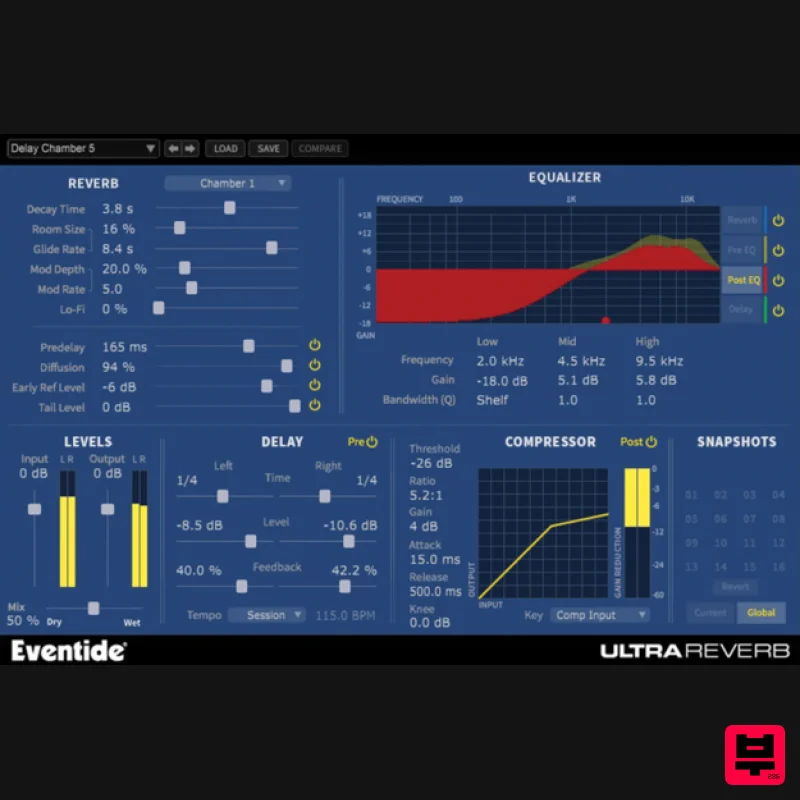
- The Culmination of More than 35 Years of Reverb R&D 9 High End Hardware-Based Reverb Algorithms Bundled in a Single Native Plug-in. UltraReverb comes packed with over 300 killer presets and features reverbs from the H8000
- compression
- EQ and delay integrated for the most flexible reverb plug-in available. Features Halls
- Chambers
- Rooms
- Plates
- and Ambience derived from Eventide's flagship hardware processor
- the H8000 UltraHarmonizer® Create acoustically natural or other-worldly environments Packed with over 300 killer presets for mixing
- mastering
- post production
- and sound design Includes Artist Presets designed by top engineers and recording professionals Session compatible with Eventide Reverb HD/TDM from the Anthology II bundle Stereo Delays (pre or post reverb) with Tempo sync to lock delays in time with your session Compressor (pre or post reverb) with key input Pre-EQ
- Post-EQ
- Reverb EQ and Delay EQ – Four independent
- three band parametric equalizers Reverb Tail Randomization based on the legendary H949 Harmonizer® Random setting Modulation Rate and Depth controls LoFi control for subtle grit or all out mangling Artists Using UltraReverb Andre Kelman (Beastie Boys
- Phoenix
- Gogol Bordello
- Cat Power) Headsnack System Requirements Windows Windows 10 and later (Windows 11 supported) (64-bit only) AAX
- VST2
- VST3 Mac macOS 10.14 and later (Intel / Apple Silicon supported) (64-bit only) AAX
- VST2
- VST3 Important Notes: Eventide tests their desktop plugins in Ableton Live
- Cubase
- FL Studio
- Logic Pro
- Pro Tools
- and Studio One (However
- their plugins should work with any compatible host.) No iLok dongle is required to run this software - only a FREE iLok account/Manager is required for authorisation. Music Connection "I like that UltraReverb starts with such great sounding reverb algorithms
- that tweaking them into perfection is easy." AudioFanzine "If you’re looking for a reverb that gives you high-quality algorithms
- impressive flexibility
- and a built-in stereo delay and compressor
- not to mention a huge selection of presets
- it’s an excellent choice. 4.5 Stars out of 5." AskAudio Magazine "The algorithms are fantastic
- the sound is lush and never harsh
- the effect modules are plentiful and the presets load quickly and efficiently." Please note: Blackhole is used as an example. Registration 1. Create an iLok account by following the steps from our help centre article - Getting Started with the iLok License Manager. If you already have an iLok account
- skip this step. 2. Go to https: //www.eventideaudio.com/login > Click 'Create Account' at the bottom of the page. 3. Enter your details (including your iLok Account User ID) > Click 'Register'. 4. You will now be redirected to your My Account page. 5. In the bottom right corner of the page
- enter the license key (format 1234-1234-1234) found in your Plugin Boutique account
- as well as your iLok Account User ID > Click 'Register'. Please note: a Serial Number is now not required Please note: Make sure there are no spaces at the beginning or after your license key. 6. Your software is now registered. 7. Launch the iLok License Manager application > Sign into your account. 8. Enter your iLok user ID and password > Click 'Sign in'. 9. Your license should now be listed within your iLok account. 10. Double-click on the license to bring up additional options > Click 'Activate' (located on the right of the screen). 11. Select where you wish the license to be activated > Click 'Activate'. 12. Click 'OK'. 13. Click 'OK'. Mac Installation 1. Download the Mac installer from https://www.eventideaudio.com/downloads/ > Run the installation > Click 'Next'. 2. Click to accept the license agreement > Click 'Next'. 3. Choose which plugin formats you'd like to install > Click 'Next'. Please note: If you're unsure
- leave all options selected or check out our help centre article Plugin Formats Explained for more information. 4. Select the destination folders (or leave them as the defaults) > Click 'Next'. 5. Click 'Next'. 6. Click 'Finish'. Your new software is now fully activated and ready to use within your DAW! Windows Installation 1. Download the Windows installer from https: //www.eventideaudio.com/downloads/ > Run the installation > Click 'Next'. 2. Read the License Agreement > Select 'I accept the agreement > Click 'Next'. 3. Choose which plugin formats you'd like to install > Click 'Next'. If you're unsure
- leave all options selected or check out our help centre article Plugin Formats Explained for more information. 4. Select the destination folders (or leave them as the defaults) > Click 'Next'. 5. Click 'Next'. 6. Click 'Finish'. Your new software is now fully activated and ready to use within your DAW!
Additional Information
About the Eventide UltraReverb
Experience the quality and tone that makes the Eventide UltraReverb a popular choice for musicians.
Why Choose the Eventide UltraReverb?
- •Authentic Eventide craftsmanship and design
- •Versatile sound suitable for multiple musical genres
- •Professional build quality and reliable performance
- •Part of Eventide's respected Reverb lineup
Compare & Explore
Browse our complete selection of Eventide instruments or explore other Reverb options. Use our comparison tools to find the perfect match for your musical style and budget.
Similar Products

DDMF Envelope
Reverb
$30
Envelope is a true stereo reverb plugin featuring 8 different room simulations, all of which can be adjusted for size,...

Initial Audio AR1 Reverb
Reverb
$30
Quality Algorithmic Reverb Plugin AR1 is an algorithmic reverb plugin designed to sound great on all types of...

PSP Audioware PSP EasyVerb
Reverb
$30
PSP EasyVerb is a reverberation effect plug-in (VST, RTAS and AAX for Windows; VST, AudioUnit, RTAS and AAX for Mac OS...

Vegas Audio Fabricverb
Reverb
$30
Get the signature sound of the UK’s most famous nightclub on your digital audio workstation! Our new convolution...

DDMF MagicVerb
Reverb
$30
MagicVerb is the latest result of the collaboration between MagicDeathEye aka Ian Sefchick and DDMF. This journey was...

PSP Audioware PSP Nexcellence
Reverb
$30
PSP Nexcellence is a rich-sounding, spring reverb emulation inspired by and modeled after classic “necklace-type”...

PSP Audioware PSP Pianoverb 2
Reverb
$30
PSP PianoVerb2 is a redesigned and improved creative resonant reverb plug-in based on our famous and beloved freeware...

XHUN Audio ShineVerb
Reverb
$30
Creative Reverb Processor ShineVerb is a creative tool specially designed for reverberation, spatialization and sound...
Frequently Asked Questions
The Eventide UltraReverb stands out for its exceptional Eventide craftsmanship and innovative design.
Yes! With its affordable price point and quality construction, it's perfect for learning reverb.
Browse the similar products section to see how it stacks up against other reverb.

