
Eventide Tverb
Professional music gear - detailed information and where to buy
Product Description
- The Sound of a Legend Tverb was developed in collaboration with legendary producer
- engineer and musician
- Tony Visconti. The plug-in was inspired by the iconic sound of the title track of David Bowie’s twelfth studio album
- Heroes
- recorded in August 1977 in the shadow of the Berlin Wall. With only one track left for lead vocals
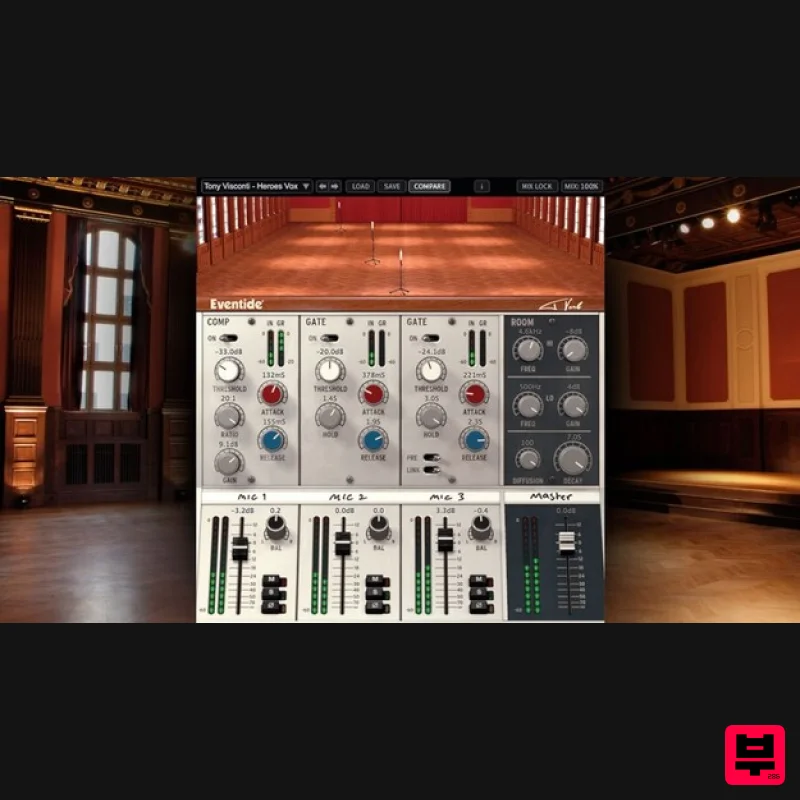
- Visconti was able to harness the power of Bowie’s voice by inventing a stunning recording technique. This technique is the foundation of Tverb. Visconti set up three microphones in the hall of Berlin’s Hansa Studios
- the first for Bowie to sing directly into
- a second positioned about 15 feet away and the third further back in the hall. Visconti placed gates on the second and third microphones set to open as Bowie sang louder and louder. Signature Techniques Tverb integrates three completely independent lush reverbs with compression and selectable polar patterns on microphone 1 and adjustable gates on microphones 2 and 3. Tverb recreates Visconti’s iconic effect as a starting point while adding features that enable new soundscapes and effects. The use of stereo microphones enhances the effect and DAW automation can be used to program the microphones to wander around the hall as the track plays. Inspiration of the Past/Power of the Future Tverb was designed with a new level of efficiency for plug-ins. It captures the rich ambience of Hansa’s studio 2
- the historic Meistersaal concert hall
- without burdening your DAW’s CPU. Tverb features three independent reverbs
- with the ability for the two far microphones to be convincingly placed anywhere in the hall. Features 2 Moveable microphones to adjust reverb size and tone Adjustable polar patterns for microphone 1 to adjust the amount of ambient room tone Custom Eventide reverb algorithm with EQ
- diffusion
- and decay control Compressor module on microphone 1
- just as Visconti had in the original session 2 Linkable post-reverb gate modules with control of when the gates close
- the speed at which they close and the length of time they are forced to stay open Console (inspired by the one used in the session and with Visconti’s "grease pencil" labelling) provides post-reverb channel processing for each individual mic and the master Room mixer module alters the sound of the room itself with control over decay
- diffusion and frequency attenuation Signal inversion buttons to remove (or create) phase cancellation Mix Lock allows for scrolling through presets or settings while keeping the wet/dry mix constant Complete automation support System Requirements Windows Windows 10 and later (Windows 11 supported) (64-bit only) AAX
- VST2
- VST3 Mac macOS 10.14 and later (Intel / Apple Silicon supported) (64-bit only) AAX
- VST2
- VST3 Important Notes: Eventide tests their desktop plugins in Ableton Live
- Cubase
- FL Studio
- Logic Pro
- Pro Tools
- and Studio One (However
- their plugins should work with any compatible host.) No iLok dongle is required to run this software - only a FREE iLok account/Manager is required for authorisation. Awards Gearspace.com "Tverb offers one of the very best sounding acoustic spaces I’ve ever heard on a plug-in
- with a natural and detailed room sound that blends very nicely with the source." Computer Music / Music Radar "Tverb's combination of gorgeous reverb
- flexible mic positioning and useful dynamics control makes it unique and very special indeed...It's a triumph and Bowie would have been proud." Producer Spot "I already love it...Tverb is a refreshing new look at the making of a plugin for emulating a production technique instead of trying to emulate a piece of gear and I like it for that. The sound quality of Tverb is awesome and sounds so lush." Please note: Blackhole is used as an example. Registration 1. Create an iLok account by following the steps from our help centre article - Getting Started with the iLok License Manager. If you already have an iLok account
- skip this step. 2. Go to https: //www.eventideaudio.com/login > Click 'Create Account' at the bottom of the page. 3. Enter your details (including your iLok Account User ID) > Click 'Register'. 4. You will now be redirected to your My Account page. 5. In the bottom right corner of the page
- enter the license key (format 1234-1234-1234) found in your Plugin Boutique account
- as well as your iLok Account User ID > Click 'Register'. Please note: a Serial Number is now not required Please note: Make sure there are no spaces at the beginning or after your license key. 6. Your software is now registered. 7. Launch the iLok License Manager application > Sign into your account. 8. Enter your iLok user ID and password > Click 'Sign in'. 9. Your license should now be listed within your iLok account. 10. Double-click on the license to bring up additional options > Click 'Activate' (located on the right of the screen). 11. Select where you wish the license to be activated > Click 'Activate'. 12. Click 'OK'. 13. Click 'OK'. Mac Installation 1. Download the Mac installer from https://www.eventideaudio.com/downloads/ > Run the installation > Click 'Next'. 2. Click to accept the license agreement > Click 'Next'. 3. Choose which plugin formats you'd like to install > Click 'Next'. Please note: If you're unsure
- leave all options selected or check out our help centre article Plugin Formats Explained for more information. 4. Select the destination folders (or leave them as the defaults) > Click 'Next'. 5. Click 'Next'. 6. Click 'Finish'. Your new software is now fully activated and ready to use within your DAW! Windows Installation 1. Download the Windows installer from https: //www.eventideaudio.com/downloads/ > Run the installation > Click 'Next'. 2. Read the License Agreement > Select 'I accept the agreement > Click 'Next'. 3. Choose which plugin formats you'd like to install > Click 'Next'. If you're unsure
- leave all options selected or check out our help centre article Plugin Formats Explained for more information. 4. Select the destination folders (or leave them as the defaults) > Click 'Next'. 5. Click 'Next'. 6. Click 'Finish'. Your new software is now fully activated and ready to use within your DAW!
Additional Information
About the Eventide Tverb
The Eventide Tverb represents excellent craftsmanship in the Reverb category.
Why Choose the Eventide Tverb?
- •Authentic Eventide craftsmanship and design
- •Versatile sound suitable for multiple musical genres
- •Professional build quality and reliable performance
- •Part of Eventide's respected Reverb lineup
Compare & Explore
Browse our complete selection of Eventide instruments or explore other Reverb options. Use our comparison tools to find the perfect match for your musical style and budget.
Similar Products

DDMF MagicVerb
Reverb
$30
MagicVerb is the latest result of the collaboration between MagicDeathEye aka Ian Sefchick and DDMF. This journey was...

PSP Audioware PSP Nexcellence
Reverb
$30
PSP Nexcellence is a rich-sounding, spring reverb emulation inspired by and modeled after classic “necklace-type”...

PSP Audioware PSP Pianoverb 2
Reverb
$30
PSP PianoVerb2 is a redesigned and improved creative resonant reverb plug-in based on our famous and beloved freeware...

XHUN Audio ShineVerb
Reverb
$30
Creative Reverb Processor ShineVerb is a creative tool specially designed for reverberation, spatialization and sound...

DDMF Envelope
Reverb
$30
Envelope is a true stereo reverb plugin featuring 8 different room simulations, all of which can be adjusted for size,...

Initial Audio AR1 Reverb
Reverb
$30
Quality Algorithmic Reverb Plugin AR1 is an algorithmic reverb plugin designed to sound great on all types of...

Vegas Audio Fabricverb
Reverb
$30
Get the signature sound of the UK’s most famous nightclub on your digital audio workstation! Our new convolution...

PSP Audioware PSP EasyVerb
Reverb
$30
PSP EasyVerb is a reverberation effect plug-in (VST, RTAS and AAX for Windows; VST, AudioUnit, RTAS and AAX for Mac OS...
Frequently Asked Questions
The Eventide Tverb stands out for its exceptional Eventide craftsmanship and innovative design.
Yes! With its affordable price point and quality construction, it's perfect for learning reverb.
Browse the similar products section to see how it stacks up against other reverb.

