
Ear Candy Technologies Ruby
Professional music gear - detailed information and where to buy
Ear Candy Technologies
Ruby
Product Info
* Prices may vary. Check retailer for current pricing and availability.
Product Description
- Discover the Intensity of Ruby Red Experience New Sounds
- Take Control of Time
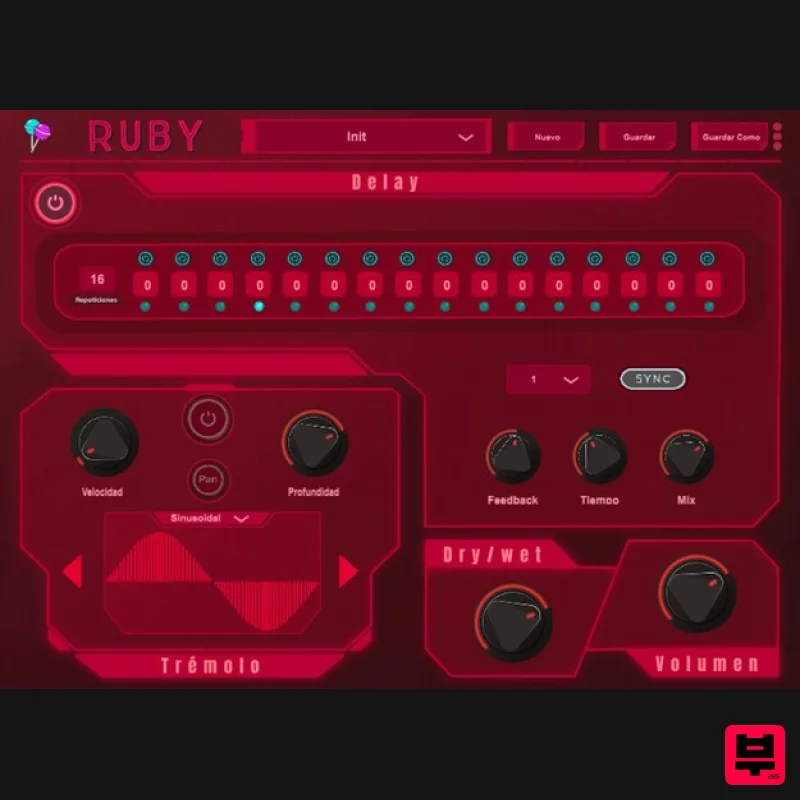
- and Define Your Style Delay With Ruby's delay
- you will have the freedom to modify the time as you want
- however you can also sync it to the BPM of your session for greater precision. Sequencer The sequencer allows you to have control over 16 repetitions of the delay with the possibility of modifying by semitones. Tremolo It suggests a comfortable and adjustable pan
- modifying the parameters and waveforms allowing you to vary both the amplitude and the speed. Explore different sounds with 6 different waveforms from the Ear Candy Technologies team. System Requirements Mac macOS 10.10 or later (Intel / M1 Apple Silicon supported) (64-bit only) AU / VST3 / VST / AAX 4 GB RAM required (8 GB recommended) 2.5 GHz CPU (Intel
- AMD or M1 Apple Silicon) 30 MB Free Disk Space Windows Windows 7 or later (64-bit only) VST3 / VST / AAX 4 GB RAM required (8 GB recommended) 2.5 GHz CPU (Intel or AMD) 30 MB Free Disk Space Please Note: Ruby is not supported on 32-bit platforms. Hector Montiel (KILLV) "Ruby is a one-of-a-kind delay... I have never found a delay that will let you do all of these things that Ruby offers." Nicolás Mariñelarena "Ruby is a delay for those who are adventurous and do not settle for the conventional." Note: Esmeralda has been used as an example. Mac 1. Download the .zip folder from your Plugin Boutique User Account > Double-click it to open and extract the installer file > Right-click the correct .pkg installer file corresponding to your Intel OR Apple M1 System > Click 'Open'. 2. If you are shown this message
- click 'Open'. 3. Click 'Continue'. 4. Click 'Continue'. 5. Click 'Continue' > Accept the license agreement. 6. Click 'Install'. 7. Enter your system password > Click 'Install Software'. 8. Click 'OK'. 9. Click 'Close'. 10. Launch your DAW > Insert Esmeralda on a new audio track. Esmeralda is now installed and ready to use. Windows 1. Download the .zip folder from your Plugin Boutique User Account > Double-click it to open and extract the installer file > Launch the .exe installer file. 2. Select your setup language > Click 'OK'. 3. Click 'Next'. 4. Select 'I accept the agreement' > Click 'Next'. 5. Select components for installation > Click 'Next'. 6. Confirm the correct directory for installation > Click 'Next'. 7. Click 'Install'. 8. Click 'Finish'. 9. Launch your DAW > Insert Esmeralda on a new audio track. Esmeralda is now installed and ready to use.
Additional Information
About the Ear Candy Technologies Ruby
The Ear Candy Technologies Ruby combines traditional design with modern performance for Delay enthusiasts.
Why Choose the Ear Candy Technologies Ruby?
- •Authentic Ear Candy Technologies craftsmanship and design
- •Versatile sound suitable for multiple musical genres
- •Professional build quality and reliable performance
- •Part of Ear Candy Technologies's respected Delay lineup
Compare & Explore
Browse our complete selection of Ear Candy Technologies instruments or explore other Delay options. Use our comparison tools to find the perfect match for your musical style and budget.
Similar Products

Phantom Sounds Analog Drift
Delay

Martinic Lem Echo Music
Delay
Gooey Audio Control
Delay

Korneff Audio Micro Digital Reverberator
Delay

PSP Audioware PSP Lexicon PSP42x
Delay

Red Sounds Mojo-Fi
Delay

UnplugRed Magic Carpet
Delay

Beastsamples Beast-DLAY
Delay

