
e-instruments Session Keys Electric S
Professional music gear - detailed information and where to buy
e-instruments
Session Keys Electric S
Product Info
* Prices may vary. Check retailer for current pricing and availability.
Product Description
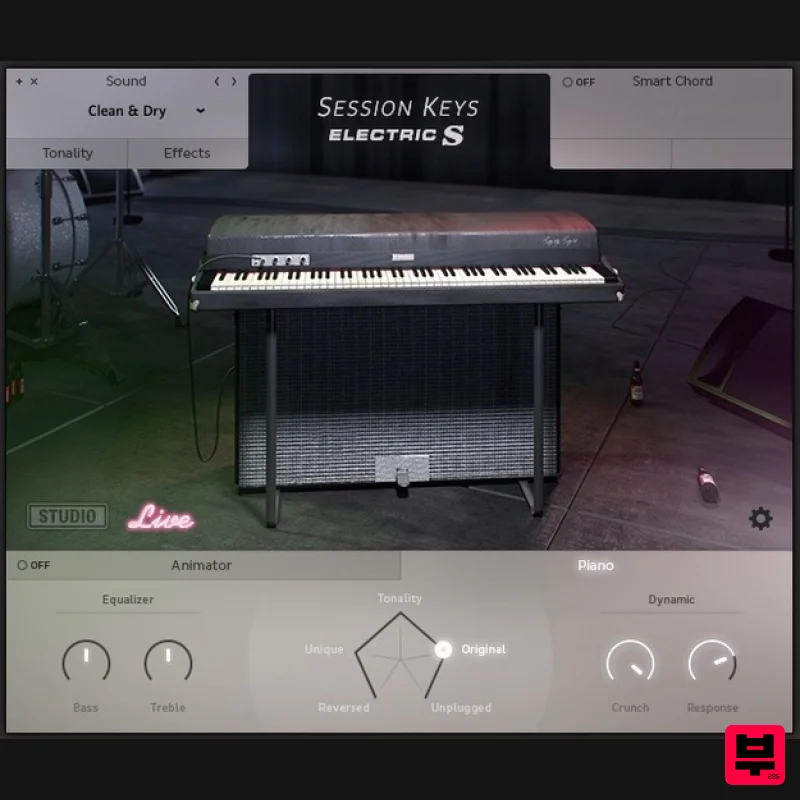
- Authentic and Extraordinary The Suitcase for Your Musical Journey The retro sound of the 1973 suitcase electric piano with more modern magic than you could imagine. At almost 20 GB in size
- Electric S is probably the most detailed sampled stage piano around. As a Session Keys family
- it offers the pro features e-instruments users have come to expect; including two distinct sample sets
- the Animator
- Chord and Pentamorph. The Suitcase Nothing embodies the evolution of the electric piano better than the 1973 Suitcase: a killer package of keyboard
- amp and speakers. To recreate this much-loved electric piano classic e-instruments hunted high and low for a top-quality original. e-instruments unearthed a magnificent 1973 suitcase which spent weeks undergoing painstaking specialist restoration. Once back to peak condition they began detailed recording to capture every nuance of its original sound. Sound Design Electric S offers almost limitless customisation options. Instantly manipulate sustain resonance
- key noises
- release
- and reverse samples
- and virtually adjust the distance between tines and pick-ups at the tweak of a button. Experiment with classic electric piano effects such as Tremolo
- Chorus
- Amp Simulation
- Delay and Reverb in the FX section or blend your electric with acoustic. In addition to recording electrical output signals of the 1973 Suitcase
- an extensive microphone set-up was used to capture the pure
- unaltered acoustic sound of the instrument. Studio and Live With the Electric S
- e-instruments wanted you to experience not only a clean
- flexible and expressive sound but also the best possible feel. The Suitcase was recorded with and without the original speaker to create two separate sound sets: Studio and Live. Studio gives direct unaltered line-out sound
- while Live captures the sound of cabinet and speakers through a comprehensive microphone set-up covering all four speakers for an incredibly realistic feel. Pentamorph The stylish Pentamorph gives you unparalleled direct control over the sound of the Electric S. Morph instantly from the classic Suitcase sound to a new complex voice using a single control. Choose from one of the five main characteristics or any position between. Animator Make it sound like a top session player is riffing in your studio. At the heart of the Animator
- you'll find more than 400 ready-to-play licks and phrases in different genres and styles. Use it to start or finish your tracks with a professional flourish in no time
- following keys and harmonies with complete control over dynamics and complexity. Chord Stuck for ideas and need some inspired chord changes? This clever feature is your new best friend. Harnessing the power of modern instruments and controllers
- full chords or Animator riffs can be played either via a pad controller or single keys. Just set the key of your song and let Chord create the harmonies. Features 1974 Electronic Piano. Two separate sound banks: Studio and Live. Pentamorph control to transform the entire sound with a single knob. Animator with more than 400 flexible piano phrases. Chord function to create instant piano chords from single keys or pads. Effects chain with tremolo / AutoPan
- chorus
- phaser
- amp simulator
- compressor and convolution reverb. Native Instruments NKS compatible. 18.8 GB / 9.9 GB download (lossless sample compression). 24-bit/44.1 kHz samples. System Requirements PC Windows 7/8.1/10 (Latest Service Pack
- 32/64-bit). VST 2
- VST 3 or AAX compatible host application to use as a plugin. Intel Core 2 Duo or AMD Athlon 64. 4 GB RAM. Requires FREE Kontakt 5 Player or Kontakt 5 Version 5.5.1 or higher. Mac OS X 10.9 or later (Latest Update). VST
- AAX or AU compatible host application to use as a plugin. Intel Core 2 Duo. 4 GB RAM. Requires FREE Kontakt 5 Player or Kontakt 5 Version 5.5.1 or higher. Stephen Gallagher “This is the best emulation hands-down that I’ve ever used and I can’t imagine ever being without it. It’s something I will use every day
- no exaggeration. I love it.” Please Note: Trinity Drums 2 by Sonuscore is used as an example. Mac 1. Download the .dmg installer file from your Plugin Boutique account. 2. Double-click the .dmg file to install Native Access. 3. Open Native Access > Create a new Native ID if you do not have one already. If you do
- skip ahead to step 5. 4. You will then receive an email with a confirmation link > Open the email and click 'CONFIRM EMAIL'. 5. Log in to Native Access with your Native ID. 6. Click 'Add a serial' 7. Enter your Serial Number found in your Plugin Boutique account > Click 'ADD SERIAL'. 8. Click the 'Not installed' tab > Locate Time Textures > Click 'INSTALL'. 9. Time Textures is now installed on your system. 10. Open Kontakt in your DAW > You should see Time Textures on the left sidebar > Click the drop-down bar and drag the .nki file into the middle of the window. Your software is now ready to use in your DAW! Windows 1. Download the .zip installer file from your Plugin Boutique account. 2. Double-click the extracted .exe file to begin the installation process > click ‘Run’. 3. Read the welcome message > click 'Next'. 4. Click 'Next' to begin the installation. 5. Native Access has now been installed > Click 'Finish'. 6. Open Native Access > Create a new Native ID if you do not have one already. If you do
- skip ahead to step 8. 7. You will then receive an email with a confirmation link > Open the email and click 'CONFIRM EMAIL'. 8. Log in to Native Access with your Native ID. 9. Click 'Add a serial'. 10. Enter your Serial Number found in your Plugin Boutique account > Click 'ADD SERIAL'. 11. Click the 'Not installed' tab > Locate Time Textures > Click 'INSTALL'. 12. Your new Kontakt Instrument is now installed on your system. 13. Open Kontakt in your DAW > You should see Time Textures on the left sidebar > Click the drop-down bar and drag the .nki file into the middle of the window. Your software is now ready to use in your DAW!
Additional Information
About the e-instruments Session Keys Electric S
Experience the quality and tone that makes the e-instruments Session Keys Electric S a popular choice for musicians.
Why Choose the e-instruments Session Keys Electric S?
- •Authentic e-instruments craftsmanship and design
- •Versatile sound suitable for multiple musical genres
- •Professional build quality and reliable performance
- •Part of e-instruments's respected Kontakt Instrument lineup
Compare & Explore
Browse our complete selection of e-instruments instruments or explore other Kontakt Instrument options. Use our comparison tools to find the perfect match for your musical style and budget.
Similar Products

HD Instruments ZoneMatrix
Kontakt Instrument

Audiofier Sequi2r EX
Kontakt Instrument

The Beat House LE HITS THE ESSENTIALS
Kontakt Instrument

Rigid Audio Retrocade
Kontakt Instrument

Audiofier Aerkord
Kontakt Instrument

Aria Sounds Hybrichord
Kontakt Instrument

DoubleBang Software Plugged
Kontakt Instrument

Ecliptiq Audio Hexa Rhythm Designer
Kontakt Instrument

