
DSK Music DSK SynthDrums
Professional music gear - detailed information and where to buy
Product Description
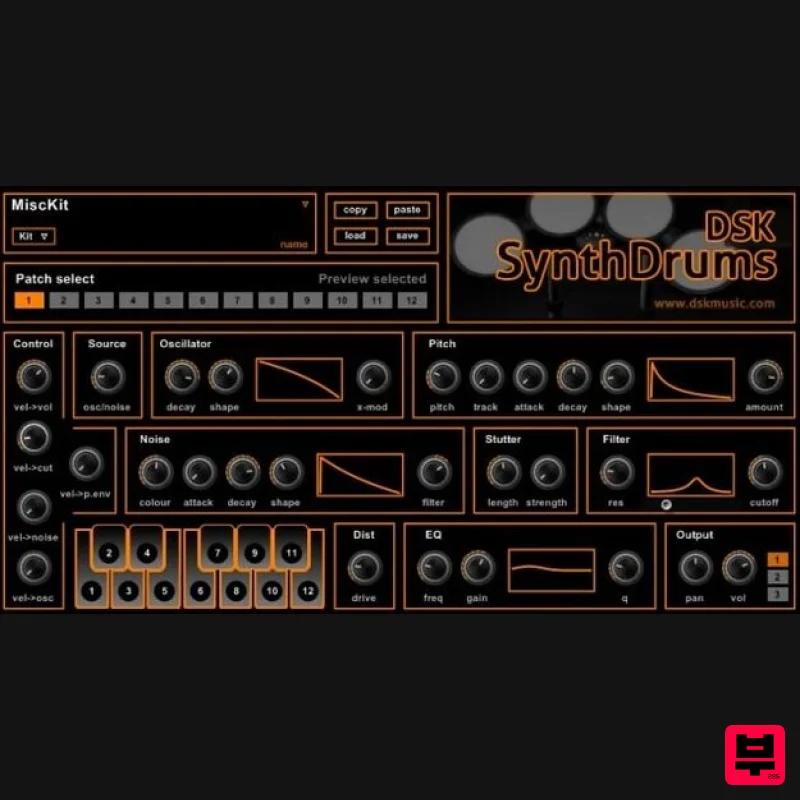
Features 12 Patch drum Synth Easy assign sounds to keyboard Deep control over sound design Selectable output Midi automation Filter, Distortion, EQ and lots of ways to create your drums sound! System Requirements PC VST Plugin. You will be supplied with a .dll file Installation 1. To install DSK Music software, first unzip the downloaded. (for demonstration purposes we're using the Bass Gnomes Clarity) 2. Next follow the file directory - Computer / System (C:) / Program Files / Steinberg - and drag the .dll file into the Steinberg folder. 3. Open up your DAW and your software will now be ready to use.
Additional Information
About the DSK Music DSK SynthDrums
The DSK Music DSK SynthDrums combines traditional design with modern performance for Synth enthusiasts.
Why Choose the DSK Music DSK SynthDrums?
- •Authentic DSK Music craftsmanship and design
- •Versatile sound suitable for multiple musical genres
- •Professional build quality and reliable performance
- •Part of DSK Music's respected Synth lineup
Compare & Explore
Browse our complete selection of DSK Music instruments or explore other Synth options. Use our comparison tools to find the perfect match for your musical style and budget.
Similar Products

discoDSP Discovery
Synth

Reflekt Audio Xonex
Synth

discoDSP Discovery Pro
Synth

discoDSP OPL
Synth

Thenatan Audio Poizen VST
Synth

discoDSP OB-Xd
Synth

AngelicVibes ELITE PIANIST
Synth

ThaLoops Templetone
Synth

