
Cinematique Instruments Vertigo Violin
Professional music gear - detailed information and where to buy
Cinematique Instruments
Vertigo Violin
Product Info
* Prices may vary. Check retailer for current pricing and availability.
Product Description
- Gentle and Raw Vertigo Violin is a new addition to Cinematique Instruments' symphonic range. It is an exciting mixture of different playing techniques of the violin
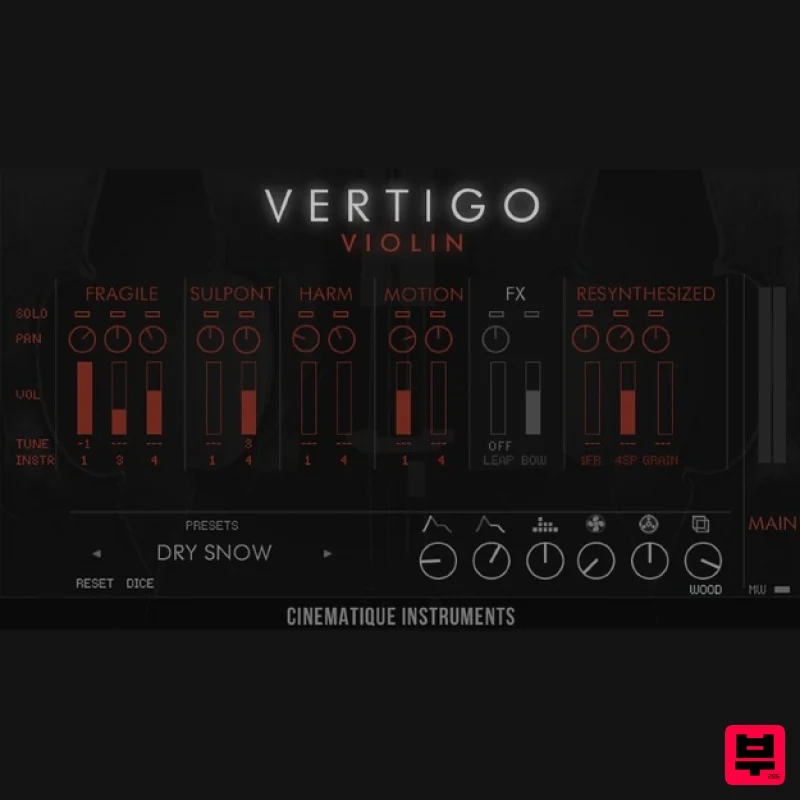
- which have been assembled into the Cinematique Instruments existing Vertigo Engine. The sound of Vertigo Violin is both and rough and opens up the possibility to create very unique and soft string instrument tunings as well as more extreme and strange-sounding soundscapes. And all this is - as always - very organic and lively. It fits so well to all types of film music. Overview Essentially Vertigo Violin is a melange of 14 meticulously selected violin articulations and additional sounds which can be mixed freely to fulfil your creative vision in an intuitive and easy way. The overall sound is characterised by a warm and raw violin ensemble
- with a special organic flavour. Cinematique Instruments' aim was to deliver a unique and inspiring violin ensemble. Cinematique Instruments recorded different articulations (fragile
- sul pont
- harmonics
- motion and bounce/ bow) with a varying amount of players. All sounds can be mixed
- tuned and panned individually. Several articulations can also be varied in the number of players. Vertigo Violin comes with 13 presets to provide instantly playable ensembles. All of these aspects come together to form the beautiful
- rich and organic sound that is Vertigo Violin. Because of its unique assortment of sounds such as raw violin sounds or resynthesized sources as well as its organic human feel
- it is a very special library. Please feel free to download the reference manual. In addition
- Vertigo violin comes with a portamento patch that plays fifths portamento in up and down variations - all in a polyphony of 1 to 8 violins. Features 14 Different Sound Sources: Fragile (1
- 3 and 4 players) - played very softly and close to the fingerboard
- Sul Pont (1 and 4 players) - Played rather harsh and close to the bridge and bowing noises
- Harmonics (1 and 4 players) - Typical soft flageolet notes
- Motion (1 and 4 players) - Moving between different articulations like long notes and tremolo
- Random Bounce (Leap) - Bouncing the bow randomly on the strings or synced in half
- 4th and 16th Bounce and bowing noise
- 3 Resynthesized Violin Sounds - Fragile and Sul Pont sounds send through various modular effects and guitar pedals All these sounds result in a wonderful tool to easily achieve inspiring as well as unique violin ensemble sounds. It gives you a rich and deep sonic experience. 13 Pre-defined Ensembles: In order to get pre-defined ensembles
- there are 13 inspiring presets available
- giving you a powerful set of sounds. Randomize Let Vertigo go random by using the 'Dice' option. 6 Additional FX Besides a tone control
- attack
- decay there are two control called 'Fog' and 'Retro' which let the entire instrument sound vintage and rich. 6 Reverb Types Besides several different sizes
- you get special types such as 'infinite' and deep valley. MW volume control Easily adjustable volume control by the modwheel. Additional Portamento Patch You get an extra additional Kontakt patch containing a fifth portamento in up and down for one octave providing an option to blend between the number of players (1
- 8) via the mod wheel. 2 additional sliders such as reverb and tone control. System Requirements The FULL Version of Kontakt 5.6.8 or higher is required. Approx. 520 MB Disk Space Important Notes: The FULL Version of Kontakt 5.6.8+ is required in order to use this instrument. You will be stuck in DEMO MODE if trying to use this instrument in the FREE Kontakt Player. Mociula is used as the example: 1. Download the software folder from your User Account. 2. Unzip and extract the folder within and save it to a computer destination/folder of choice. 3. Launch Kontakt and click 'Browse' > Select 'Files
- ' which is located at the top left hand corner of Kontakt's interface. 4. Locate the instrument folder from the computer destination/folder that you saved it to > Select the Instruments sub-folder. 5. Once you locate the instrument.nki file
- drag and drop it into the blank space which is available on the right hand side of Kontakt's interface. 6. Your instrument is now loaded into Kontakt and ready-to-use!
Additional Information
About the Cinematique Instruments Vertigo Violin
The Cinematique Instruments Vertigo Violin represents excellent craftsmanship in the Kontakt Instrument category.
Why Choose the Cinematique Instruments Vertigo Violin?
- •Authentic Cinematique Instruments craftsmanship and design
- •Versatile sound suitable for multiple musical genres
- •Professional build quality and reliable performance
- •Part of Cinematique Instruments's respected Kontakt Instrument lineup
Compare & Explore
Browse our complete selection of Cinematique Instruments instruments or explore other Kontakt Instrument options. Use our comparison tools to find the perfect match for your musical style and budget.
Similar Products

Aria Sounds Hybrichord
Kontakt Instrument

Ecliptiq Audio Hexa Rhythm Designer
Kontakt Instrument

Rigid Audio Retrocade
Kontakt Instrument

HD Instruments ZoneMatrix
Kontakt Instrument

The Beat House LE HITS THE ESSENTIALS
Kontakt Instrument

Audiofier Aerkord
Kontakt Instrument

Audiofier Sequi2r EX
Kontakt Instrument

DoubleBang Software Plugged
Kontakt Instrument

