
Cinematique Instruments Banjo v3
Professional music gear - detailed information and where to buy
Cinematique Instruments
Banjo v3
Product Info
* Prices may vary. Check retailer for current pricing and availability.
Product Description
- Bluegrass Typically
- the Banjo is a stringed instrument with four or five strings
- a long fretted neck and a circular drum-like body overlaid with parchment – today
- drumheads. Its unique sound comes from vibrating the body's membrane by plucking the strings with the fingers or a plectrum. The Banjo is usually associated with country
- folk
- classical music
- Irish traditional music and bluegrass music. The Banjo Cinematique have used is a 5 String Banjo with a 33 cm diameter mahogany body. They've played and recorded the Banjo in several ways to get the typical banjo sound – each in several velocity layers and 2 Round Robin variations. After editing and processing the samples
- they created a banjo patch that provides various Banjo styles
- shortened notes feature
- an octaver
- a reverb knob
- and enhanced scripting. They also added the noises of strumming the Banjo to this patch. As a result
- they came out with a very realistic and organic Banjo. Update: In 2015
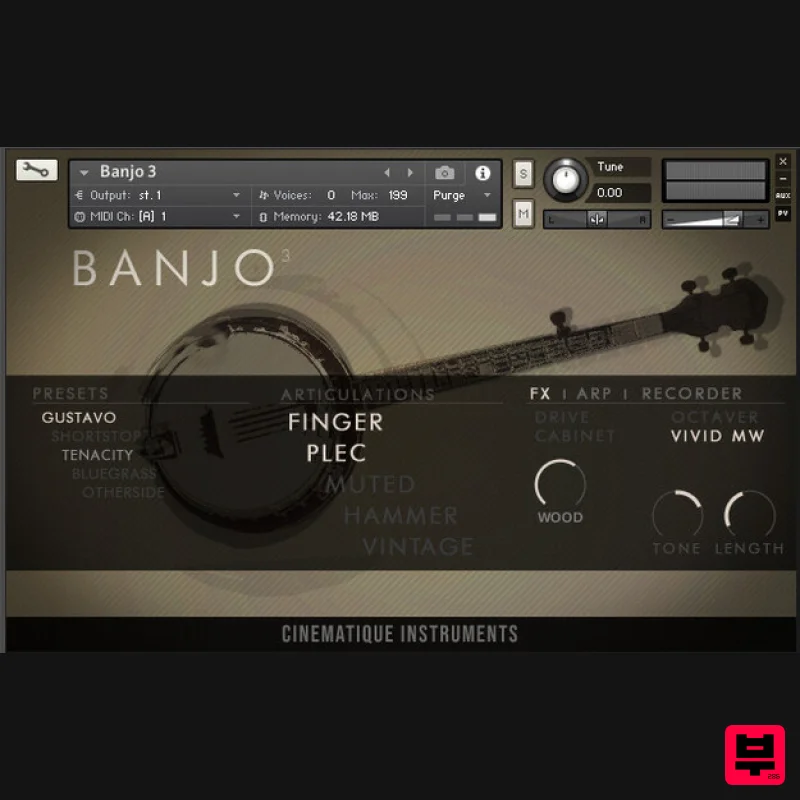
- Cinematique updated the Banjo and put together all separate patches into one complex patch covered by a new GUI. It is now possible to play all different articulations in one patch. Update: In 2022
- Cinematique recorded two new articulations with a new banjo instrument to improve the older version enormously. Now you have a complex and expressive instrument that can play both familiar bluegrass sounds and imposing film score scenes. Finally
- they've added FX and editing possibilities
- an arpeggiator
- and a step sequencer in a newer
- more intuitive GUI. Features Approximately 200 samples 100 MB of compressed data New articulations
- strumming
- arpeggiator System Requirements The FULL Version of Kontakt 5.8.1 or higher is required. Important Notes: The FULL Version of Kontakt 5.8.1+ is required in order to use this instrument. You will be stuck in DEMO MODE if trying to use this instrument in the FREE Kontakt Player. Mociula is used as the example: 1. Download the software folder from your User Account. 2. Unzip and extract the folder within and save it to a computer destination/folder of choice. 3. Launch Kontakt and click 'Browse' > Select 'Files
- ' which is located at the top left hand corner of Kontakt's interface. 4. Locate the instrument folder from the computer destination/folder that you saved it to > Select the Instruments sub-folder. 5. Once you locate the instrument.nki file
- drag and drop it into the blank space which is available on the right hand side of Kontakt's interface. 6. Your instrument is now loaded into Kontakt and ready-to-use!
Additional Information
About the Cinematique Instruments Banjo v3
Experience the quality and tone that makes the Cinematique Instruments Banjo v3 a popular choice for musicians.
Why Choose the Cinematique Instruments Banjo v3?
- •Authentic Cinematique Instruments craftsmanship and design
- •Versatile sound suitable for multiple musical genres
- •Professional build quality and reliable performance
- •Part of Cinematique Instruments's respected Kontakt Instrument lineup
Compare & Explore
Browse our complete selection of Cinematique Instruments instruments or explore other Kontakt Instrument options. Use our comparison tools to find the perfect match for your musical style and budget.
Similar Products

Audiofier Aerkord
Kontakt Instrument

Ecliptiq Audio Hexa Rhythm Designer
Kontakt Instrument

DoubleBang Software Plugged
Kontakt Instrument

Rigid Audio Retrocade
Kontakt Instrument

Audiofier Sequi2r EX
Kontakt Instrument

The Beat House LE HITS THE ESSENTIALS
Kontakt Instrument

Aria Sounds Hybrichord
Kontakt Instrument

HD Instruments ZoneMatrix
Kontakt Instrument

