
Cherry Audio Mercury-6
Professional music gear - detailed information and where to buy
Cherry Audio
Mercury-6
Product Info
* Prices may vary. Check retailer for current pricing and availability.
Product Description
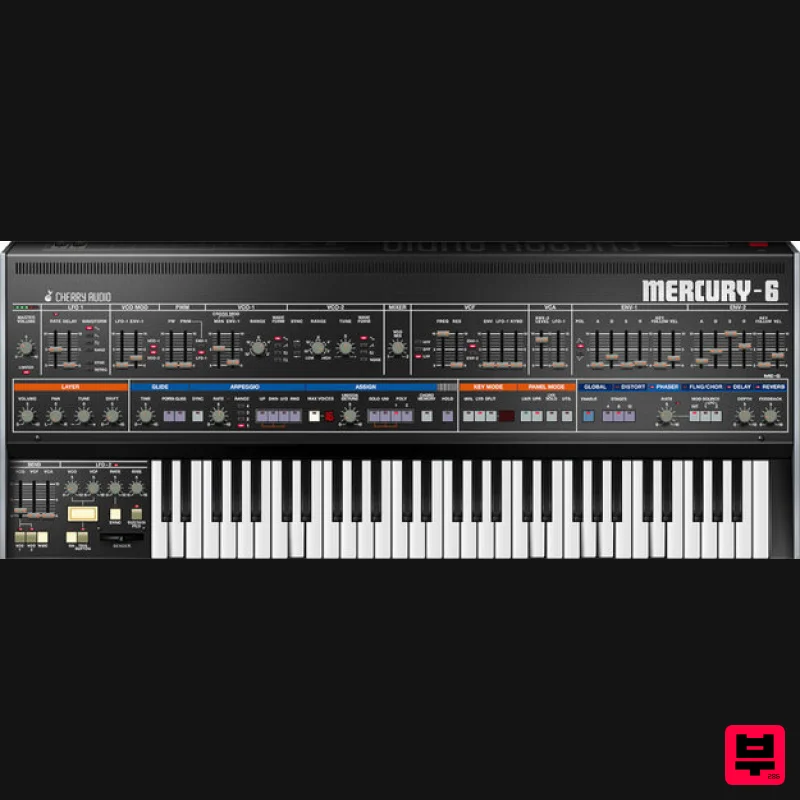
- The Sleeper Has Awakened Mercury-6 is a meticulous recreation of the Jupiter-6 analog polyphonic synthesizer
- initially released in 1983. Sandwiched between the earlier Jupiter-4 and Jupiter-8 models in name only
- the sophisticated Jupiter-6 has sometimes been considered a sleeper release. These days
- it has persevered to become one of Roland's most notable and coveted classic synthesizers due to its distinctive dark and complex character. If you've long yearned to explore the Jupiter-6
- you'll love Mercury-6! The Year Everything Changed Released in 1983 as a more affordable alternative to the flagship eight-voice Jupiter-8
- the six-voice Jupiter-6 nevertheless staked out an essential position in the history of analog polysynths. Though similar in appearance and feature set
- the Jupiter-6 sounded considerably different from the Jupiter-8. The Jupiter-6's versatile filter design lent a more aggressive sound than previous Jupiters
- making it a natural for cutting-edge techno and electro styles. The Jupiter-6 VCOs supported multiple simultaneous waveforms
- and its two LFOs and oscillator cross mod capabilities provided extensive modulation possibilities. Its earthshaking solo and poly unison modes enabled massive lead and bass sounds
- and it was one of the first synthesizers to include the then-new MIDI protocol. However
- the cost-cutting in the Jupiter-6 design resulted in some disadvantages. Audio output was mono only
- and it was limited to six-voice polyphony
- hampering the potential of its split keyboard feature. And its timing was ill-fated with the release of Yamaha's revolutionary DX7 the same year. But in a testament to the Jupiter-6's staying power over the decades
- its popularity grew in genres such as big beat
- house
- and techno. As a result
- the original hardware is still in demand today. Mercury-6: Twice As Nice at a Fraction of the Price Cherry Audio's Mercury-6 captures all that is exceptional in this classic and boosts the extraordinary feature set and functionality for today's DAW production and workflow. The Cherry Audio team have added velocity sensitivity
- improved the split mode
- and added a layer mode capable of stacking two different sounds simultaneously with per-layer stereo panning
- detuning
- and sustain. A panel control lets users easily select and navigate between these layers and includes a utility function for exchanging settings between the lower and upper layers
- or even between presets. And with polyphony extended to 16 notes
- Mercury-6 won't easily run out of voices. They have also reproduced the arpeggiator
- including the hidden Up/Down modes of the original
- and augmented it by adding a Random mode and MIDI tempo sync. A chord memory mode enables multiple notes to be stored and played back with a single key. Cherry Audio have improved the functionality of the LFOs with a retrigger for LFO-1 and an always-on option for LFO-2
- both syncable to MIDI tempo. Cherry Audio also introduced an integrated studio-quality effects panel with brilliant-sounding distortion
- phaser
- flanger/chorus
- delay
- and reverb. With additional touches such as per-layer drift control
- over 500 expertly designed presets
- and flexible MIDI mapping
- Cherry Audio's Mercury-6 brings the authentic Jupiter-6 experience 40 years into the future. Features Highly optimized
- massive dual-layer voicing architecture with 16 polyphonic voices per layer. Keyboard split or stacked layer modes allow two simultaneously playable layers
- with separate per-layer controls for all parameters
- including effects Two VCOs per voice with combined waveform capabilities: triangle
- ramp sawtooth
- noise
- and square or variable pulse Multimode filter with a 24 dB/oct lowpass
- 24 dB/oct highpass
- or 12 dB/oct bandpass modes Accurate reproduction of the original's advanced VCO-2 to VCO-1 FM cross-modulation for searing tones Precisely implemented portamento and glissando modes Exactingly replicated arpeggio section with MIDI tempo sync
- the hidden Up/Down modes of the original
- and the addition of a Random mode Powerful solo and polyphonic unison modes for fat
- stacked sounds Two tempo-syncable LFOs with extended retrigger functionality Per-layer drift control for oscillators and filter frequencies for authentic analog character Single-key chord memory mode Over 500 presets
- created by a talented team of sound design veterans
- easily accessible in a convenient preset browser Panel Control for selecting layer controls
- including extensive utility functions for duplicating and exchanging synthesis and effects parameters between layers and presets. Studio-quality integrated effects: distortion
- 4/8/12 stage phaser
- flanger/chorus
- three types of delay with sync
- and four types of reverb
- with easy-to-access global or layer settings Complete MIDI control and DAW automation for all controls
- with easy-to-use MIDI learn and mapping (Preset and Global) Cherry Audio's popular Focus zoom-in feature
- as well as standard UI zoom and resize via drag Complete documentation available directly online from the instrument or in downloadable PDF format Highly optimized coding for optimal performance with ultra-low CPU load
- and multithreaded processing for presets using Split and Layer modes User-adjustable oversampling control System Requirements Mac 10.13 or above (macOS 13 Ventura supported)
- 64-bit required. Native Apple M1 processor or greater support
- including Ultra. 3.4 GHz Quad-Core or M1 CPU with 8GB of RAM is recommended AU
- VST3
- AAX compatible Windows Windows 7 or above (including Windows 11)
- 64-bit required. Quad-core computer with 8GB of RAM is recommended. VST
- VST3
- AAX compatible Note: An internet connection is required to activate this plugin. Mac Registration Note: Voltage Modular Core 2 + Electro Drums have been used as an example. <iframe frameborder="0" height="315" src="//www.youtube.com/embed/Ejmfc3wEcPQ?showinfo=0&autohide=1&iv_load_policy=3&rel=0" width="560"></iframe> 1. Visit https://store.cherryaudio.com/redeem?ref=PluginBoutique > click ‘create an account’ to register your product. (If you already have a Cherry Audio account
- simply click ‘login’). 2. Enter your details and click the 'I'm not a robot’ reCAPTCHA > click 'Create an Account'. 3. Once logged in click ‘Store’ on the top toolbar and then ‘Redeem Code’. 4. Enter the serial number from your Plugin Boutique account > click 'Redeem Product'. Installation 1. Choose the correct Mac format for your systen (Intel or M1) > click 'Download'. 2. Open the downloaded .pkg installer > Click 'Continue'. 3. Read through the Software License Agreements > Click 'Continue'. 4. Click 'Agree'. 5. Select your installation destination > Click 'Continue'. 6. Choose the plugin formats you want to install > click 'Continue'. 6. Click 'Install'. 7. Click 'Close' to complete the installation process. Activation 1. Open your installed product and enter your Cherry Audio registered Email and Password > Click 'Login'. Your software is now activated and ready to use! Windows Registration Note: Voltage Modular Core 2 + Electro Drums have been used as the example. <iframe frameborder="0" height="315" src="//www.youtube.com/embed/Ejmfc3wEcPQ?showinfo=0&autohide=1&iv_load_policy=3&rel=0" width="560"></iframe> 1. Visit https://store.cherryaudio.com/redeem?ref=PluginBoutique > click ‘create an account’ to register your product. (If you already have a Cherry Audio account
- simply click ‘login’). 2. Enter your details and click the 'I'm not a robot’ reCAPTCHA > click 'Create an Account'. 3. Once logged in click ‘Store’ on the top toolbar and then ‘Redeem Code’. 4. Enter the serial number from your Plugin Boutique account > click 'Redeem Product'. Installation 1. Choose the Windows format > click 'Download'. 2. Open the downloaded .exe installer > Click 'Next'. 3. Select 'I Agree to the Terms of this License Agreement' > Click 'Next'. 4. Choose the plugin formats you want to install > click 'Next'. 5. Click 'Next'. 6. Click 'Finish' to complete the installation process. Activation 1. Open your installed product and enter your Cherry Audio registered Email and Password > Click 'Login'. Your software is now activated and ready to use!
Additional Information
About the Cherry Audio Mercury-6
The Cherry Audio Mercury-6 combines traditional design with modern performance for Synth enthusiasts.
Why Choose the Cherry Audio Mercury-6?
- •Authentic Cherry Audio craftsmanship and design
- •Versatile sound suitable for multiple musical genres
- •Professional build quality and reliable performance
- •Part of Cherry Audio's respected Synth lineup
Compare & Explore
Browse our complete selection of Cherry Audio instruments or explore other Synth options. Use our comparison tools to find the perfect match for your musical style and budget.
Similar Products

Thenatan Audio Poizen VST
Synth
$30
Thenatan and Global Audio Tools have teamed up again to bring music makers across the globe a jam packed powerful tool...

discoDSP OB-Xd
Synth
$30
OB-Xd is based on the Oberheim OB-X. It attempts to recreate its sound and behavior, but as the original was very...

discoDSP OPL
Synth
$30
The OPL is a digital sound synthesis chip developed by Yamaha in the mid 1980s. Among other products, it was used in...

discoDSP Discovery Pro
Synth
$30
discoDSP’s Discovery was one of the company’s first and finest efforts. Heavily inspired by Clavia’s Nord Lead...

AngelicVibes ELITE PIANIST
Synth
$30
Your next go-to virtual instrument. Real piano recordings with unique sound and effects 50 high-quality presets for...

Reflekt Audio Xonex
Synth
$30
Xonex is a futuristic plugin that we have used time and time again to make a variety of beats. Xonex has offered me a...

discoDSP Discovery
Synth
$30
Discovery is a virtual analog Nord Lead 2 inspired synthesizer featuring multi-layering, a morphing engine, high...

ThaLoops Templetone
Synth
$30
The Ultimate Hip-Hop Production Plugin – Featuring a Vast Collection of Hip-Hop Sounds. Choose between wild drums,...
Frequently Asked Questions
The Cherry Audio Mercury-6 stands out for its exceptional Cherry Audio craftsmanship and innovative design.
Yes! With its affordable price point and quality construction, it's perfect for learning synth.
Browse the similar products section to see how it stacks up against other synth.

