
Cherry Audio Mercury-4
Professional music gear - detailed information and where to buy
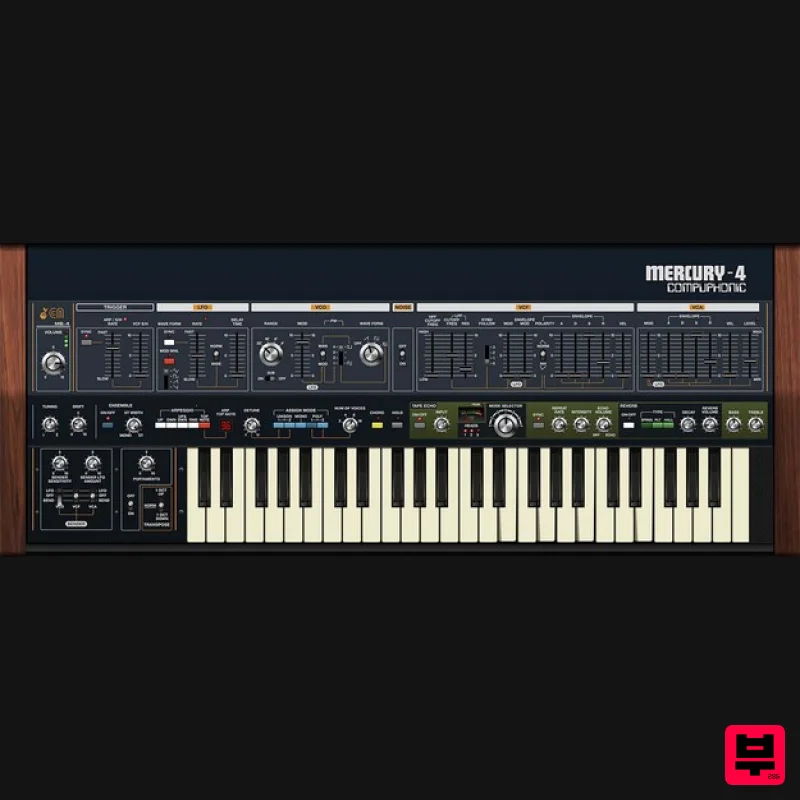
Cherry Audio
Mercury-4
Product Info
* Prices may vary. Check retailer for current pricing and availability.
Product Description
- Poly In The Beginning Originally released in 1978
- the Roland Jupiter-4 synthesizer was one of the earliest instruments to combine voice-assign polyphony with digital patch storage - that is
- the ability to store and recall sounds to digital memory and recall them at the touch of a button. "Voice-assign polyphony
- ” refers to instruments with a finite number of independent synthesizer voices (four
- in this case) that digitally scan the keyboard and assign notes to onboard voices. These days
- voice-assign polyphony and digital patch storage are taken for granted
- but this was a HUGE deal in the late 70s when options for polyphonic synthesis were mostly limited to crude string synthesizers based upon 60s organ technology
- and patch recall was generally limited to how fast you could twirl knobs and flick switches! In its day
- the Jupiter-4 was overshadowed by larger
- more complex (and far more expensive) instruments from American synth manufacturers
- and on paper
- its specs weren’t as impressive. But specs don't tell the whole story
- because the Jupiter-4 sounds fantastic
- with a raw
- raunchy tone not found in any of the other beloved Juno and Jupiter synths. Its analogue oscillators have a uniquely aggressive tone quality
- the built-in sub-oscillator adds girth
- its oddly fast and deep LFO modulation capabilities allow it to create uniquely whacked out modular synth-like tones
- and Roland's famous stereo chorus "ensemble" circuit is beautifully implemented
- adding a boatload of width and dimension. The original instrument had its share of caveats
- including a meagre eight user patch locations
- no edit mode for stored patches
- just four voices of polyphony
- it weighed a ton (a portly 42 lb!)
- and the lack of oscillator autotune meant a cold breeze could send it careening out of tune. Cherry Audio's Mercury-4 addresses every one of these issues
- with up to 16-voice polyphony
- infinite patch storage
- easy patch editing
- and much more. In addition to recreating the Jupiter-4's uniquely powerful oscillator and filter tonality
- Mercury-4 beautifully replicates Roland’s renowned stereo ensemble effect. They've also added a truly other-worldly "Space Echo"-style tape echo with multiple reverb modes. The tape echo perfectly recreates the warm tonality and subtle speed variations that make the original Space Echo units so desirable
- and the reverb section expands upon the original spring reverb with plate and hall modes for enhanced spatial depth. Features Authentically modelled oscillator with sub-oscillator All filter characteristics modelled
- including powerful low-frequency resonance Up to 16-voice polyphony Over 300 presets
- programmed by industry veterans Exactingly replicated unique arpeggio section w/tempo sync Carefully modelled wide-range LFO modulation with "inverted" mod characteristics Drift control for increased analogue realism Precisely replicated stereo ensemble effect Warm and organic tape echo with multiple reverb modes Tempo-syncable LFO Detunable unison mode Single-key chord memory mode Highly optimized coding for high performance with ultra-low CPU load Advanced one-click UI magnification Comprehensive MPE support Full MIDI control and DAW automation for all controls Mercury-4 is available in AU
- VST3
- and standalone formats System Requirements Mac 10.13 or above. macOS 13 Ventura supported. 64-bit required. Native Apple M1 processor support
- including Apple M1 Ultra. 3.4 GHz Quad-Core or M1 CPU with 8GB of RAM recommended. Available in AU
- VST3
- AAX & Standalone formats Windows Windows 7 or above (including Windows 11)
- 64-bit required. Quad-core computer with 8GB of RAM recommended. Available in VST
- VST3
- AAX & Standalone formats Joe McGinty "Though I haven’t spent a lot of time with the original Roland Jupiter-4
- based on the sound of the Mercury-4
- I now understand its allure - it’s incredibly warm and organic. The MPE support takes the instrument to a whole other level. It was very easy to dial up "Blade Runner" Leon Turner "I’ve started using the Mercury-4 synth while touring and in studio. It allows me to get synth sounds that are more modern with a vintage feel. The stock sounds are absolutely fantastic
- the user Interface is very easy to use and has great ways to create the sounds I’m looking for. It’s a major upgrade for me.” Eric Levy "The attention to detail is A+. All the little things
- from easy resizing to quality browser
- to logically placed and welcome enhanced features - these things add up to take strain off the left hemisphere of my brain
- allowing me to feel creative rather than frustrated or overwhelmed" Mac Registration Note: Voltage Modular Core 2 + Electro Drums have been used as an example. <iframe frameborder="0" height="315" src="//www.youtube.com/embed/Ejmfc3wEcPQ?showinfo=0&autohide=1&iv_load_policy=3&rel=0" width="560"></iframe> 1. Visit https://store.cherryaudio.com/redeem?ref=PluginBoutique > click ‘create an account’ to register your product. (If you already have a Cherry Audio account
- simply click ‘login’). 2. Enter your details and click the 'I'm not a robot’ reCAPTCHA > click 'Create an Account'. 3. Once logged in click ‘Store’ on the top toolbar and then ‘Redeem Code’. 4. Enter the serial number from your Plugin Boutique account > click 'Redeem Product'. Installation 1. Choose the correct Mac format for your systen (Intel or M1) > click 'Download'. 2. Open the downloaded .pkg installer > Click 'Continue'. 3. Read through the Software License Agreements > Click 'Continue'. 4. Click 'Agree'. 5. Select your installation destination > Click 'Continue'. 6. Choose the plugin formats you want to install > click 'Continue'. 6. Click 'Install'. 7. Click 'Close' to complete the installation process. Activation 1. Open your installed product and enter your Cherry Audio registered Email and Password > Click 'Login'. Your software is now activated and ready to use! Windows Registration Note: Voltage Modular Core 2 + Electro Drums have been used as the example. <iframe frameborder="0" height="315" src="//www.youtube.com/embed/Ejmfc3wEcPQ?showinfo=0&autohide=1&iv_load_policy=3&rel=0" width="560"></iframe> 1. Visit https://store.cherryaudio.com/redeem?ref=PluginBoutique > click ‘create an account’ to register your product. (If you already have a Cherry Audio account
- simply click ‘login’). 2. Enter your details and click the 'I'm not a robot’ reCAPTCHA > click 'Create an Account'. 3. Once logged in click ‘Store’ on the top toolbar and then ‘Redeem Code’. 4. Enter the serial number from your Plugin Boutique account > click 'Redeem Product'. Installation 1. Choose the Windows format > click 'Download'. 2. Open the downloaded .exe installer > Click 'Next'. 3. Select 'I Agree to the Terms of this License Agreement' > Click 'Next'. 4. Choose the plugin formats you want to install > click 'Next'. 5. Click 'Next'. 6. Click 'Finish' to complete the installation process. Activation 1. Open your installed product and enter your Cherry Audio registered Email and Password > Click 'Login'. Your software is now activated and ready to use!
Additional Information
About the Cherry Audio Mercury-4
The Cherry Audio Mercury-4 combines traditional design with modern performance for Synth enthusiasts.
Why Choose the Cherry Audio Mercury-4?
- •Authentic Cherry Audio craftsmanship and design
- •Versatile sound suitable for multiple musical genres
- •Professional build quality and reliable performance
- •Part of Cherry Audio's respected Synth lineup
Compare & Explore
Browse our complete selection of Cherry Audio instruments or explore other Synth options. Use our comparison tools to find the perfect match for your musical style and budget.
Similar Products

discoDSP Discovery Pro
Synth
$30
discoDSP’s Discovery was one of the company’s first and finest efforts. Heavily inspired by Clavia’s Nord Lead...

discoDSP Discovery
Synth
$30
Discovery is a virtual analog Nord Lead 2 inspired synthesizer featuring multi-layering, a morphing engine, high...

discoDSP OPL
Synth
$30
The OPL is a digital sound synthesis chip developed by Yamaha in the mid 1980s. Among other products, it was used in...

ThaLoops Templetone
Synth
$30
The Ultimate Hip-Hop Production Plugin – Featuring a Vast Collection of Hip-Hop Sounds. Choose between wild drums,...

discoDSP OB-Xd
Synth
$30
OB-Xd is based on the Oberheim OB-X. It attempts to recreate its sound and behavior, but as the original was very...

Reflekt Audio Xonex
Synth
$30
Xonex is a futuristic plugin that we have used time and time again to make a variety of beats. Xonex has offered me a...

AngelicVibes ELITE PIANIST
Synth
$30
Your next go-to virtual instrument. Real piano recordings with unique sound and effects 50 high-quality presets for...

Thenatan Audio Poizen VST
Synth
$30
Thenatan and Global Audio Tools have teamed up again to bring music makers across the globe a jam packed powerful tool...
Frequently Asked Questions
The Cherry Audio Mercury-4 stands out for its exceptional Cherry Audio craftsmanship and innovative design.
Yes! With its affordable price point and quality construction, it's perfect for learning synth.
Browse the similar products section to see how it stacks up against other synth.

