
Boz Digital Labs Pan Knob
Professional music gear - detailed information and where to buy
Boz Digital Labs
Pan Knob
Product Info
* Prices may vary. Check retailer for current pricing and availability.
Product Description
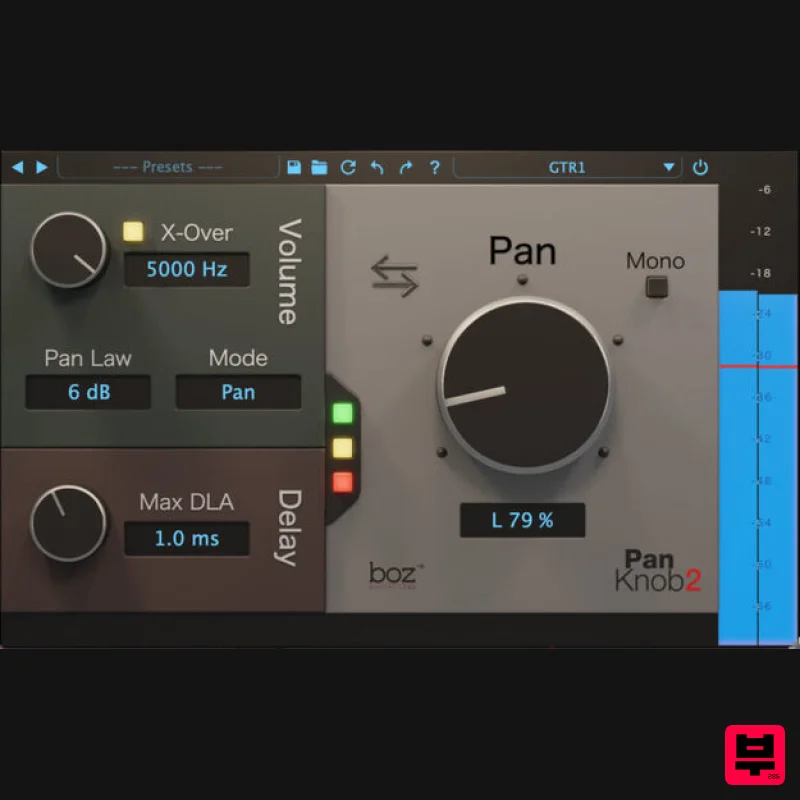
- Pan Knob overcomes the limitations of traditional panning schemes with a superior algorithm that centres low frequencies while panning higher frequencies for superior balance and mix translation. Panning is one of the most basic mixing tools we have
- and it’s included in every DAW. So why a Pan Knob plugin? Simple answer: because it sounds way better
- especially in headphones. Longer answer: Keep reading. Why Change a Bread and Butter Effect? Traditional panning works by adjusting the volume on your right and left channels to move where it sounds in the stereo field. Simple enough. But there’s a major problem with this: It sounds really sucky on headphones when you pan things wide. Why? Because in the real world
- sound never shows up in just one ear
- unless it’s a mosquito. Pan Knob fixes this by adding a couple of extra dimensions to your pan control. 1) It keeps low frequencies unpanned. This simulates the natural effect of your head filtering the high frequencies while letting low frequencies hit both ears. 2) It adds a delay to simulate the wavefront hitting your ears at different times. Both of these effects can be toggled on and off depending on your situation. Pan knob will do everything from traditional dumb panning to advanced natural-sounding panning. Break the Rules Because Pan Knob lets you pan anywhere and still sound natural
- you are now free to break the traditional rules of panning. You want to pan your bass to the left? Go for it. It will sound natural. You want that snare drum to come from the right without giving the listener a migraine? Have at it. The traditional panning rules no longer apply. Just the Facts Superior panning algorithm for all listening formats Centers low frequencies to maintain left/right balance regardless of higher frequency positioning Selectable micro delay Improves mix translation Selectable pan laws Switch between balance and pan Pan anywhere in your signal chain Pan Knob to the Rescue Pan Knob enables you to instantly swap pan positions of instruments
- choose between Balance or Pan for stereo tracks
- and select pan laws. Best of all
- Pan Knob lets you depart from standard panning schemes while still sounding natural
- and doesn’t cause the balance problems common to ear-bud and headphone listening. Pan Knob enables you to experiment with panning without all the tail-chasing and tradeoffs that come with moving instruments and vocals around the stereo field using traditional panners. As an added benefit
- Pan Knob speeds up your workflow
- which is essential for both professional and aspiring mix engineers. Features Better Panning algorithm for all listening formats Choose pan law Switch between Balance/Pan Pan anywhere in your signal chain System Requirements Mac macOS 10.13 High Sierra or later (Intel / M1 Apple Silicon supported) (64-bit only) VST2
- VST3
- AAX Native Windows Windows 7 or later (64-bit only) VST2
- VST3
- AAX Native Note: El Clapo is used as an example. Mac Redemption 1. Click Download in your Plugin Boutique account or go to https://www.bozdigitallabs.com/plugin-boutique-retrieve/. 2. Copy and paste the code from your Plugin Boutique account > Click 'Retrieve Plugin'. 3. Review the order > Click 'Proceed to Checkout'. 4. Enter your email address
- username and password > Click 'Register'. Note: If you already have Boz Digital Labs account
- select 'Click Here to Login' after entering your email address/username and password > Click 'Login'. 5. Check that your email is correct > Click 'Next'. 6. Review your order > Click 'Next'. 7. Click 'I have read and agree to the website terms and conditions' > Click 'Place order'. 8. Click 'Download Plugin Here'. 9. Click the Mac link to download the installer. Installation 1. Run the .pkg installer > Click 'Continue'. 2. Select the formats you wish to install > Click 'Continue'. Note: If you're unsure about which format to use
- leave all options selected and proceed. Check out this article for more information. 3. Click 'Install'. 4. Click 'Close'. 5. Open your DAW and open the plugin > Enter your Boz Digital Labs username and the serial code that you received in your Boz Digital Labs Account > Click 'Register'. Your software is now authorised and ready for use! Windows Redemption 1. Click Download in your Plugin Boutique account or go to https: //www.bozdigitallabs.com/plugin-boutique-retrieve/. 2. Copy and paste the code from your Plugin Boutique account > Click 'Retrieve Plugin'. 3. Review the order > Click 'Proceed to Checkout'. 4. Enter your email address
- username and password > Click 'Register'. Note: If you already have Boz Digital Labs account
- select 'Click Here to Login' after entering your email address/username and password > Click 'Login'. 5. Check that your email is correct > Click 'Next'. 6. Review your order > Click 'Next'. 7. Click 'I have read and agree to the website terms and conditions' > Click 'Place order'. 8. Click 'Download Plugin Here'. 9. Click the Windows link to download the installer. Installation 1. Double-click the .exe installer > Click 'I accept the agreement' then click 'Next'. 2. Click 'Next'. 3. Click 'Next'. 4. Select a VST folder in which to install the 32-bit software format > Click 'Next'. 5. Select a VST folder in which to install the 64-bit software format > Click 'Next'. 6. Select the components you wish to install > Click 'Next'. 7. Click 'Next'. 8. Click 'Install'. 9. Click 'Finish'. 10. Open your DAW and open the plugin > Enter your Boz Digital Labs username and the serial code that you received in your Boz Digital Labs Account > Click 'Register'. Your software is now authorised and ready for use!
Additional Information
About the Boz Digital Labs Pan Knob
The Boz Digital Labs Pan Knob represents excellent craftsmanship in the Utility category.
Why Choose the Boz Digital Labs Pan Knob?
- •Authentic Boz Digital Labs craftsmanship and design
- •Versatile sound suitable for multiple musical genres
- •Professional build quality and reliable performance
- •Part of Boz Digital Labs's respected Utility lineup
Compare & Explore
Browse our complete selection of Boz Digital Labs instruments or explore other Utility options. Use our comparison tools to find the perfect match for your musical style and budget.
Similar Products

Blue Cat Audio Blue Cat's Connector
Utility
$30
The Virtual Cable For Your Virtual Studio Blue Cat’s Connector is an audio & MIDI streaming plug-in that can be used...

DDMF TheStrip
Utility
$30
What is it? The Strip is the essential channel strip: the finest EQ, gate and compressor bundled in one beautifully...

Tonalic Tonalic Arranger - 30 Day Subscription
Utility
$30
Real Musicians. Real Feel. Adaptive Performance Instrument for Your DAW Bring authentic, human musicianship into your...

Inphonik RX950
Utility
$30
Legendary Grit and Crunch Meet the RX950 Classic AD/DA Converter, Inphonik’s first effect plug-in, designed to...

Audible Genius Building Blocks 1
Utility
$30
Music Theory & Composition Training Software for DAW-Based Music Makers Drum Patterns, Basslines, Chord Progressions,...

Audible Genius Building Blocks 2
Utility
$30
Music Theory & Composition Training Software for DAW-Based Music Makers Drum Patterns, Basslines, Chord Progressions,...

Soundspear Luxor
Utility
$30
Luxor is the key if you want an instrument to stand out and spread in the mix. It will scoop your high frequencies to...

Acoustica Spin It Again
Utility
$30
Spin It Again is the easiest way to convert your LPs and cassettes to CD and MP3. Remember all those ‘oldies but...
Frequently Asked Questions
The Boz Digital Labs Pan Knob stands out for its exceptional Boz Digital Labs craftsmanship and innovative design.
Yes! With its affordable price point and quality construction, it's perfect for learning utility.
Browse the similar products section to see how it stacks up against other utility.

