
BLEASS BLEASS Omega Synth
Professional music gear - detailed information and where to buy
Product Description
- User-Friendly FM Synthesizer If you think FM Synthesis is complicated
- it's time to think again! BLEASS Omega places all of the sparkle
- character
- nuance and dynamic expressiveness of FM Synthesis at your fingertips
- and does away with the arcane programming interfaces so often associated with FM. Harnessing BLEASS' signature GUI technology
- creating and crafting sounds in Omega is not just easier than with other FM synths
- it's easy - PERIOD! Al of the classic capabilities of FM Synthesis is available in BLEASS Omega - expressive electric pianos
- deep thundering basses
- crystal-clear pads
- sparkling bells
- and soulful leads. And thanks to the instrument’s analogue-style Waveshaper and multi-mode Filter
- BLEASS Omega can inject powerful analogue-like flavour into those pure FM tones
- giving searing filter sweeps
- growling distortions
- and harmonically-rich resonances. The four FM operators that sit at the heart of BLEASS Omega are edited simultaneously from within a single screen
- with all operator envelopes and controls available to the touch of your finger or click of your mouse. This amazingly user-friendly approach makes light work of sound editing and encourages experimentation and exploration in a way no other FM synth can achieve. With eleven FM algorithms on offer
- each providing a different way of interconnecting the four operators for radically different results
- the sonic scope of BLEASS Omega is vast. The included library of over 160 professionally designed presets makes full use of this versatility
- furnishing you with a varied and inspirational sound palette to use in your music-making and sound design projects. BLEASS Omega fits in with your workflow and studio setup
- no matter how you like to create. BLEASS Omega is available for Windows and macOS comes as a VST3 plugin instrument
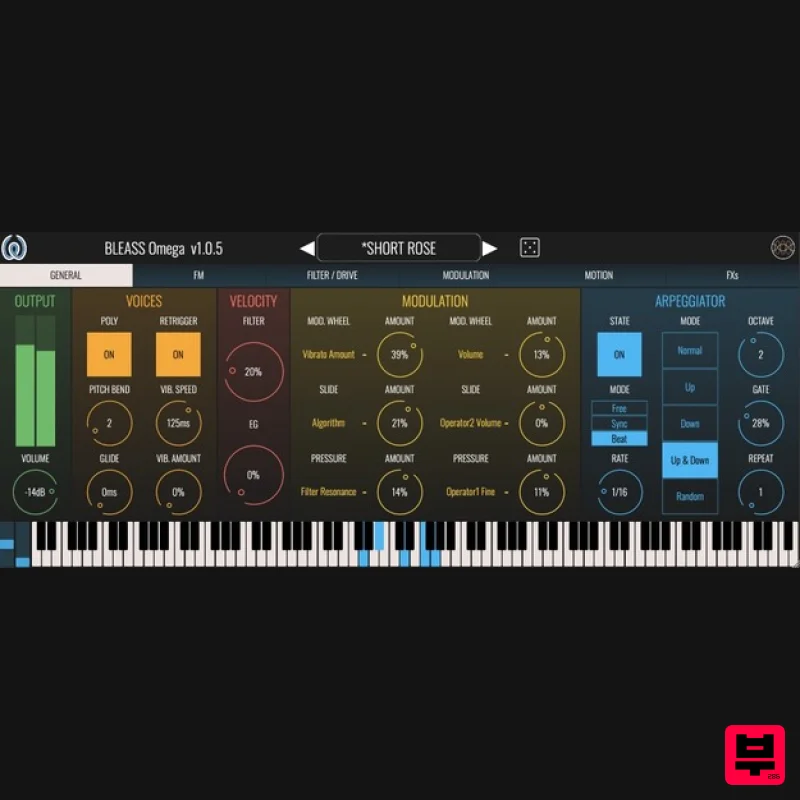
- compatible with all major DAWS. General: Set the basic synth properties
- such as voices
- glide
- MPE modulation targets
- and arpeggiator. Set the master volume and view current output level. Switch between monophonic and polyphonic modes. Set note glide duration
- and enable or disable retriggering of ADSR envelopes when playing legato. Configure and map mod wheel and MPE controllers (Slide and Pressure) to up to two destinations each. Enable or disable arpeggiator
- and configure its style and synchronisation settings. FM: Choose and configure the FM algorithm; configure the four FM operators. Choose from 11 FM algorithms
- with colour-coded graphical representations to help with your choice. Each algorithm corresponds to a different routing of the four FM operators
- with the flow starting at the top of the diagram and working downwards. Where operators are linked
- the upper operator(s) modulate the frequency of the lower operator(s). In all algorithms
- the fourth operator has a feedback loop that allows it to modulate its own frequency. The Feedback control sets the strength of this modulation. The Time control sets a global time multiplier that’s applied to the ADSR envelopes of the four operators. Transpose and fine-tune the synth using the Octave and Tune controls Each operator generates a sine wave whose amplitude is controlled by a dedicated ADSR envelope and volume control. There’s also a Velocity setting that determines how sensitive the operator is to playing velocity. The frequency of an operator’s sine wave can either follow the keyboard input (Fixed = OFF) or produce a static frequency (Fixed = ON). If Fixed is OFF
- the operator’s frequency is calculated from the note that was played multiplied by the operator’s Coarse setting
- with a further offset available from the Fine control. If Fixed is ON
- the operator frequency is set using the Frequency and Multiplier controls. Filter / Drive BLEASS Omega’s Waveshaper and multi-mode Filter allow you to add more character and colour to the FM synthesis engine’s output. The Waveshaper adds warmth and overdrive to the sound. It offers nine different shaping algorithms and a set of controls for fine-tuning the waveshaping function. The Filter can choose from low-pass
- high-pass
- band-pass and notch modes. Set the Filter’s cutoff frequency and resonance by dragging inside the filter visualisation. The Filter’s Keyboard control sets how the cutoff frequency is affected by the pitch of the note you play. The Filter’s Envelope control determines how strongly the filter’s dedicated ADSR envelope impacts the cutoff frequency. Modulation: BLEASS Omega has a pair of freely assignable LFOs (Low-Frequency Oscillators) and a third ADSR envelope. Each source can be assigned to up to two destinations. Select LFO waveforms – sine
- triangle
- saw up
- saw down
- square and sample-and-hold. Control LFO rate and offset
- and how strongly it will impact its assigned destinations. Intuitive LFO visualisation gives an easy understanding of what each is doing. Motion: BLEASS’ unique Motion Sequencer generates rhythmic movement and repeating patterns of modulation values that can be assigned to any two modulation destinations. Enable or disable the Motion Sequencer
- and create a sequence of modulation values. Configure the length and randomness of a sequence. Choose whether the Motion Sequencer syncs to your DAW
- or steps through its pattern each time you trigger a note. Arp Reset determines whether the Motion Sequencer restarts or continues when the arpeggiator is enabled and a new chord is played. The Dispatch mode controls how the Motion Sequencer’s modulation will affect the voices of the synth. In Global mode
- all voices are affected; in Notes mode
- only the last-played note is affected. Snap Mode: Set whether the sliders used to define the sequence move freely or snap to fixed values. Set up the additional assignable ADSR envelope
- and configure the mapping to up to two destinations. FX: BLEASS Omega contains four effects processors that bring colourful variations and spatial presence to your sound. The Chorus processor adds stereo thickening and motion to your sound. Add classic volume fluctuations and flutters with the Tremolo effect. The Delay processor can run freely or be synchronised to your project’s tempo. It can switch between standard and ping-pong modes
- and includes low- and high-pass filters for detailed control over the effect. BLEASS’ flexible Reverb processor creates a wide range of high quality spatial and room emulation effects without overloading you with options and settings. System Requirements PC Windows 8 and later (64-bit only) VST3
- AAX Mac macOS 10.9 and later (64-bit only) (including macOS 11 Big Sur and M1 processors) VST3
- Audio Unit
- AAX Format: BLEASS Omega is not a standalone product
- it requires host software. BLEASS Omega is compatible with nearly all VST3
- Audio Unit and AAX compatible DAWs. Note: BLEASS Reverb is used as the example. Registration 1. Go to https://www.bleass.com/redeem
- enter your registration code located within your Plugin Boutique account and click SUBMIT. 2. Enter your email address and click SUBMIT. You will now be sent your serial number and installers for your software. Your BLEASS software is now registered! Mac Installation 1. Go to your email account and locate the 'BLEASS Product License' email. 2. Copy and paste the Mac installer URL into your browser and click enter to download the installer. 3. Open the Installer file and click ‘Continue’. 4. Click ‘Continue’. 5. Click 'Install'. 6. Enter your login details and click 'Install Software'. 7. Your software is now installed - click 'Close'. 8. Open your newly installed BLEASS software inside your DAW and click ‘UNREGISTERED’. 9. Enter your email address and the serial number you were given in your BLEASS Product Licence email > Click ‘OK’. Your software is now activated and ready to use in your DAW! Windows Installation 1. Go to your email account and locate the 'BLEASS Product License' email. 2. Copy and paste the Windows installer URL into your browser and click enter to download the installer. 3. Open the installer and click 'Yes'. 4. Click 'Next >'. 5. Click 'Install'. 6. Click 'Finish'. 7. Open your newly installed BLEASS software inside your DAW and click ‘UNREGISTERED’. 8. Enter your email address and the serial number you were given in your BLEASS Product Licence email > Click ‘OK’. Your software is now activated and ready to use in your DAW!
Additional Information
About the BLEASS BLEASS Omega Synth
The BLEASS BLEASS Omega Synth represents excellent craftsmanship in the Synth category.
Why Choose the BLEASS BLEASS Omega Synth?
- •Authentic BLEASS craftsmanship and design
- •Versatile sound suitable for multiple musical genres
- •Professional build quality and reliable performance
- •Part of BLEASS's respected Synth lineup
Compare & Explore
Browse our complete selection of BLEASS instruments or explore other Synth options. Use our comparison tools to find the perfect match for your musical style and budget.
Similar Products

AngelicVibes ELITE PIANIST
Synth
$30
Your next go-to virtual instrument. Real piano recordings with unique sound and effects 50 high-quality presets for...

ThaLoops Templetone
Synth
$30
The Ultimate Hip-Hop Production Plugin – Featuring a Vast Collection of Hip-Hop Sounds. Choose between wild drums,...

Thenatan Audio Poizen VST
Synth
$30
Thenatan and Global Audio Tools have teamed up again to bring music makers across the globe a jam packed powerful tool...

Reflekt Audio Xonex
Synth
$30
Xonex is a futuristic plugin that we have used time and time again to make a variety of beats. Xonex has offered me a...

discoDSP OPL
Synth
$30
The OPL is a digital sound synthesis chip developed by Yamaha in the mid 1980s. Among other products, it was used in...

discoDSP Discovery Pro
Synth
$30
discoDSP’s Discovery was one of the company’s first and finest efforts. Heavily inspired by Clavia’s Nord Lead...

discoDSP OB-Xd
Synth
$30
OB-Xd is based on the Oberheim OB-X. It attempts to recreate its sound and behavior, but as the original was very...

discoDSP Discovery
Synth
$30
Discovery is a virtual analog Nord Lead 2 inspired synthesizer featuring multi-layering, a morphing engine, high...
Frequently Asked Questions
The BLEASS BLEASS Omega Synth stands out for its exceptional BLEASS craftsmanship and innovative design.
Yes! With its affordable price point and quality construction, it's perfect for learning synth.
Browse the similar products section to see how it stacks up against other synth.

