
BLEASS BLEASS Multiband Compressor
Professional music gear - detailed information and where to buy
BLEASS
BLEASS Multiband Compressor
Product Info
* Prices may vary. Check retailer for current pricing and availability.
Product Description
- Deep Dynamics Detail BLEASS Multiband Compressor is the perfect tool for injecting loudness
- power and punch into your mixes
- stems and tracks. Whether you are creating music on-the-move on your iPad
- producing your masterpiece in the studio
- or doing both
- BLEASS Multiband Compressor dispenses detailed precision control over your music’s dynamics. One of the secret weapons of professional mix and mastering engineers
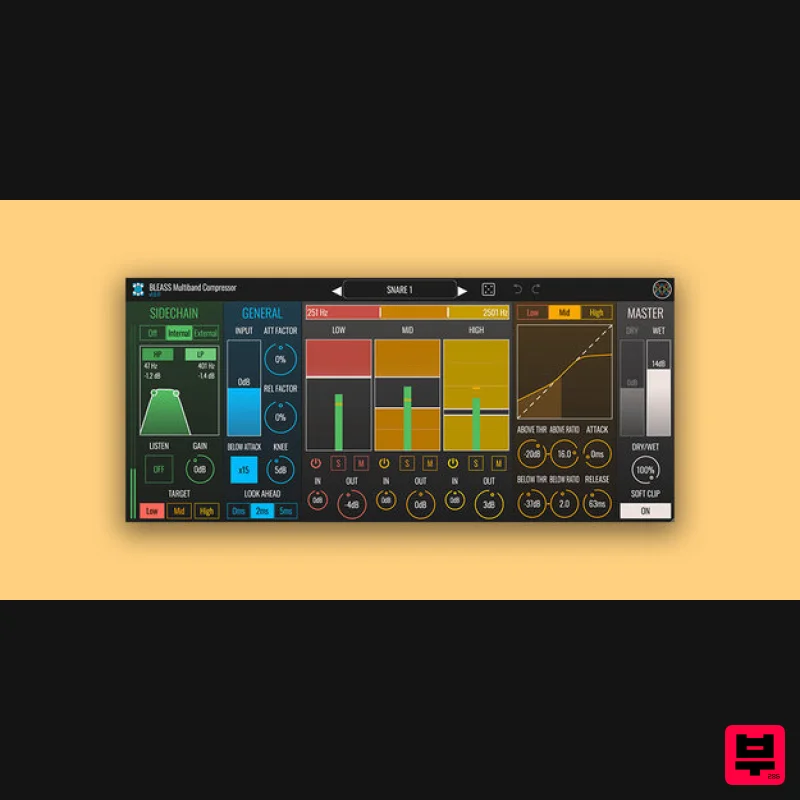
- multiband dynamics processors have various advantages over conventional broadband processors. By separating your audio into three frequency bands
- and processing each independently
- BLEASS Multiband Compressor ensures that loud passages and transients in one frequency range do not impact on how the other bands behave. This eliminates the “volume pumping” effect often exhibited by broadband compressors
- making BLEASS Multiband Compressor the perfect tool for processing drum kits
- synths
- pianos and – of course – full mixes and stems. The plugin works brilliantly with other sources too
- from solo instruments to vocals and spoken voice. Unusually for a multiband processor
- each of BLEASS Multiband Compressor’s three bands features a dual stage dynamics processor. This consists of an Above stage that senses for and processes signals whose level exceeds the Above threshold
- and a Below stage that senses for and processes signals that are quieter than the Below threshold. Additionally
- each stage can operate as either a compressor or
- by dialing in Ratio values below 1: 1
- an expander. Altogether this makes for phenomenally versatile control over the volume and loudness of your mixes
- stems and parts. Another innovative feature of BLEASS Multiband Compressor is its flexible sidechain system. This allows you to choose which bands will key from the input signal in the normal way
- and which will key from a filtered and/or external signal. This is ideal for corrective work such as controlling resonances
- sibilances and other unwanted artefacts
- but is also a fabulous creative tool
- allowing for stylish ducking effects and ultra-deep dynamics control. Rounding things off
- the plugin provides comprehensive output level and dry / wet balance control
- along with a soft clipping feature that ensures overly-hot signals don’t become nasty and harsh
- but instead take on a classic valve-like saturation character. BLEASS Multiband Compressor stands out for its great sound
- innovative features
- versatile dynamics control
- and exceptional efficiency. System Requirements PC Windows 10 and later (64-bit) VST3 / AAX Mac macOS 10.15 and later (64-bit only) (including macOS 11 Big Sur and Silicon processors) VST3 / Audio Unit / AAX Please note: BLEASS Reverb is used as an example. Registration 1. Go to https://www.bleass.com/redeem
- enter your registration code located within your Plugin Boutique account and click SUBMIT. 2. Enter your email address and click SUBMIT. You will now be sent your serial number and installers for your software. Your BLEASS software is now registered! Mac Installation 1. Go to your email account and locate the 'BLEASS Product License' email. 2. Copy and paste the Mac installer URL into your browser and click enter to download the installer. 3. Open the Installer file and click ‘Continue’. 4. Click ‘Continue’. 5. Click 'Install'. 6. Enter your login details and click 'Install Software'. 7. Your software is now installed - click 'Close'. 8. Open your newly installed BLEASS software inside your DAW and click ‘UNREGISTERED’. 9. Enter your email address and the serial number you were given in your BLEASS Product Licence email > Click ‘OK’. Your software is now activated and ready to use in your DAW! Windows Installation 1. Go to your email account and locate the 'BLEASS Product License' email. 2. Copy and paste the Windows installer URL into your browser and click enter to download the installer. 3. Open the installer and click 'Yes'. 4. Click 'Next >'. 5. Click 'Install'. 6. Click 'Finish'. 7. Open your newly installed BLEASS software inside your DAW and click ‘UNREGISTERED’. 8. Enter your email address and the serial number you were given in your BLEASS Product Licence email > Click ‘OK’. Your software is now activated and ready to use in your DAW!
Additional Information
About the BLEASS BLEASS Multiband Compressor
The BLEASS BLEASS Multiband Compressor combines traditional design with modern performance for Compressor enthusiasts.
Why Choose the BLEASS BLEASS Multiband Compressor?
- •Authentic BLEASS craftsmanship and design
- •Versatile sound suitable for multiple musical genres
- •Professional build quality and reliable performance
- •Part of BLEASS's respected Compressor lineup
Compare & Explore
Browse our complete selection of BLEASS instruments or explore other Compressor options. Use our comparison tools to find the perfect match for your musical style and budget.
Similar Products

DDMF Comprezzore
Compressor

PSP Audioware PSP Vintage Warmer 2
Compressor

MeldaProduction MEssentialsFXBundle
Compressor

Soundspear Supertube
Compressor

DDMF LinComp
Compressor

Korneff Audio Pawn Shop Comp
Compressor

W. A. Production BIGGIFIER
Compressor

Initial Audio IA-LA1
Compressor

