
Big Fish Audio Celtic Instruments
Professional music gear - detailed information and where to buy
Big Fish Audio
Celtic Instruments
Product Info
* Prices may vary. Check retailer for current pricing and availability.
Product Description
- Authentic bagpipes
- fiddle
- harp
- bodhran
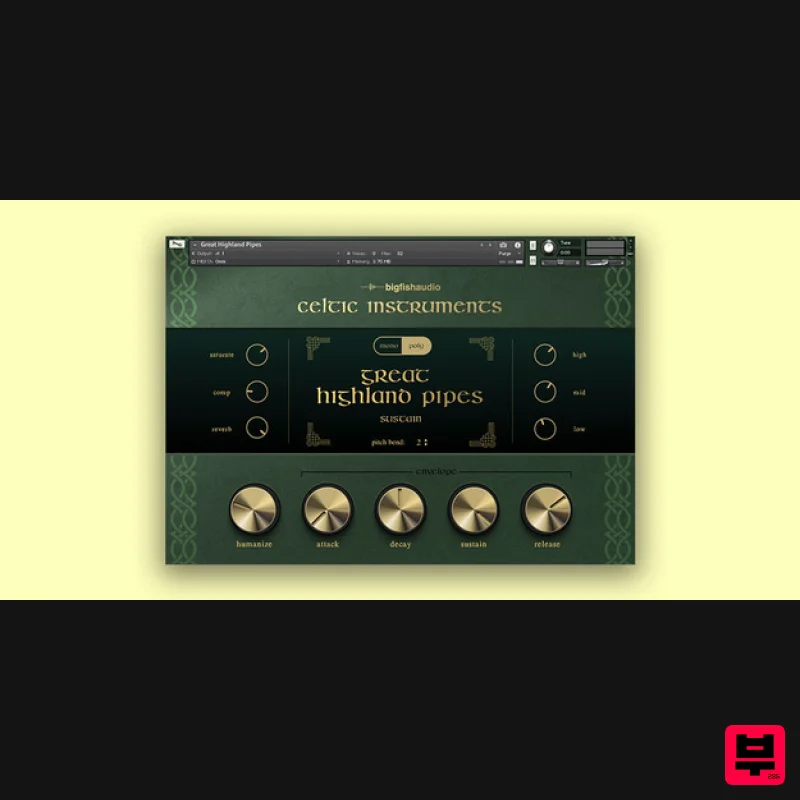
- and more Big Fish Audio’s Celtic Instruments for Kontakt Player offers a richly detailed and immersive experience
- bringing the enchanting spirit of Celtic music directly to your projects. This expertly crafted library transports you to the misty landscapes of Scotland and Ireland with its collection of high-quality instruments
- including the powerful Great Highland Pipes
- intricate Uilleann Pipes
- versatile Scottish Pipes
- and other bagpipe-style instruments. In addition to those iconic sounds
- Celtic Instruments includes authentic Pennywhistle
- Bodhran (Irish Drum)
- Fiddle patches
- and more
- all meticulously recorded for a genuine performance. The latest version enhances the library with new effects
- refined samples
- and full NKS compatibility
- all presented through a user-friendly GUI. This streamlined interface ensures that all essential controls are easily accessible
- allowing you to effortlessly infuse your compositions with the captivating essence of Celtic tradition. Komplete Kontrol & Maschine Integration Celtic Instruments has been designed for seamless integration with Komplete Kontrol and Maschine
- offering you a unique hands-on experience. Easily manipulate the interface using the controls of all NKS compatible hardware. Included Instruments Accordion Bodhran Celtic Harp Celtic Percussion Fiddle Great Highland Pipes Guitar (in D) Harmonica Low Whistle North Umbrian Pipes Pennywhistle Scottish Pipes Uilleann Pipes System Requirements The library requires approximately 1.2GB once installed Kontakt 7 Player or Kontakt 7 (Version 7.10.1) 4GB RAM or more Mac OS 12 or higher 64 bit only Intel Core i5 or later Or Apple Silicone Macs Windows Windows 10 or higher 64 bit only Intel Core i5 or equivalent CPU Note: Ambient Minimalism is used as the example. Redemption 1. Go to https://www.bigfishaudio.com/redemption.html > Enter your Name
- Email Address
- and Redemption Code
- found in the Serial Number section of your Plugin Boutique User Account > Click 'CONTINUE'. 2. Sign into your existing Big Fish Audio account
- or if you don't have one
- click "CREATE ACCOUNT" and fill in your details to create an account. 3. Your product is now redeemed. Please make note of the serial provided here > Click "DOWNLOAD" to download the plugin. 4. Unzip the downloaded installer. Mac Installation / Activation 1. Download and install the FREE Kontakt Player from the Native Instruments website. 2. Download and install the FREE Native Access application. 3. Open Native Access and enter your Native Instruments-registered email address and password > Click 'LOG IN'. 4. Click 'Add a serial' in the top left corner of the application window. 5. Enter the Serial Number found in your email > Click 'Add Serial'. 6. Click 'View products not installed'. 7. Navigate to Ambient Minimalism > Click 'ADD LIBRARY'. 8. Click 'BROWSE' > Navigate to where you downloaded and unzipped Ambient Minimalism too > Once selected
- click 'INSTALL'. 9. Ambient Minimalism is now installed. 10. Open Kontakt and go to the 'Libraries' tab. Your Library is now activated and ready to use in standalone or within your DAW. PC Installation / Activation 1. Download and install the FREE Kontakt Player from the Native Instruments website. 2. Download and install the FREE Native Access application. 3. Open Native Access and enter your Native Instruments-registered email address and password > Click 'LOG IN'. 4. Click 'Add a serial' in the top left corner of the application window. 5. Enter the previously acquired Serial Code from Big Fish Audio > Click 'Add Serial'. 6. Click 'View products not installed'. 7. Navigate to Ambient Minimalism > Click 'ADD LIBRARY'. 8. Click 'BROWSE' > Navigate to where you downloaded and unzipped Ambient Minimalism too > Once selected
- click 'INSTALL'. 9. Ambient Minimalism is now installed. 10. Open Kontakt and go to the 'Libraries' tab. Your Library is now activated and ready to use in standalone or within your DAW.
Additional Information
About the Big Fish Audio Celtic Instruments
Discover the distinctive sound and feel of the Big Fish Audio Celtic Instruments, a standout choice among Kontakt Instrument.
Why Choose the Big Fish Audio Celtic Instruments?
- •Authentic Big Fish Audio craftsmanship and design
- •Versatile sound suitable for multiple musical genres
- •Professional build quality and reliable performance
- •Part of Big Fish Audio's respected Kontakt Instrument lineup
Compare & Explore
Browse our complete selection of Big Fish Audio instruments or explore other Kontakt Instrument options. Use our comparison tools to find the perfect match for your musical style and budget.
Similar Products

Rigid Audio Retrocade
Kontakt Instrument

Audiofier Aerkord
Kontakt Instrument

Ecliptiq Audio Hexa Rhythm Designer
Kontakt Instrument

The Beat House LE HITS THE ESSENTIALS
Kontakt Instrument

HD Instruments ZoneMatrix
Kontakt Instrument

Audiofier Sequi2r EX
Kontakt Instrument

DoubleBang Software Plugged
Kontakt Instrument

Aria Sounds Hybrichord
Kontakt Instrument

