
BFD BFD Player Expansion: Pop Essentials
Professional music gear - detailed information and where to buy
BFD
BFD Player Expansion: Pop Essentials
Product Info
* Prices may vary. Check retailer for current pricing and availability.
Product Description
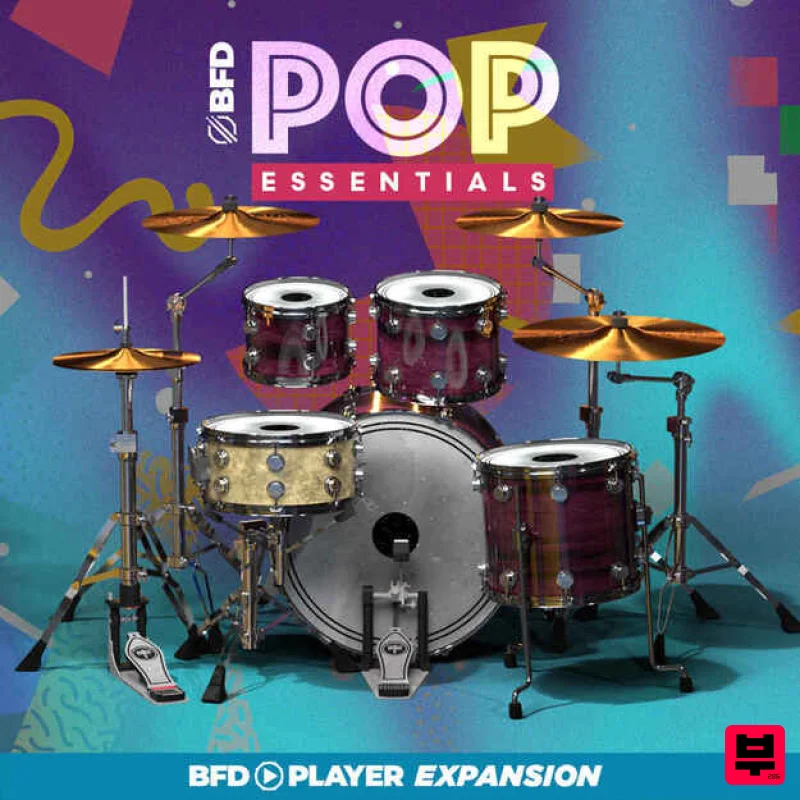
- Introducing Pop Essentials: Your Rhythmic Foundation for Chart-Topping Hits! Derived from the renowned BFD3 Core Library
- this drum sample pack is a sonic treasure trove tailored specifically for pop and rock songwriters. Featuring a 1980 Gretsch maple drumkit
- each beat
- fill
- and groove resonates with the unmistakable essence of pop and rock music. Elevate your tracks with the authentic sound and feel of these meticulously crafted drum samples
- meticulously recorded and expertly curated to seamlessly integrate into your production workflow. Pop Essentials also comes with a complement of Paiste cymbals
- and a fantastic sounding Tama Bell Brass snare drum. Whether you're seeking that infectious pop punch or the driving force behind rock anthems
- Pop Essentials provides the essential rhythmic backbone for your creative vision. Unleash the power of these pristine drum sounds and watch your compositions soar to new heights. Join the league of hitmakers and elevate your music with Pop Essentials – where the heartbeat of your songs meets professional-grade quality and unmatched authenticity. Features 24x18” Gretsch Purple Kick 14x12” Gretsch Purple Floor Tom 12x9” Gretsch Purple Mid Tom 10x7” Gretsch Purple High Tom Snare: 14x6.5” Tama Bell Brass Snare Cymbals: 21” Paiste Signature Dry Heavy Ride 18” Paiste Signature Full Crash 14” Paiste Signature Hihat 17” Paiste Signature Power Crash System Requirements Windows Windows 10 version 1909 and above 2GB free disk space (10.5 GB for all content recommended) 4GB RAM (8GB recommended) Dual-core 2.5GHz CPU BFD Player 1.1.0 required Not compatible with BFD3 Mac macOS 10.13 to macOS 13 Ventura (Apple Silicon compatible) 2GB free disk space (10.5 GB for all content) 4GB RAM (8GB recommended) Dual-core 2.5GHz CPU BFD Player 1.1.0 required Not compatible with BFD3 Note: BFD3 is used as an example. Registration 1. Go to https://profile.inmusicbrands.com/customer/account/login/ > Enter your email address and password > Click 'Create Account'. 2. Enter your details > Click 'NEXT STEP'. 3. Select brands you're interested in > Click 'I agree to inMusic's PRIVACY POLICY and TERMS OF USE' > Click 'CREATE ACCOUNT'./ 4. You have just created an inMusic account. You will now be sent a confirmation email. 5. Locate the account confirmation email > Click 'CONFIRM ACCOUNT'. Your account is now confirmed! Mac Installation 1. Download the BFD License Manager from your Plugin Boutique account. 2. Run the BFD License Manager installer > Drag the BFD License Manager icon over to your Applications folder. 3. Open the BFD License Manager when it has installed > Click 'Login via browser'. 4. Enter your details and log into your account. 5. Go back to the BFD License Manager > Click 'Products' on the toolbar > Select 'Register Product Serial'. 6. Enter the serial number found in your Plugin Boutique account > Click 'Register'. 7. Your serial is now registered > Click 'OK'. 8. Click 'Authorize'. 9. Your product is now authorised > Click 'OK'. Core Library Installation 1. Go back to the BFD License Manager > Click on BFD3 > Click the download button by 'BFD Content Installer'. You will now download the BFD3 Core Library (this is a large download and may take a while). 2. Click the 'play' button when the download has finished to install the core library > Click 'Next'. 3. Read the License Agreement > Click 'I agree with the terms and conditions detailed above' > Click 'Next'. 4. Click 'BFD3 ONLY' > Click 'Next'. 5. Choose where you want to install the library (if you have enough space
- leave this as the default and install it on your main drive) > Select the installation size > Click 'Install'. 6. Please wait for the Core Library to install. 7. The BFD3 Core Library is now installed > Click 'Done'. 8. Open BFD3 in your DAW > Choose your preferences > Click 'Do It!'. BFD3 is now installed
- activated and ready to use in your DAW! Windows Installation 1. Download the BFD License Manager from your Plugin Boutique account. 2. Run the BFD License Manager installer (you may need to find it in your download folder in Windows Explorer and open it from there) > click 'Yes'. 3. Read the License Agreement > Click 'I agree with the terms and conditions detailed above' > Click 'Install'. 4. The BFD License Manager is now installed > Click 'Done'. 5. Open the BFD License Manager > Click 'Login via Browser'. 6. Your browser will now open a new tab > Log in with your details. 7. Go back to the BFD License Manager > Click 'Products' in the toolbar > Select 'Register Product Serial...'. 8. Enter the serial number found in your Plugin Boutique account > Click 'Register'. 9. Click on your license > Click 'Authorize'. 10. Click 'Authorize' again. 11. Click the download button next to 'BFD3 Software Installer' to download the BFD3 installer. 12. Wait for the download to finish > Click the 'play' button. 13. Extract the contents of the ZIP folder. 14. Click 'Next'. 15. Read the License Agreement > Click 'I agree with the terms and conditions detailed above' > Click 'Next'. 16. Click 'Next'. 17. Click 'Browse...' > Select the VST folder that your DAW uses > Click 'Next'. 18. Click 'Install'. BFD3 is now installed on your system. Factory Content Installation 1. Click the download button next to 'BFD3 Content Installer' 2. Wait for the download to finish > Click the 'play' button for the 'BFD3 Core Library'. 3. Click 'Next'. 4. Select 'I agree with the terms and conditions detailed above' > Click 'Next'. 5. Select 'BFD3 ONLY' > Click 'Next'. 6. Click 'Install'. 7. Wait for the Core Libary to install > Click 'Done'. 8. Open BFD3 in your DAW > Choose your preferences > Click 'OK'. 9. Click 'OK' 10. Select your preferences > Click 'Do It!' BFD3 is now installed
- activated and ready to use in your DAW!
Additional Information
About the BFD BFD Player Expansion: Pop Essentials
The BFD BFD Player Expansion: Pop Essentials combines traditional design with modern performance for Expansion Packs enthusiasts.
Why Choose the BFD BFD Player Expansion: Pop Essentials?
- •Authentic BFD craftsmanship and design
- •Versatile sound suitable for multiple musical genres
- •Professional build quality and reliable performance
- •Part of BFD's respected Expansion Packs lineup
Compare & Explore
Browse our complete selection of BFD instruments or explore other Expansion Packs options. Use our comparison tools to find the perfect match for your musical style and budget.
Similar Products

Tracktion DG-8000 Expansion Pack (for Attracktive)
Expansion Packs

Tracktion SA-1000 Expansion Pack (for Attracktive)
Expansion Packs

Tracktion Taurinorum Expansion Pack (for Attracktive)
Expansion Packs

Tracktion Suitcase in a Box Expansion Pack (for Attracktive)
Expansion Packs

Tracktion Langweil 150 Expansion Pack (for Attracktive)
Expansion Packs

Tracktion Stonegrabber D-232 Expansion Pack (for Attracktive)
Expansion Packs

Tracktion Poly-One Expansion Pack (for Attracktive)
Expansion Packs

Tracktion SH-20 Expansion Pack (for Attracktive)
Expansion Packs

