
Ben Osterhouse Viola Da Gamba
Professional music gear - detailed information and where to buy
Ben Osterhouse
Viola Da Gamba
Product Info
* Prices may vary. Check retailer for current pricing and availability.
Product Description
- The Viola da Gamba is a six-stringed baroque instrument. It's similar in size to the cello
- but has a slightly different shape
- uses frets
- and is tuned in 4ths. It is strung with synthetic gut strings
- which to give it a strident
- husky sound. The Gamba's earthy tones can provide a rustic alternative to the classical string sound. This is one of only a handful of other baroque virtual instruments recorded. Features The Viola da Gamba is split into 2 nki's: The first one is a collection of 12 articulations that features a variety of different length strokes
- along with pizzicato
- trills
- ponticello
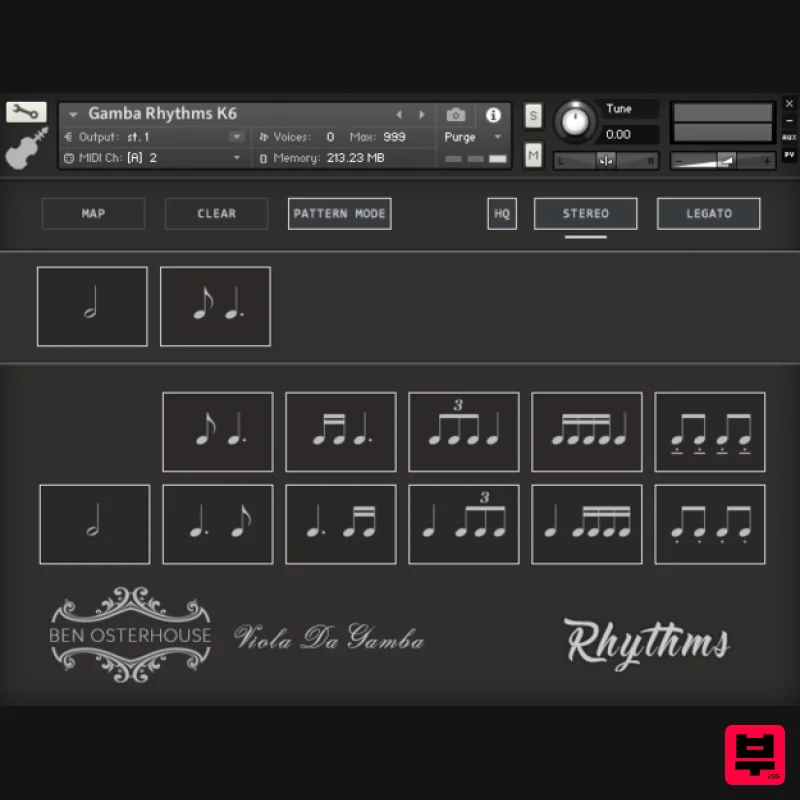
- and tremolo. All of the different articulations can be easily layered together within a single interface. The second nki is a collection of rhythmic figures which have been designed to fit together to create natural-sounding ostinato patterns. Each of the rhythmic figures can be accessed either by using key switches or using a unique interface which allows you to visually arrange the figures into a sequence. Each rhythmic figure is recorded as a 4-bar loop
- and the musical emphasis is given to downbeats and upbeats. This gives a natural ebb and flow to any ostinato pattern created with the Gamba. It's a three-octave range from C36 (2 octaves below middle C) up to C72 (an octave above middle C) System Requirements 710 MB available HD space Kontakt Full Version 5.8.1 or later Important Notes: The FULL Version of Kontakt 5.8.1+ is required in order to use this instrument. You will be stuck in DEMO MODE if trying to use this instrument in the FREE Kontakt Player. Please Note: Pattern Strings is used as an example. Pulse Downloader is used to download the software and must be installed. Mac 1. Download and extract the 'Pulse_Downloader_Mac_X.X.X.zip' folder from within your My Account
- open the file and run the installer 'Pulse-XX.X.X.dmg'. 2. Drag 'Pulse' to 'Applications'. 3. Log in to your Pulse account
- or create a new account by clicking 'Register' at the bottom of the window. 4. If registering
- input your email and password
- agree to the terms of use and click 'Register'. 5. Click the '+ Add a Product' button located in the top right-hand corner of the window. 6. Copy and paste your serial number from your My Account page
- click 'Install Now'
- then click 'Redeem'. 7. Select a location for Pulse to download the software by clicking the file icon on the right-hand side of the window. 8. Select the location you would like your software to download and install to. 9. Click 'Download and Install'. 10. The instrument is now downloading. 11. Once the instrument has finished downloading
- open Kontakt
- then open the 'Files' tab and navigate to the location that you downloaded the Kontakt Library to. Then click and drag the .nki file into the empty window. Your Kontakt instrument is now installed and ready to use. Windows 1. Download and extract the 'Pulse_Downloader_Windows_X.X.X.zip' folder from within your My Account page
- open the file and run the installer 'Pulse Web Setup X.X.X.exe'. 2. Log in to your Pulse account
- or create a new account by clicking 'Register' at the bottom of the window. 3. If registering
- input your email and password
- agree to the terms of use and click 'Register'. 4. Click the '+ Add a Product' button located in the top right-hand corner of the window. 5. Copy and paste your serial number from your My Account page
- click 'Install Now'
- then click 'Redeem'. 6. Select a location for Pulse to download the software by clicking the file icon on the right-hand side of the window. 7. Select the location you would like your software to download and install to. 8. Click 'Download and Install'. 9. The instrument is now downloading. 10. Once the instrument has finished downloading
- open Kontakt
- then open the 'Files' tab and navigate to the location that you downloaded the Kontakt Library to. Then click and drag the .nki file into the empty window. Your Kontakt instrument is now installed and ready to use.
Additional Information
About the Ben Osterhouse Viola Da Gamba
The Ben Osterhouse Viola Da Gamba combines traditional design with modern performance for Kontakt Instrument enthusiasts.
Why Choose the Ben Osterhouse Viola Da Gamba?
- •Authentic Ben Osterhouse craftsmanship and design
- •Versatile sound suitable for multiple musical genres
- •Professional build quality and reliable performance
- •Part of Ben Osterhouse's respected Kontakt Instrument lineup
Compare & Explore
Browse our complete selection of Ben Osterhouse instruments or explore other Kontakt Instrument options. Use our comparison tools to find the perfect match for your musical style and budget.
Similar Products

Audiofier Aerkord
Kontakt Instrument

The Beat House LE HITS THE ESSENTIALS
Kontakt Instrument

DoubleBang Software Plugged
Kontakt Instrument

HD Instruments ZoneMatrix
Kontakt Instrument

Audiofier Sequi2r EX
Kontakt Instrument

Aria Sounds Hybrichord
Kontakt Instrument

Rigid Audio Retrocade
Kontakt Instrument

Ecliptiq Audio Hexa Rhythm Designer
Kontakt Instrument

