
Ben Osterhouse Pattern Strings
Professional music gear - detailed information and where to buy
Ben Osterhouse
Pattern Strings
Product Info
* Prices may vary. Check retailer for current pricing and availability.
Product Description
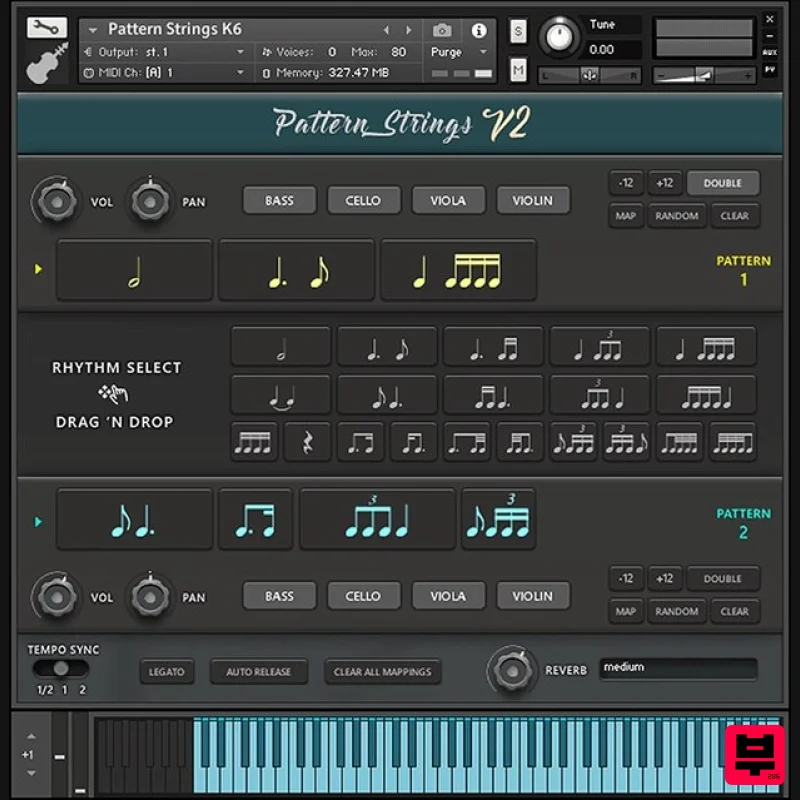
- Pattern Strings offers a unique approach to ostinatos by providing a collection of tempo-synced rhythmic fragments. These 19 rhythms have been recorded at two dynamic layers on violin
- viola
- cello
- and bass
- with 4 round robins. The interface utilizes an intuitive drag and drop mechanic which allows you to arrange the rhythms into sequences in which all the rhythms flow together with natural phrasing and musicality. You can drag and drop rhythms in the centre to either of the pattern strips. If you want to change the order of the rhythms you can do that too
- by dragging them around. With Legato turned on
- new notes start sync-ed with previously held notes. This way it's possible to create convincing lines by changing notes according to the rhythms
- as seen in the demos. Pattern Strings has an automatic bow direction feature. It plays downbow samples on downbeats and upbow samples on upbeats
- which creates a natural ebb and flow between beats. The tempo-sync switch allows you to set the sample playback to half speed or double speed. Some of the samples were recorded at 90bpm
- and others at 80bpm. So
- let's say you're working at 160bpm. This would mean that the 90bpm samples would be time stretched to twice their original speed! To make up for this
- you could use the Tempo Sync option to set the speed to be half as fast. All the combinations of instruments have been rendered down
- both single and with stereo doubling. This makes it possible to layer instruments together without so much memory and CPU. Because pattern strings contains 8.32GB of samples
- the interface was designed with a Dynamic Loading system so that it only loads what you need. In order to make it more efficient
- combinations of instruments have been rendered together
- saving on voice count and memory. This way if all instruments are enabled
- it will use the same amount of memory and CPU as if only one instrument was enabled. Beef up the sound of an instrument by turning on Doubling. Stereo-doubled samples have been rendered down
- so turning this on won't increase the number of voices or memory needed. Say you're using Pattern Strings on a track
- and you have a couple of different variations you want to use at different parts of the track. Rather than opening up multiple instances
- you could save variations into Custom Keyswitches. Just click “Map”
- then click on one of the coloured keys at the very bottom of the keyboard
- and Voilà
- the current pattern can now be recalled by that key! Generate a sequence of rhythms using the Random Button
- and perhaps you will find something useful. System Requirements 8.5GB available HD space Kontakt Full Version 5.8.1 or later Please Note: Pattern Strings is used as an example. Pulse Downloader is used to download the software and must be installed. Mac 1. Download and extract the 'Pulse_Downloader_Mac_X.X.X.zip' folder from within your My Account
- open the file and run the installer 'Pulse-XX.X.X.dmg'. 2. Drag 'Pulse' to 'Applications'. 3. Log in to your Pulse account
- or create a new account by clicking 'Register' at the bottom of the window. 4. If registering
- input your email and password
- agree to the terms of use and click 'Register'. 5. Click the '+ Add a Product' button located in the top right-hand corner of the window. 6. Copy and paste your serial number from your My Account page
- click 'Install Now'
- then click 'Redeem'. 7. Select a location for Pulse to download the software by clicking the file icon on the right-hand side of the window. 8. Select the location you would like your software to download and install to. 9. Click 'Download and Install'. 10. The instrument is now downloading. 11. Once the instrument has finished downloading
- open Kontakt
- then open the 'Files' tab and navigate to the location that you downloaded the Kontakt Library to. Then click and drag the .nki file into the empty window. Your Kontakt instrument is now installed and ready to use. Windows 1. Download and extract the 'Pulse_Downloader_Windows_X.X.X.zip' folder from within your My Account page
- open the file and run the installer 'Pulse Web Setup X.X.X.exe'. 2. Log in to your Pulse account
- or create a new account by clicking 'Register' at the bottom of the window. 3. If registering
- input your email and password
- agree to the terms of use and click 'Register'. 4. Click the '+ Add a Product' button located in the top right-hand corner of the window. 5. Copy and paste your serial number from your My Account page
- click 'Install Now'
- then click 'Redeem'. 6. Select a location for Pulse to download the software by clicking the file icon on the right-hand side of the window. 7. Select the location you would like your software to download and install to. 8. Click 'Download and Install'. 9. The instrument is now downloading. 10. Once the instrument has finished downloading
- open Kontakt
- then open the 'Files' tab and navigate to the location that you downloaded the Kontakt Library to. Then click and drag the .nki file into the empty window. Your Kontakt instrument is now installed and ready to use.
Additional Information
About the Ben Osterhouse Pattern Strings
Discover the distinctive sound and feel of the Ben Osterhouse Pattern Strings, a standout choice among Kontakt Instrument.
Why Choose the Ben Osterhouse Pattern Strings?
- •Authentic Ben Osterhouse craftsmanship and design
- •Versatile sound suitable for multiple musical genres
- •Professional build quality and reliable performance
- •Part of Ben Osterhouse's respected Kontakt Instrument lineup
Compare & Explore
Browse our complete selection of Ben Osterhouse instruments or explore other Kontakt Instrument options. Use our comparison tools to find the perfect match for your musical style and budget.
Similar Products

Rigid Audio Retrocade
Kontakt Instrument

Ecliptiq Audio Hexa Rhythm Designer
Kontakt Instrument

Audiofier Aerkord
Kontakt Instrument

DoubleBang Software Plugged
Kontakt Instrument

Aria Sounds Hybrichord
Kontakt Instrument

HD Instruments ZoneMatrix
Kontakt Instrument

The Beat House LE HITS THE ESSENTIALS
Kontakt Instrument

Audiofier Sequi2r EX
Kontakt Instrument

