
Ben Osterhouse Pathfinder Violin
Professional music gear - detailed information and where to buy
Ben Osterhouse
Pathfinder Violin
Product Info
* Prices may vary. Check retailer for current pricing and availability.
Product Description
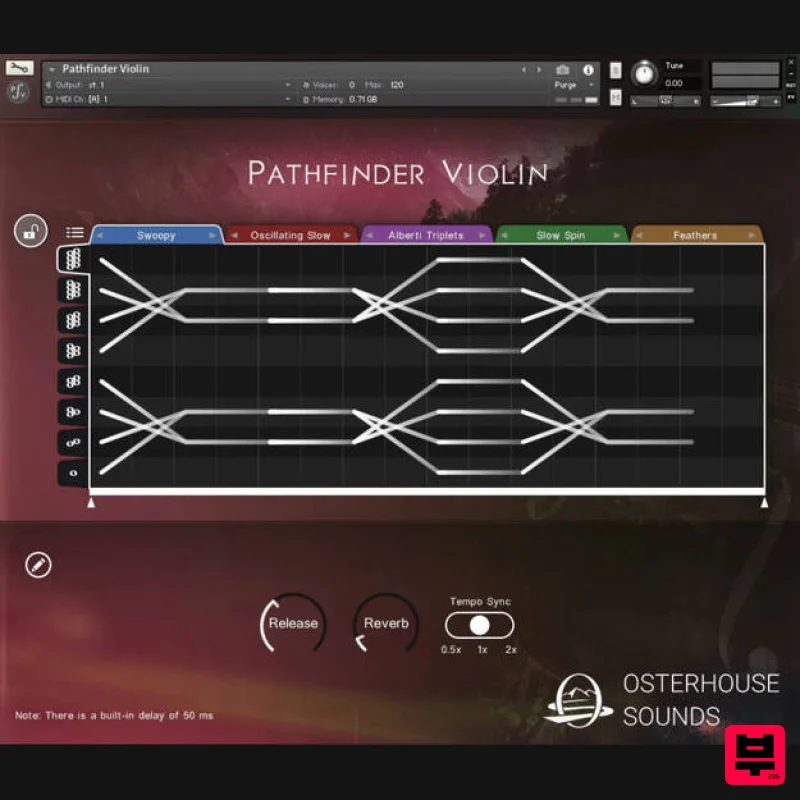
- Pathfinder Violin is a rhythmic legato library
- ideal for creating expressive phrases and ostinatos. Feed it a chord
- and it will play phrases based upon the notes of the chord. These phrases are determined by a graphic notation consisting of “paths”. Features Microphrases tempo-sync to your DAW’s bpm
- using Kontakt’s tmpro Tempo Sync multiplier provides greater control over how the samples are stretched by your project bpm. Built-in preset browser contains 227 presets Drag and drop interface allows unlimited customization of the presets Compatible with the free Kontakt Player
- with activation through Native Access. Download Kontakt Player from the Native Instruments website 2.6 GB (compressed) 9082 samples (each sample is a 2-4 second microphrase) System Requirements Kontakt Player 6.7.1 and above Windows 10/11 Mac 10.13 and above This library will take a substantial chunk of CPU and memory. It is recommended that you have at least 8GB memory. Note: This product is compatible with the FREE Native Instruments Kontakt Player 6.6.1 or later. Mac 1. Download the .dmg installer file from your Plugin Boutique account. 2. Double-click the .dmg file to install Native Access. 3. Open Native Access > Create a new Native ID if you do not have one already. If you do
- skip ahead to step 5. 4. You will then receive an email with a confirmation link > Open the email and click 'CONFIRM EMAIL'. 5. Log in to Native Access with your Native ID. 6. Click 'Add a serial' 7. Enter your Serial Number found in your Plugin Boutique account > Click 'ADD SERIAL'. 8. Click the 'Not installed' tab > Locate Pathfinder Cello > Click 'INSTALL'. 9. Pathfinder Cello is now installed on your system. 10. Open Kontakt in your DAW > You should see Pathfinder Cello on the left sidebar > Click the drop-down bar and drag the .nki file into the middle of the window. Your software is now ready to use in your DAW! Windows 1. Download the .zip installer file from your Plugin Boutique account. 2. Double-click the extracted .exe file to begin the installation process > click ‘Run’. 3. Read the welcome message > click 'Next'. 4. Click 'Next' to begin the installation. 5. Native Access has now been installed > Click 'Finish'. 6. Open Native Access > Create a new Native ID if you do not have one already. If you do
- skip ahead to step 8. 7. You will then receive an email with a confirmation link > Open the email and click 'CONFIRM EMAIL'. 8. Log in to Native Access with your Native ID. 9. Click 'Add a serial'. 10. Enter your Serial Number found in your Plugin Boutique account > Click 'ADD SERIAL'. 11. Once your serial has been registered
- click 'VIEW PRODUCTS NOT INSTALLED'. 12. Click the 'Not installed' tab > Locate Pathfinder Cello > Click 'INSTALL'. 13. Your new Kontakt Instrument is now installed on your system. 14. Open Kontakt in your DAW > You should see Pathfinder Cello on the left sidebar > Click the drop-down bar and drag the .nki file into the middle of the window. Your software is now ready to use in your DAW!
Additional Information
About the Ben Osterhouse Pathfinder Violin
Experience the quality and tone that makes the Ben Osterhouse Pathfinder Violin a popular choice for musicians.
Why Choose the Ben Osterhouse Pathfinder Violin?
- •Authentic Ben Osterhouse craftsmanship and design
- •Versatile sound suitable for multiple musical genres
- •Professional build quality and reliable performance
- •Part of Ben Osterhouse's respected Kontakt Instrument lineup
Compare & Explore
Browse our complete selection of Ben Osterhouse instruments or explore other Kontakt Instrument options. Use our comparison tools to find the perfect match for your musical style and budget.
Similar Products

Audiofier Aerkord
Kontakt Instrument

HD Instruments ZoneMatrix
Kontakt Instrument

Audiofier Sequi2r EX
Kontakt Instrument

Ecliptiq Audio Hexa Rhythm Designer
Kontakt Instrument

DoubleBang Software Plugged
Kontakt Instrument

The Beat House LE HITS THE ESSENTIALS
Kontakt Instrument

Rigid Audio Retrocade
Kontakt Instrument

Aria Sounds Hybrichord
Kontakt Instrument

