
BeatSkillz Flashback
Professional music gear - detailed information and where to buy
BeatSkillz
Flashback
Product Info
* Prices may vary. Check retailer for current pricing and availability.
Product Description
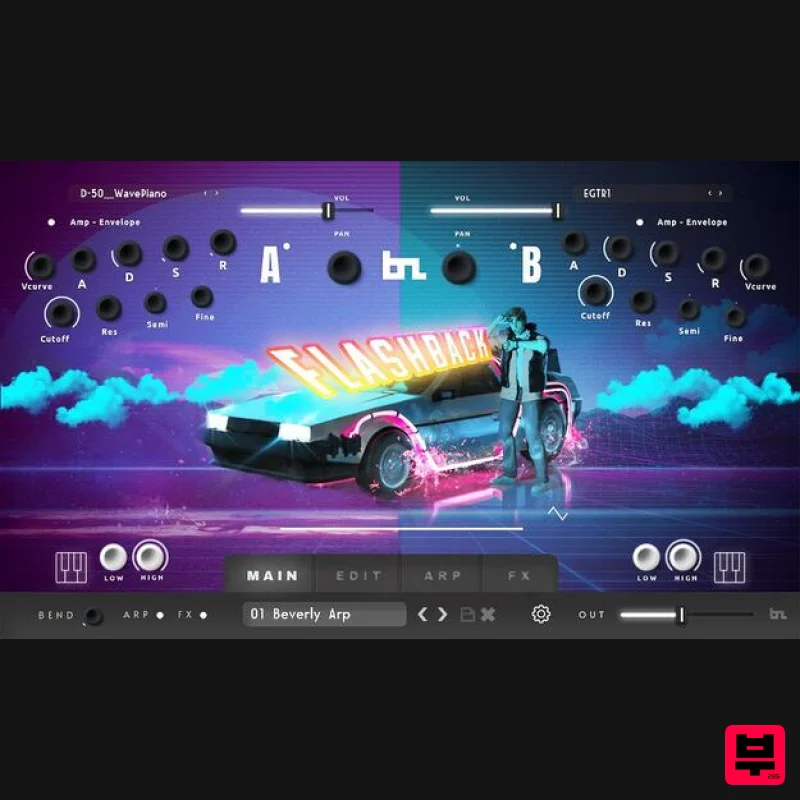
- The 80s Are Back Get the authentic & nostalgic sounds of Pop
- Film and TV from the era. Deep Sampled and created from Real Synths (Digital & Analog). Deep Sampling
- Release Groups and Lots of Synthesis in this plugin let you make “dynamic” tracks full of Color with 200 + presets & arp patterns to get you started. Get ready for Nostalgia with the authentic presets from Flashback. Inspired by the top artists and composers of the 80s. Beatskillz specializes in Retro style plugins
- This is the genre they live for. After the super success of their Retro Kz & Synthwave Kz plugins
- Beatskillz brings a new and advanced sample playback engine with deep maps
- release samples
- filters
- envelopes
- pitch effects
- and a full effects section to tweak. This is a very dynamic and expressive plugin. Features Factory Presets: Comes Bundled with 200+ Factory Presets: 18 Animated Sounds
- 53 Keys
- 22 bass
- 11 Brass
- 34 Synth
- 28 Orchestra
- 17 Pads
- 18 Bass
- 14 Misc
- and 11 Combo Sounds. Multi-Sample Maps: 23 Bass maps
- 8 Brass maps
- 38 Keys maps
- 14 Misc maps
- 24 Orchestra
- Keys maps
- 12 Pads maps
- 20 Pads maps
- and 35 Synth maps. The 2 Multisample Maps Engines A and B can be Layered or Split on the keyboard with automatic assignment via MIDI. All Controls on the plugin are MIDI mappable easily with a “right-click”. Library Relocate: Easily place the content on any internal or external drive of your computer and just use the settings icon to Locate your library once. You can move the content anywhere at any time and re-connect it with the plugin. Synthesis Features: Each Engine Features : Amp Envelope - ADSR Filter envelope - ADSR Pitch Envelope - ADSR3 LFOs for Filter
- Volume
- and Pitch respectively. All Syncable to tempo. Features Rate and Depth Controls. Analog Modelled Ladder Filter with LP
- and BP modes with 12 or 24dB / Oct selections. Filter Cutoff and Resonance controls. Pitch Transpose
- Tune. Portamento (Glide) with rate parameter. Velocity to Volume Curve adjustment & Velocity to Filter Cutoff Curve Adjustment. Arpeggiator: Up to 32-step Arpeggiator synced to tempo with Modulation in steps for : Velocity
- Note Length
- and Pitch. Save your own patterns and load factory patterns. Step Increment
- Swing
- and other features are also implemented. FX Engine: 9 Swappable Effects available: Reverb Chorus / Flanger Phaser 4-Band EQ Compressor Bit Crusher Delay Saturation Stereo Expander System Requirements Mac macOS 10.14 Mojave or later (Intel / M1 Apple Silicon supported) 64-bit only) Intel i5 or later / AMD Athlon 64 or equivalent 2 GB RAM / 300 MB HD VST3
- AAX (64-bit host) Windows Windows 10 or later (64-bit only) Intel i5 or later / AMD Athlon 64 or equivalent 2 GB RAM / 300 MB HD VST3
- AAX (64-bit host) Flashback has been tested on the following DAWs: Ableton Live 11 Bitwig Cubase Fl Studio 20 Logic 10.7.2 Pro Tools 12 Reaper Important Note: Chorust is used as an example. Installation Windows 1. Download the installation package from within your Plugin Boutique User Account and extract the contents. Launch the .exe file. 2. Click 'Install'. 3. Once installed
- click 'Finish'. Mac 1. Download the installation package from within your Plugin Boutique User Account and extract the contents. Launch the .pkg file. 2. Click 'Continue'. 3. Click 'Continue'. 4. Click 'Install'. 5. Once installation is complete
- click 'Close'. Activation 1. Open the plugin within your DAW
- and click 'Register'. Alternatively
- if you already have an account on Beatskillz or Tone Empire
- enter your existing email ID and Password
- and click 'Login'. 2. You will be taken to the BeatSkillz/Tone Empire registration page. Enter your details here in the provided boxes
- and click 'Register'. 3. Having input your information
- you will now receive a verification email to your email address. Navigate to this
- and click the 'Click Here' link inside. 4. Head back to the plugin dialogue box within your DAW
- and enter the details exactly as they were input to the BeatSkillz/Tone Empire registration page in step 2. Click 'Login'. 5. Enter the serial number from within your Plugin Boutique User Account
- and click 'Activate'. Important note: To install the content
- download and extract the content file. Click the settings (cog) icon in Flashback and select the folder containing the extracted content. 6. Your plugin is now activated and ready to use!
Additional Information
About the BeatSkillz Flashback
Discover the distinctive sound and feel of the BeatSkillz Flashback, a standout choice among Synth.
Why Choose the BeatSkillz Flashback?
- •Authentic BeatSkillz craftsmanship and design
- •Versatile sound suitable for multiple musical genres
- •Professional build quality and reliable performance
- •Part of BeatSkillz's respected Synth lineup
Compare & Explore
Browse our complete selection of BeatSkillz instruments or explore other Synth options. Use our comparison tools to find the perfect match for your musical style and budget.
Similar Products

discoDSP OPL
Synth
$30
The OPL is a digital sound synthesis chip developed by Yamaha in the mid 1980s. Among other products, it was used in...

discoDSP Discovery Pro
Synth
$30
discoDSP’s Discovery was one of the company’s first and finest efforts. Heavily inspired by Clavia’s Nord Lead...

ThaLoops Templetone
Synth
$30
The Ultimate Hip-Hop Production Plugin – Featuring a Vast Collection of Hip-Hop Sounds. Choose between wild drums,...

AngelicVibes ELITE PIANIST
Synth
$30
Your next go-to virtual instrument. Real piano recordings with unique sound and effects 50 high-quality presets for...

Reflekt Audio Xonex
Synth
$30
Xonex is a futuristic plugin that we have used time and time again to make a variety of beats. Xonex has offered me a...

Thenatan Audio Poizen VST
Synth
$30
Thenatan and Global Audio Tools have teamed up again to bring music makers across the globe a jam packed powerful tool...

discoDSP OB-Xd
Synth
$30
OB-Xd is based on the Oberheim OB-X. It attempts to recreate its sound and behavior, but as the original was very...

discoDSP Discovery
Synth
$30
Discovery is a virtual analog Nord Lead 2 inspired synthesizer featuring multi-layering, a morphing engine, high...
Frequently Asked Questions
The BeatSkillz Flashback stands out for its exceptional BeatSkillz craftsmanship and innovative design.
Yes! With its affordable price point and quality construction, it's perfect for learning synth.
Browse the similar products section to see how it stacks up against other synth.

