
Audiority XenoVerb
Professional music gear - detailed information and where to buy
Product Description
- Creative Multi-Algorithm Reverb. VST
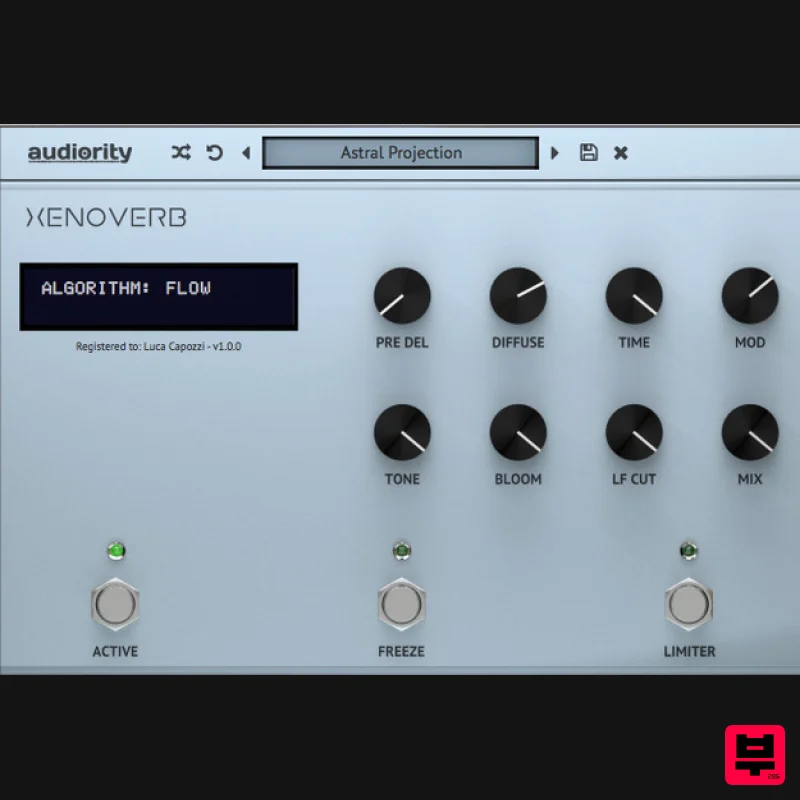
- AU and AAX. XenoVerb is a versatile reverb processor featuring both classic and creative reverb algorithms delivering a wide range of reverbs with a clean and simple interface. 13 Reverb Algorithms ROOM: A flexible room algorithm useful to create classic environments ranging from studios to large dancing clubs. ROOM B: A revision of the ROOM algorithm. HALL: A classic yet versatile hall reverb ranging from concert venues to huge canyons. The reflections and soft building tail are beautiful on pianos
- drums and vocals. LARGE HALL: A bright large hall inspired by late ‘80s Japanese studio reverbs. The tail works like a charm on drums
- vocals and synthesizers. PLATE 1: A simplified version of a classic plate algorithm found in late ‘70s hardware processors. PLATE 2: An extended version of a classic plate algorithm found in late ‘70s hardware processors. Very great on vocals
- drums and pads. PLATE XL: A huge and dense plate algorithm with a pitch shifting vibrato as modulator. Perfect for ambient synths
- pads
- guitars and vocals. SPRINGY: A fully algorithmic spring tank reverberator. Dirty
- ringing and metallic
- great on guitars and to add sparkle to synth and percussions. GLASS (FDN): A modern highly diffusive and transparent reverb. This versatile algorithm can be used on any source material and can range from ambiences to outer world spaces. FLOW: A lush
- hugely diffusive creative reverb based on the ‘90s hardware processors
- where a lot of allpass blocks were used to create dense late reverberation. The result is a lush
- soft building reverb
- great for pads
- guitars
- voices and creative sound design. SHIMMER: A reverb with a dual pitch shifter in a feedback loop creates an evolving harmonizing soundscape. That’s a classic effect pioneered by Eno
- Lanois and U2’s The Edge. BODE: A weird sound design oriented algorithm made by placing a frequency shifter in the reverb feedback loop. Useful to create metallic resonances and drones. FORMANT: A creative reverb algorithm featuring a formant filter before the reverb tank. Features 13 Reverb Algorithms: Room
- Room B
- Hall
- Large Hall
- Plate 1
- Plate 2
- Plate XL
- Springy
- Glass
- Flow
- Shimmer
- Bode
- Formant Over 250 presets Pre Delay Diffusion Modulation Tone Control Reverb Freeze / Loop Limiter PC Windows 7 64bit or later Intel i5 or higher 2GB RAM Screen resolution: 1024×768 VST2
- VST3
- AAX 64-bit only Intel Mac OSX 10.13 or later Intel i5 or higher 2GB RAM Screen resolution: 1024×768 VST2
- VST3
- AAX 64-bit only Silicon Mac macOS 11.0 or later Apple M1 or higher 2GB RAM Screen resolution: 1024×768 VST2
- VST3
- CLAP
- AU 64-bit host PT11 or higher
- AAX 64-bit host Note: LDC2 Compander is used as the example. Mac Registration 1. Visit https://www.audiority.com/register and enter your personal details > Click 'Register.' 2. Once logged in
- Click the 'Redeem' button at the top of the page and enter the redeem code
- found in your Plugin Boutique User Account > Click 'Submit'. 3. Click the 'My Plugins' button > Select the Mac Installer. 4. Locate the .dmg installer file from the 'Downloads' section of your computer
- and double-click it to begin the installation process > click ‘Continue.’ Installation 1. Open the .dmg file > Open the .pkg file to begin the installation. 2. Click 'Continue'. 3. Click 'Continue'. 4. Click 'Continue'. 5. Click 'Agree'. 6. Click 'Continue'. 7. Click 'Install'. 8. Enter your computer Username and Password > Click 'Install Software'. 9. Click 'Close'. Activation 1. Open the newly installed plugin in your DAW > Click 'Register Online'. 2. Enter your username and email address that you registered at Audiority > Click 'Login'. Your plugin is now activated and ready to use. Windows Registration 1. Visit https: //www.audiority.com/register and enter your personal details > Click 'Register.' 2. Once logged in
- Click the 'Redeem' button at the top of the page and enter the redeem code
- found in your Plugin Boutique User Account > Click 'Submit'. 3. Click the 'My Plugins' button > Select the Windows Installer. Installation 1. Double-click the installer to extract the contents > Double-click the .exe file to begin the installation. 2. Select 'I Accept the Agreement' > Click 'Next'. 3. Click 'Next'. 4. Click 'Next'. 5. Click 'Next'. 6. Click 'Install'. 7. Click 'Finish'. Activation 1. Open the newly installed plugin in your DAW > Click 'Register Online'. 2. Enter your username and email address that you registered at Audiority > Click 'Login'. Your plugin is now activated and ready to use.
Additional Information
About the Audiority XenoVerb
The Audiority XenoVerb represents excellent craftsmanship in the Reverb category.
Why Choose the Audiority XenoVerb?
- •Authentic Audiority craftsmanship and design
- •Versatile sound suitable for multiple musical genres
- •Professional build quality and reliable performance
- •Part of Audiority's respected Reverb lineup
Compare & Explore
Browse our complete selection of Audiority instruments or explore other Reverb options. Use our comparison tools to find the perfect match for your musical style and budget.
Similar Products

PSP Audioware PSP Pianoverb 2
Reverb
$30
PSP PianoVerb2 is a redesigned and improved creative resonant reverb plug-in based on our famous and beloved freeware...

PSP Audioware PSP EasyVerb
Reverb
$30
PSP EasyVerb is a reverberation effect plug-in (VST, RTAS and AAX for Windows; VST, AudioUnit, RTAS and AAX for Mac OS...

PSP Audioware PSP Nexcellence
Reverb
$30
PSP Nexcellence is a rich-sounding, spring reverb emulation inspired by and modeled after classic “necklace-type”...

XHUN Audio ShineVerb
Reverb
$30
Creative Reverb Processor ShineVerb is a creative tool specially designed for reverberation, spatialization and sound...

DDMF Envelope
Reverb
$30
Envelope is a true stereo reverb plugin featuring 8 different room simulations, all of which can be adjusted for size,...

DDMF MagicVerb
Reverb
$30
MagicVerb is the latest result of the collaboration between MagicDeathEye aka Ian Sefchick and DDMF. This journey was...

Initial Audio AR1 Reverb
Reverb
$30
Quality Algorithmic Reverb Plugin AR1 is an algorithmic reverb plugin designed to sound great on all types of...

Vegas Audio Fabricverb
Reverb
$30
Get the signature sound of the UK’s most famous nightclub on your digital audio workstation! Our new convolution...
Frequently Asked Questions
The Audiority XenoVerb stands out for its exceptional Audiority craftsmanship and innovative design.
Yes! With its affordable price point and quality construction, it's perfect for learning reverb.
Browse the similar products section to see how it stacks up against other reverb.

