
Audiority LDC2 Compander
Professional music gear - detailed information and where to buy
Audiority
LDC2 Compander
Product Info
* Prices may vary. Check retailer for current pricing and availability.
Product Description
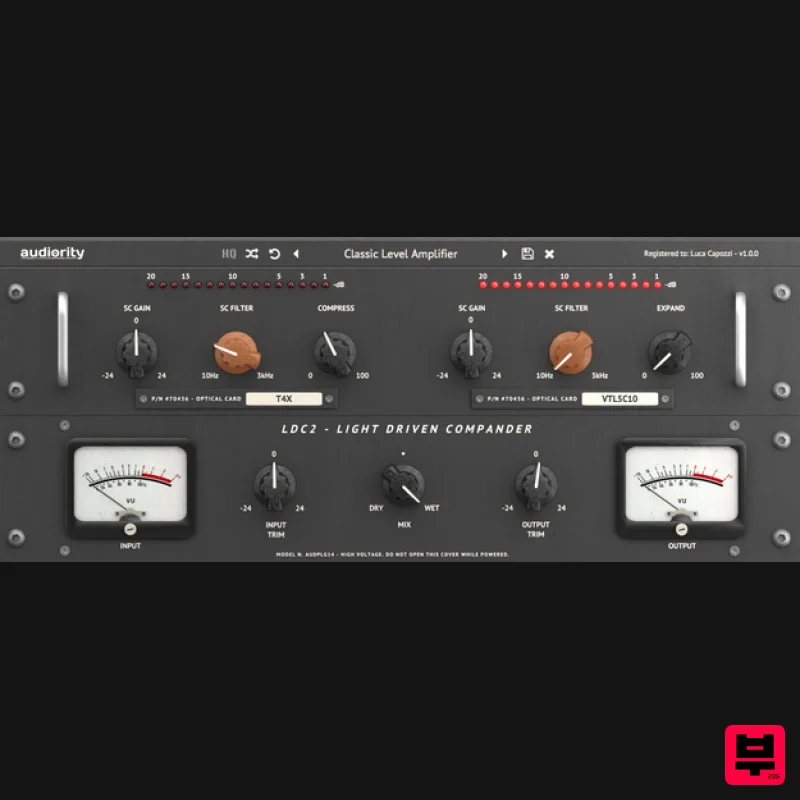
- LDC2 is an analog modelled optical compressor and expander with exchangeable optical circuits
- solid-state preamplifier and output stage
- giving you a unique compression character. LDC2 provides and warm dynamics processing for tracking
- mixing
- mastering and live performances. Features 17 real-time optical circuit models Fixed ratio (4: 1) Optical Compressor Maximum compressor gain reduction: 40dB Fixed ratio (3:1) Optical Expander Maximum expander gain reduction: 30dB Independent side-chain gain and high-pass filters Diode based preamplifier System Requirements PC Windows 7 or later (64-bit only) Intel i5 or higher 2GB RAM Screen resolution: 1024×768 VST2
- VST3 64-bit host PT 11+ AAX 64-bit host MAC (Intel) OSX 10.8 or later (64-bit only) Intel i5 or higher 2GB RAM Screen resolution: 1024×768 VST2
- VST3
- AU 64-bit host PT 11+ AAX 64-bit host MAC (Silicon) macOS 11.0 or later (64-bit only) Apple M1 or higher 2GB RAM Screen resolution: 1024×768 VST2
- VST3
- AU 64-bit host PT11 or higher
- AAX 64-bit host Important note: this software is 64-bit compatible only and will not function on 32-bit systems. Mac Registration 1. Visit https://www.audiority.com/register and enter your personal details > Click 'Register.' 2. Once logged in
- Click the 'Redeem' button at the top of the page and enter the redeem code
- found in your Plugin Boutique User Account > Click 'Submit'. 3. Click the 'My Plugins' button > Select the Mac Installer. 4. Locate the .dmg installer file from the 'Downloads' section of your computer
- and double-click it to begin the installation process > click ‘Continue.’ Installation 1. Open the .dmg file > Open the .pkg file to begin the installation. 2. Click 'Continue'. 3. Click 'Continue'. 4. Click 'Continue'. 5. Click 'Agree'. 6. Click 'Continue'. 7. Click 'Install'. 8. Enter your computer Username and Password > Click 'Install Software'. 9. Click 'Close'. Activation 1. Open the newly installed plugin in your DAW > Click 'Register Online'. 2. Enter your username and email address that you registered at Audiority > Click 'Login'. Your plugin is now activated and ready to use. Windows Registration 1. Visit https: //www.audiority.com/register and enter your personal details > Click 'Register.' 2. Once logged in
- Click the 'Redeem' button at the top of the page and enter the redeem code
- found in your Plugin Boutique User Account > Click 'Submit'. 3. Click the 'My Plugins' button > Select the Windows Installer. Installation 1. Double-click the installer to extract the contents > Double-click the .exe file to begin the installation. 2. Select 'I Accept the Agreement' > Click 'Next'. 3. Click 'Next'. 4. Click 'Next'. 5. Click 'Next'. 6. Click 'Install'. 7. Click 'Finish'. Activation 1. Open the newly installed plugin in your DAW > Click 'Register Online'. 2. Enter your username and email address that you registered at Audiority > Click 'Login'. Your plugin is now activated and ready to use.
Additional Information
About the Audiority LDC2 Compander
Experience the quality and tone that makes the Audiority LDC2 Compander a popular choice for musicians.
Why Choose the Audiority LDC2 Compander?
- •Authentic Audiority craftsmanship and design
- •Versatile sound suitable for multiple musical genres
- •Professional build quality and reliable performance
- •Part of Audiority's respected Compressor lineup
Compare & Explore
Browse our complete selection of Audiority instruments or explore other Compressor options. Use our comparison tools to find the perfect match for your musical style and budget.
Similar Products

DDMF Comprezzore
Compressor

Initial Audio IA-LA1
Compressor

PSP Audioware PSP Vintage Warmer 2
Compressor

W. A. Production BIGGIFIER
Compressor

Soundspear Supertube
Compressor

MeldaProduction MEssentialsFXBundle
Compressor

Korneff Audio Pawn Shop Comp
Compressor

DDMF LinComp
Compressor

