
Audiomodern Mechania: Soundbox Instrument
Professional music gear - detailed information and where to buy
Audiomodern
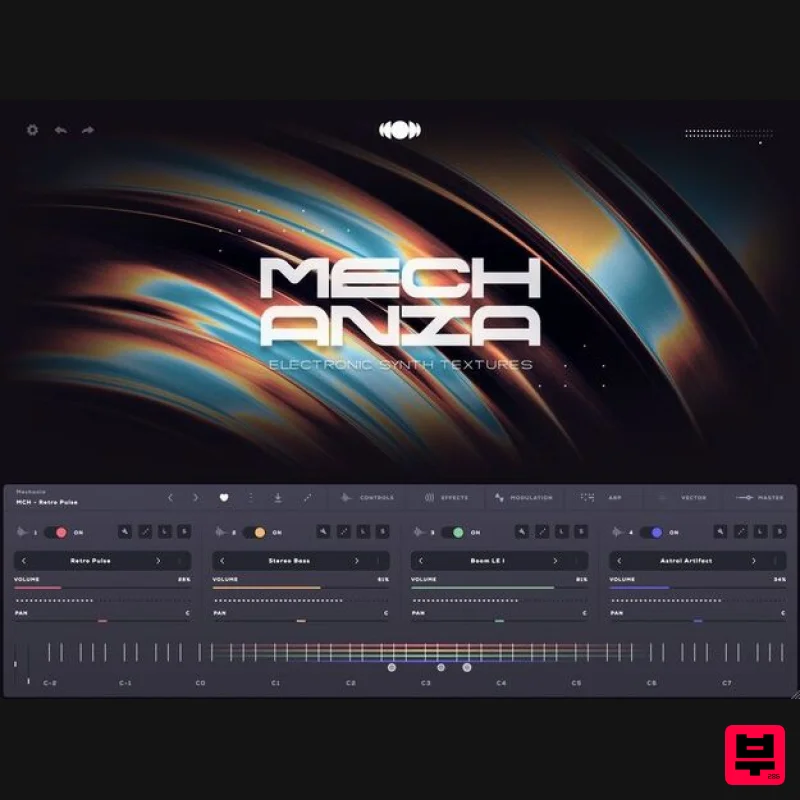
Mechania: Soundbox Instrument
Product Info
* Prices may vary. Check retailer for current pricing and availability.
Product Description
- Mechania is a virtual instrument designed for electronic music producers featuring synth textures
- Electronic FX and and bold
- dynamic leads that are perfect for genres like synthwave
- ambient
- Techno and more. With intuitive controls for real-time modulation and effects
- you can shape everything from ambient
- evolving soundscapes to punchy
- energetic leads that cut through any mix. In detail expect to find 1.01 GB of audio material and 15 fully unlocked presets using the custom Soundbox engine
- including Synth textures
- Electronic FX and and bold
- dynamic leads. <iframe allow="accelerometer; autoplay; clipboard-write; encrypted-media; gyroscope; picture-in-picture; web-share" allowfullscreen="" frameborder="0" height="315" src="https: //www.youtube.com/embed/5LOtwT9u-GQ?si=zGdM4aYgxHKtp0GY" title="YouTube video player" width="560"></iframe> About Soundbox A Powerful Virtual Instrument Platform Soundbox is a new MPE sampler
- crafted to introduce cutting-edge virtual instruments with enhanced power and capability. It comes with a plethora of features and is entirely customizable allowing you to create your own bespoke virtual instruments from scratch. A powerful combination of features make Soundbox the do-it-all sampler instrument that helps create anything you can imagine. Users can easily create their own bespoke Instruments
- with their preferred effects signal chains
- their own artwork and color combinations and share them across devices or with other users with one click export/import. No code or programming skills are needed Effortless Navigation & Advanced Mapping Editor Soundbox features flawless sound browsing
- with genre and style tags
- ensuring rapid access to your sounds categorized by their musical characteristics. It also includes a comprehensive audio and mapping editor
- equipped with multiple velocity layers
- a versatile group section
- and a host of powerful features. It’s never been easier to build custom Instruments in one device. With MPE support
- modular effects
- a Vector engine and powerful modulation engines
- Soundbox is designed to be highly extensible
- reconfigurable
- and fully customizable. Soundbox allows you to create your own custom virtual instruments with extensive customization options that you can export and share them with other Soundbox users. <iframe allow="accelerometer; autoplay; clipboard-write; encrypted-media; gyroscope; picture-in-picture; web-share" allowfullscreen="" frameborder="0" height="320" src="https: //www.youtube.com/embed/K8t2aA1BUkA?si=oMa4HS8vxVZ2eV9U" title="YouTube video player" width="600"></iframe> Soundbox comes free with any library Soundbox is designed with simplicity and transparency in mind. There are no subscriptions or hidden paywalls. You only pay for the libraries you like and want to use. This means you have complete control over your purchases
- ensuring you only invest in the content that suits your creative needs. Audiomodern's goal is to provide a straightforward and user-friendly experience
- allowing you to focus on making music without any unexpected costs. Features 1.01 GB of sounds 15 playable patches Mix 'n' Match Sound Combinations Customizable Modular FX
- Vector Engine & more FREE Feature-Rich Sampler engine System Requirements This instrument runs in the free Audiomodern Soundbox engine MacOS VST/VST3/AU/AUv3/AAX Windows VST/VST3/AAX 1. When you download an Instrument
- you will receive the Instrument file (.sbpack) 2. To run the Instrument file
- it must be imported into the Soundbox engine. You can download Soundbox directly from the official Soundbox page (https: //audiomodern.com/soundbox/) or from you Audiomodern account: https://audiomodern.com/login/ 3. Once Soundbox is installed
- open it 4. You can now proceed to import the Instrument file. Follow these steps to import Soundbox Instrument(s): https://d3jxl5cc6pcqb4.cloudfront.net/Soundbox_Packs/Audiomodern_Soundbox_Import_Pack_Guide.pdf (If you have multiple Instruments to import into Soundbox
- you only need to authorize Soundbox once with a purchased Instrument license key. Additional authorizations are not required) 5. (Optional) If you want to register your new Soundbox Instrument(s) to your Audiomodern account
- here's how: https://audiomodern.com/buying-from-third-party-resellers/
Additional Information
About the Audiomodern Mechania: Soundbox Instrument
The Audiomodern Mechania: Soundbox Instrument combines traditional design with modern performance for Virtual Instruments enthusiasts.
Why Choose the Audiomodern Mechania: Soundbox Instrument?
- •Authentic Audiomodern craftsmanship and design
- •Versatile sound suitable for multiple musical genres
- •Professional build quality and reliable performance
- •Part of Audiomodern's respected Virtual Instruments lineup
Compare & Explore
Browse our complete selection of Audiomodern instruments or explore other Virtual Instruments options. Use our comparison tools to find the perfect match for your musical style and budget.
Similar Products

Boom SWAMPS - 3D Surround
Virtual Instruments

ZAK Sound Lyra
Virtual Instruments

Safari Audio Cubby
Virtual Instruments

MNTRA Instruments Nagual
Virtual Instruments

ZAK Sound Asteroid
Virtual Instruments

Audiomodern Opacity 2: Soundbox Instrument
Virtual Instruments

MeldaProduction Electric Keys - Tines
Virtual Instruments

UJAM BEAUTYFLUTE Pro
Virtual Instruments

