
Audio Blast AcidBox V2
Professional music gear - detailed information and where to buy
Audio Blast
AcidBox V2
Product Info
* Prices may vary. Check retailer for current pricing and availability.
Product Description
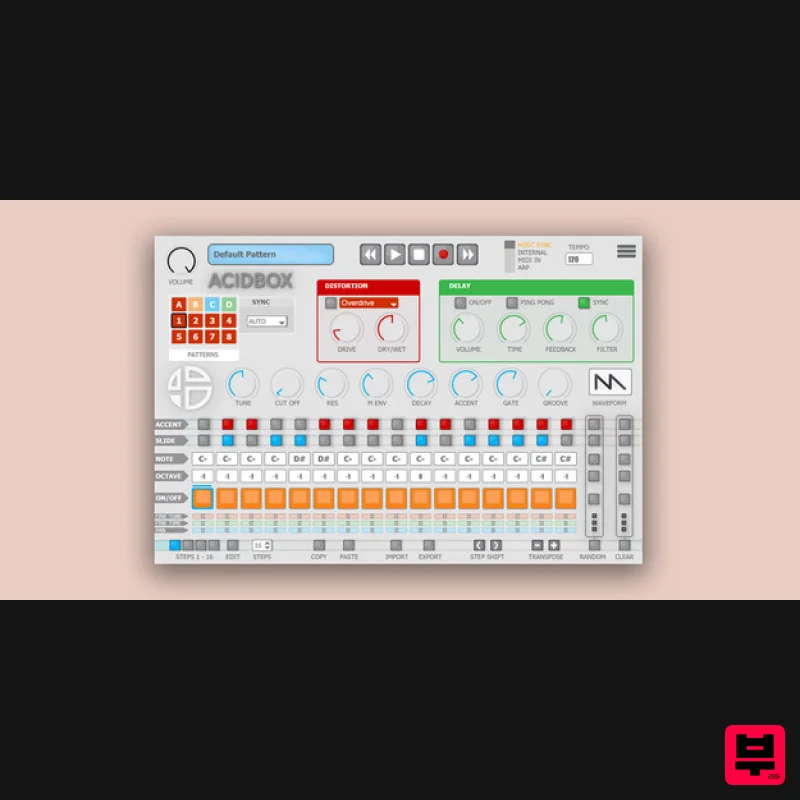
- Welcome To The AcidBox! The AcidBox V2 is a bass line synthesizer
- a recreation of the iconic 303 bass line synthesizer from the 80’s with a new interface
- which makes it easier to create real-time sequences and tweak them in a live situation. Ability to export and import your sequences
- patterns
- and banks in multiple formats. Get your live performances further with ACID BOX
- a bass line synthesizer with custom functions
- a 16 to 64 steps sequencer
- and 6 integrated effects. A simple tool for real-time creation. AcidBox is inspired by works from Techno and House artists like Daft Punk
- Aphex Twin or Laurent Garnier
- with their use of vintage 80’s synthesizers and influences stemming from the Acid House genre. This synth also pay homage to Acid precursors such as DJ Pierre
- Dr. Fernando
- Woody McBride
- Hardfloor
- Leo Anibaldi or Fast Eddie. Features 4 synchronize modes: host sync
- internal sync
- MIDI in
- Arp Up to 32 patterns 5 Distortion units 1 Delay
- with synced and ping pong mode A sequencer
- with on-the-fly MIDI in record
- to ease your sequencing System Requirements Mac MacOS 10.13+ (Apple Silicon Supported) Intel Core i5 or equivalent CPU 2GB RAM PC Windows 7+ Intel Core i5 or equivalent CPU 2GB RAM Please Note: You require an internet connection in order to install and update your products. Important note: When accessing this software via a Rent to Own plan or the Beatport Studio membership
- it's installed and run through the Beatport Access portal. An internet connection is required every 30 days to validate your license. Note: Acidbox has been used as an example. Activation 1. Go to https://www.audioblast.me/register/ > Enter your email address as well as the code found in your Plugin Boutique User Account. 2. You will now receive your Username and Serial > Make note of both of these (they will also be sent to your email address for future reference). 3. You will have received an email from Audio Blast with links to download your software > Download the relevant installer. Installation PC 1. Double-click the .exe file to begin the installation process. 2. Click 'I accept the agreement' > Click 'Next >'. 3. Select which components you wish to install > Click 'Next >'. 4. Select the location you wish to install the plugin to > Click 'Next >'. 5. Select where you would like to set up the shortcut for the standalone version > Click 'Next >. 6. Click 'Finish'. 7. Open your DAW > Locate and open Acidbox. 8. Enter the username and serial code that you received earlier > Once entered
- click anywhere to activate the plugin. Acidbox is now activated and ready for use inside your DAW! Mac 1. Double click the .pkg file to begin the installation process. 2. Click 'Continue'. 3. Click 'Continue'. 4. Click 'Agree'. 5. Click 'Continue'. 6. Click 'Close'. 7. Open your DAW > Locate and open Acidbox. 8. Enter the username and serial code that you received earlier > Once entered
- click anywhere to activate the plugin. Acidbox is now activated and ready for use inside your DAW!
Additional Information
About the Audio Blast AcidBox V2
Experience the quality and tone that makes the Audio Blast AcidBox V2 a popular choice for musicians.
Why Choose the Audio Blast AcidBox V2?
- •Authentic Audio Blast craftsmanship and design
- •Versatile sound suitable for multiple musical genres
- •Professional build quality and reliable performance
- •Part of Audio Blast's respected Synth lineup
Compare & Explore
Browse our complete selection of Audio Blast instruments or explore other Synth options. Use our comparison tools to find the perfect match for your musical style and budget.
Similar Products

Reflekt Audio Xonex
Synth
$30
Xonex is a futuristic plugin that we have used time and time again to make a variety of beats. Xonex has offered me a...

discoDSP Discovery
Synth
$30
Discovery is a virtual analog Nord Lead 2 inspired synthesizer featuring multi-layering, a morphing engine, high...

discoDSP OB-Xd
Synth
$30
OB-Xd is based on the Oberheim OB-X. It attempts to recreate its sound and behavior, but as the original was very...

discoDSP OPL
Synth
$30
The OPL is a digital sound synthesis chip developed by Yamaha in the mid 1980s. Among other products, it was used in...

ThaLoops Templetone
Synth
$30
The Ultimate Hip-Hop Production Plugin – Featuring a Vast Collection of Hip-Hop Sounds. Choose between wild drums,...

Thenatan Audio Poizen VST
Synth
$30
Thenatan and Global Audio Tools have teamed up again to bring music makers across the globe a jam packed powerful tool...

discoDSP Discovery Pro
Synth
$30
discoDSP’s Discovery was one of the company’s first and finest efforts. Heavily inspired by Clavia’s Nord Lead...

AngelicVibes ELITE PIANIST
Synth
$30
Your next go-to virtual instrument. Real piano recordings with unique sound and effects 50 high-quality presets for...
Frequently Asked Questions
The Audio Blast AcidBox V2 stands out for its exceptional Audio Blast craftsmanship and innovative design.
Yes! With its affordable price point and quality construction, it's perfect for learning synth.
Browse the similar products section to see how it stacks up against other synth.

