
Applied Acoustics Systems Strum Session
Professional music gear - detailed information and where to buy
Applied Acoustics Systems
Strum Session
Product Info
* Prices may vary. Check retailer for current pricing and availability.
Product Description
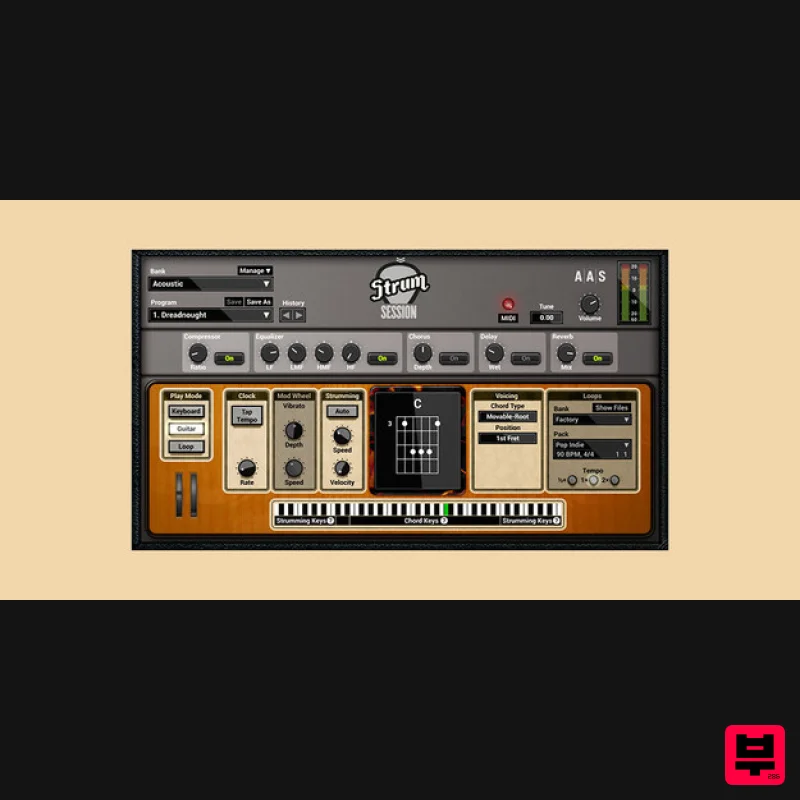
- Your New Session Guitarist Combines an acoustic and an electric guitar in the same package. With chord recognition
- chord voicing
- strumming and picking action
- MIDI riff library
- amp and effects
- playing guitar on a keyboard has never been so easy. Strum with MIDI loops Use the collection of recorded strumming patterns over the chords you play and find inspiration for your track. drag and drop the loop to your host sequencer and make it perfect for you song. The right voicings for the chords you know Strum gs-2 chord library contains basic and extended chords available in open
- movable
- or drop voicings. play the chords you know and strum voices them automatically as a guitarist would. Strum on your keyboard Trigger down and upstrokes
- scratches and mutes
- or create picking patterns using the arpeggio keys. Articulation and expression Slide and bend with the pitch wheel or aftertouch. add vibrato with the modulation wheel. natural hammer-ons and pull-offs when playing leads. The benefits of physical modeling Sound manipulation at the source core Presets load in a flash Super dynamics—no velocity layers! memory footprint—less than 256 MB of RAM per instance Installs in less than a minute—less than 61 MB on disk Presets Acoustic Dreadnought Nylon Dreadnought Dreadnought Bright Dreadnought Lite Bright Dreadnought Swooshy Dreadnought FX Dreadnought Mellow Dynamic Nylon Bright Nylon Mellow Nylon FX Nylon Dynamic Electric Shinny Electric Twangy Trem Amped Jazz Stingy Warm Crunch 1 Warm Crunch 2 Shred 1 Shred 2 Ballistic Squeeze Maxed Out 1 Maxed Out 2 Maxed Out 3 System Requirements WINDOWS · 64bit · MAC OS X · 64bit · VST · AU · RTAS · AAX NATIVE · STANDALONE AAS products are compatible with nearly all DAWs... Ableton Live Apple GarageBand Apple Logic Pro Apple Mainstage Avid Pro Tools Bitwig Studio Bandlab Cakewalk Cockos Reaper Image-Line FL Studio MOTU Digital Performer Native Instruments Komplete Kontrol Native Instruments Maschine PreSonus Studio One Propellerhead Reason Steinberg Cubase Mac minimum system requirements* macOS 10.15 or later Intel Core i5 (circa 2015)
- Apple M1 processor or later 64-bit DAW PC minimum system requirements* Windows 10 64‑bit or later Intel Core i5 (circa 2015) processor or later 64-bit DAW Note: The minimum system requirements mentioned above are for standalone usage. For plugin usage
- please refer to your DAW software requirements (Sonar
- Pro Tools
- Cubase
- Live
- Digital Performer
- Logic Pro
- etc.). Important note: When accessing this software via a Rent to Own plan or the Beatport Studio membership
- it's installed and run through the Beatport Access portal. An internet connection is required every 30 days to validate your license. Please note: Objeq Delay is used as an example as the installation process is the same for all Applied Acoustics Systems products. Registration 1. Copy and paste the URL which is listed as the ‘Serial Number’ in your account into your browser search bar and click enter. 2. Enter your email address and name (the key will have been automatically entered). 3. Choose your communication preferences > Click 'Submit'. Mac Installation 1. Download the Mac Installer. 2. Open the ZIP folder you’ve just downloaded > Double click the PKG installer file. 3. You may see this message - if so
- please click 'Open'. 4. Click 'Continue'. 5. Read the Software License Agreement > Click 'Continue'. 6. Click 'Agree'. 7. Click 'Install'. 8. Tap your fingerprint or enter your password. 9. Your software will now install. 10. Open your new software in your DAW (you may need to restart your Mac and/or rescan your plugins). Your software is now ready to use within your DAW! Windows Installation 1. Download the Windows Installer. 2. Open the ZIP file you’ve just downloaded > Double click the Setup file. 3. Click 'Yes' to allow the installation to run. 4. Close your DAW if it’s open > Click 'OK'. 5. Read the License Agreement > Click ‘I Agree’. 6. Choose the install location (we recommend leaving it as the default). 7. Your software will now install. 8. The installation is now complete > Click 'Close'. 9. Open your new software in your DAW (you may need to restart your Mac and/or rescan your plugins). Your software is now ready to use within your DAW!
Additional Information
About the Applied Acoustics Systems Strum Session
The Applied Acoustics Systems Strum Session combines traditional design with modern performance for Synth enthusiasts.
Why Choose the Applied Acoustics Systems Strum Session?
- •Authentic Applied Acoustics Systems craftsmanship and design
- •Versatile sound suitable for multiple musical genres
- •Professional build quality and reliable performance
- •Part of Applied Acoustics Systems's respected Synth lineup
Compare & Explore
Browse our complete selection of Applied Acoustics Systems instruments or explore other Synth options. Use our comparison tools to find the perfect match for your musical style and budget.
Similar Products

discoDSP Discovery
Synth

discoDSP Discovery Pro
Synth

Thenatan Audio Poizen VST
Synth

discoDSP OPL
Synth

discoDSP OB-Xd
Synth

ThaLoops Templetone
Synth

AngelicVibes ELITE PIANIST
Synth

Reflekt Audio Xonex
Synth

