
Applied Acoustics Systems Lounge Lizard Session
Professional music gear - detailed information and where to buy
Applied Acoustics Systems
Lounge Lizard Session
Product Info
* Prices may vary. Check retailer for current pricing and availability.
Product Description
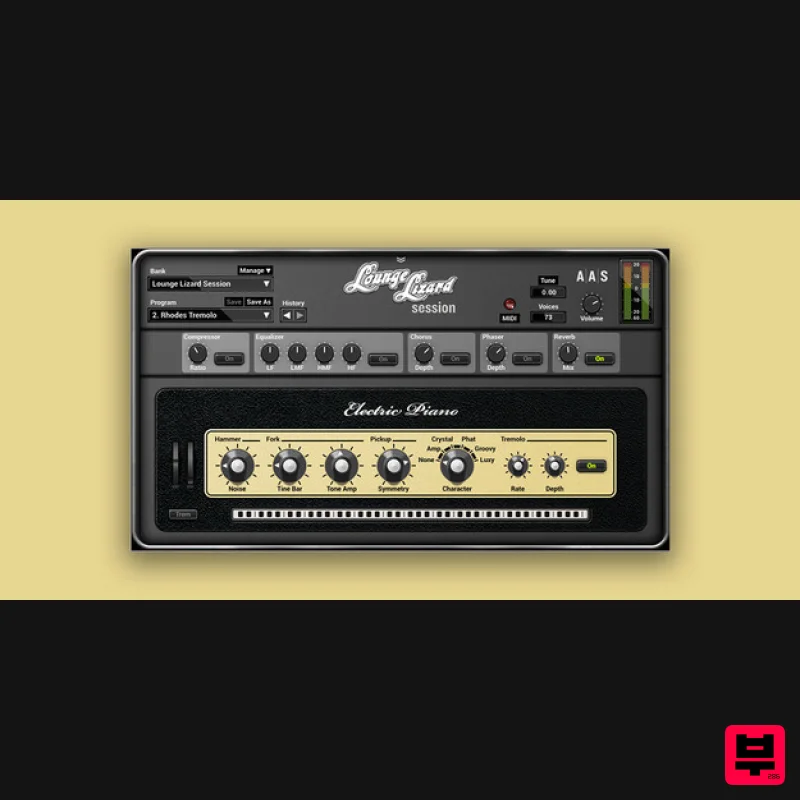
- Lounge Lizard Session delivers authentic classic electric piano tones with outstanding sound quality
- action
- and feel. Compressor and Equalizer: Craft your sound and add punch. High-end effects: Tremolo
- chorus
- phaser
- and reverb especially tuned for an electric piano. Key controls: Craft your tone with access to key synthesis parameters acting on the mallet
- pickup
- tine
- and tone bar. Character knob: Provides five classic studio and stage signal path emulations. Library: 16 classic electric piano sounds from the award-winning Lounge Lizard EP-4: Classic Tremolo Chorus Phaser Compressed Dark Dark Tremolo Dark Chorus Dark Phaser Bright Bright Tremolo Bright Chorus Bright Phaser Groovy EP Bite EP Bass Neat features Standalone operation for quick jams and experimentations Real-time control over any parameters via your MIDI controller knobs
- faders
- and switches MIDI clock
- and host tempo synchronization for effects and modulations Relaxed editing with unlimited undo/redo capability The benefits of physical modelling Sound manipulation at the source core Presets load in a flash Super dynamics—no velocity layers! memory footprint—less than 256 MB of RAM per instance Installs in less than a minute—less than 61 MB on disk System Requirements WINDOWS · 64bit · MAC OS X · 64bit · VST · AU · RTAS · AAX NATIVE · STANDALONE AAS products are compatible with nearly all DAWs... Ableton Live Apple GarageBand Apple Logic Pro Apple Mainstage Avid Pro Tools Bitwig Studio Bandlab Cakewalk Cockos Reaper Image-Line FL Studio MOTU Digital Performer Native Instruments Komplete Kontrol Native Instruments Maschine PreSonus Studio One Propellerhead Reason Steinberg Cubase Mac minimum system requirements macOS 10.15 or later Intel Core i5 (circa 2015)
- Apple M1 processor or later 64-bit DAW PC minimum system requirements Windows 10 64‑bit or later Intel Core i5 (circa 2015) processor or later 64-bit DAW Importat Notes: The minimum system requirements mentioned above are for standalone usage. For plugin usage
- please refer to your DAW software requirements (Sonar
- Pro Tools
- Cubase
- Live
- Digital Performer
- Logic Pro
- etc.). The sounds shown in the first video are from Lounge Lizard EP-4 and are NOT included with this product. When accessing this software via a Rent to Own plan or the Beatport Studio membership
- it's installed and run through the Beatport Access portal. An internet connection is required every 30 days to validate your license. Please note: Objeq Delay is used as an example as the installation process is the same for all Applied Acoustics Systems products. Registration 1. Copy and paste the URL which is listed as the ‘Serial Number’ in your account into your browser search bar and click enter. 2. Enter your email address and name (the key will have been automatically entered). 3. Choose your communication preferences > Click 'Submit'. Mac Installation 1. Download the Mac Installer. 2. Open the ZIP folder you’ve just downloaded > Double click the PKG installer file. 3. You may see this message - if so
- please click 'Open'. 4. Click 'Continue'. 5. Read the Software License Agreement > Click 'Continue'. 6. Click 'Agree'. 7. Click 'Install'. 8. Tap your fingerprint or enter your password. 9. Your software will now install. 10. Open your new software in your DAW (you may need to restart your Mac and/or rescan your plugins). Your software is now ready to use within your DAW! Windows Installation 1. Download the Windows Installer. 2. Open the ZIP file you’ve just downloaded > Double click the Setup file. 3. Click 'Yes' to allow the installation to run. 4. Close your DAW if it’s open > Click 'OK'. 5. Read the License Agreement > Click ‘I Agree’. 6. Choose the install location (we recommend leaving it as the default). 7. Your software will now install. 8. The installation is now complete > Click 'Close'. 9. Open your new software in your DAW (you may need to restart your Mac and/or rescan your plugins). Your software is now ready to use within your DAW!
Additional Information
About the Applied Acoustics Systems Lounge Lizard Session
Experience the quality and tone that makes the Applied Acoustics Systems Lounge Lizard Session a popular choice for musicians.
Why Choose the Applied Acoustics Systems Lounge Lizard Session?
- •Authentic Applied Acoustics Systems craftsmanship and design
- •Versatile sound suitable for multiple musical genres
- •Professional build quality and reliable performance
- •Part of Applied Acoustics Systems's respected Synth lineup
Compare & Explore
Browse our complete selection of Applied Acoustics Systems instruments or explore other Synth options. Use our comparison tools to find the perfect match for your musical style and budget.
Similar Products

Thenatan Audio Poizen VST
Synth

AngelicVibes ELITE PIANIST
Synth

discoDSP OPL
Synth

discoDSP Discovery Pro
Synth

ThaLoops Templetone
Synth

discoDSP Discovery
Synth

Reflekt Audio Xonex
Synth

discoDSP OB-Xd
Synth

