
Ample Sound Ample Slide Lapsteel
Professional music gear - detailed information and where to buy
Ample Sound
Ample Slide Lapsteel
Product Info
* Prices may vary. Check retailer for current pricing and availability.
Product Description
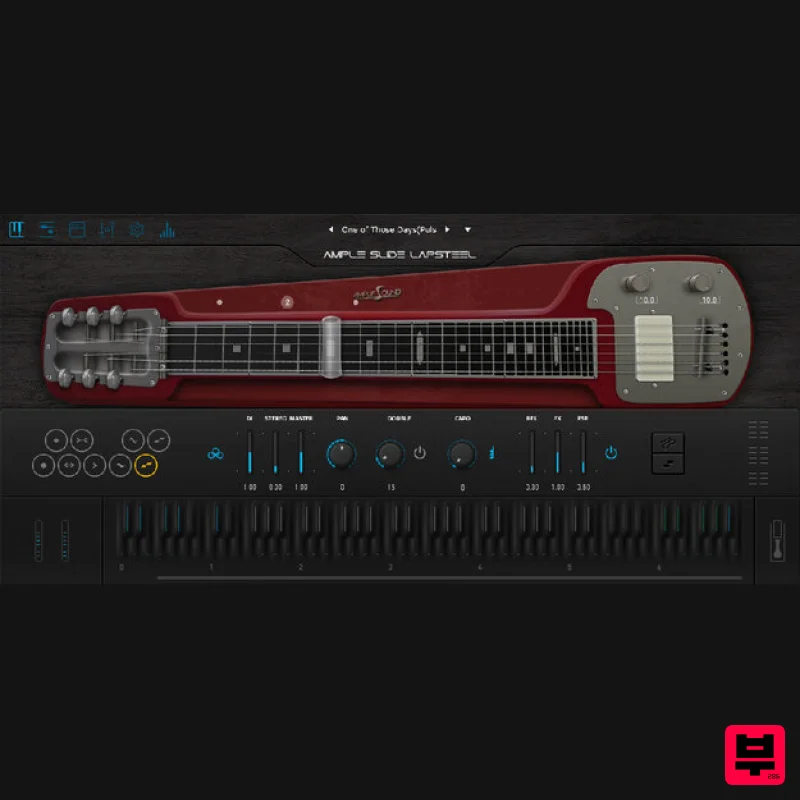
- Ample Slide Lapsteel captures the expressive
- singing tone of a 70s Jedson Lap Steel—famously used by David Gilmour—and delivers it with unparalleled realism in a powerful virtual instrument. Designed specifically for slide performance
- it features a unique legato slide system that merges real samples with algorithmic nuance
- enabling fluid
- pitch-accurate slides of any length and complexity. With 9 detailed articulations
- mono/stereo modes
- advanced MIDI editing
- and a full amp and FX suite
- this lap steel plugin is perfect for cinematic scoring
- ambient textures
- blues
- and classic rock alike. Features Sampled from a 70s Jedson Lap Steel (David Gilmour Custom Model) 9 articulations including Legato Slide
- Glissando
- Quarter Slide
- and Harmonics Unique polyphonic legato slide engine with nuanced tone variation Stereo and mono playing modes Riffer with Legato Position control and deep MIDI editing tools String Roll Editor with 8-note attributes for expressive programming Built-in amp sim with 6 amp models
- 7 cabs
- and 8 mic choices Full FX suite: 8-band EQ
- compressor
- 6-tap echo
- and IR reverb with 3D visualization 2.8 GB of detailed samples with authentic character and noise System Requirements Windows: Windows 7/8/10/11
- 64-bit only. Mac: 10.9 or higher VST2
- VST3
- AAX and Standalone host. 10 GB Hard Disk
- Intel i5 or higher. Activation 1. Head to www.amplesound.net/en/purchase-exchange.asp. 2. Log in via the link provided beneath the form if you are an existing Ample Sound user. Alternatively
- enter your Redeem Code (listed as 'Serial Number') from within your Plugin Boutique User Account
- and complete the Captcha as necessary. Click 'Redeem'. 3. Complete the form using your details
- and click 'Confirm'. 4. Check your inbox for an email titled 'Ample Sound Software' (note: this may have appeared in your Spam folder)
- and open it. Installation Important Note: Both the instrument and its corresponding sample library must be installed in order for your Ample Sound plugin to work. 1. Download the installation files for your system from within the email from Ample Sound
- unzip its contents
- and open the instrument installation file (the file which does not include 'Library' in its name). 2. Follow the installation prompts to complete installation on your system. 3. Once the instrument has completed installation
- open the corresponsing library installation file (this will include 'Library' in its name). 4. Follow the installation prompts to complete installation on your system (note: Library installation destination must not contain non-English characters or other invalid characters such as “*&^%$#@”) 5. Open your new plugin within your DAW
- and enjoy!
Additional Information
About the Ample Sound Ample Slide Lapsteel
Discover the distinctive sound and feel of the Ample Sound Ample Slide Lapsteel, a standout choice among Virtual Instruments.
Why Choose the Ample Sound Ample Slide Lapsteel?
- •Authentic Ample Sound craftsmanship and design
- •Versatile sound suitable for multiple musical genres
- •Professional build quality and reliable performance
- •Part of Ample Sound's respected Virtual Instruments lineup
Compare & Explore
Browse our complete selection of Ample Sound instruments or explore other Virtual Instruments options. Use our comparison tools to find the perfect match for your musical style and budget.
Similar Products

ZAK Sound Lyra
Virtual Instruments

MeldaProduction Electric Keys - Tines
Virtual Instruments

Audiomodern Opacity 2: Soundbox Instrument
Virtual Instruments

Boom SWAMPS - 3D Surround
Virtual Instruments

MNTRA Instruments Nagual
Virtual Instruments

ZAK Sound Asteroid
Virtual Instruments

Safari Audio Cubby
Virtual Instruments

UJAM BEAUTYFLUTE Pro
Virtual Instruments

