
AIR Music Technology Organ
Professional music gear - detailed information and where to buy
AIR Music Technology
Organ
Product Info
* Prices may vary. Check retailer for current pricing and availability.
Product Description
- Classic Organic Tone and Color with Authentic Controls Classic Organ Sounds with Hands-On Control polished
- vibrant—that’s what you’ll hear from the new Organ! Whether you’re playing jazz
- gospel
- rock
- or hip-hop
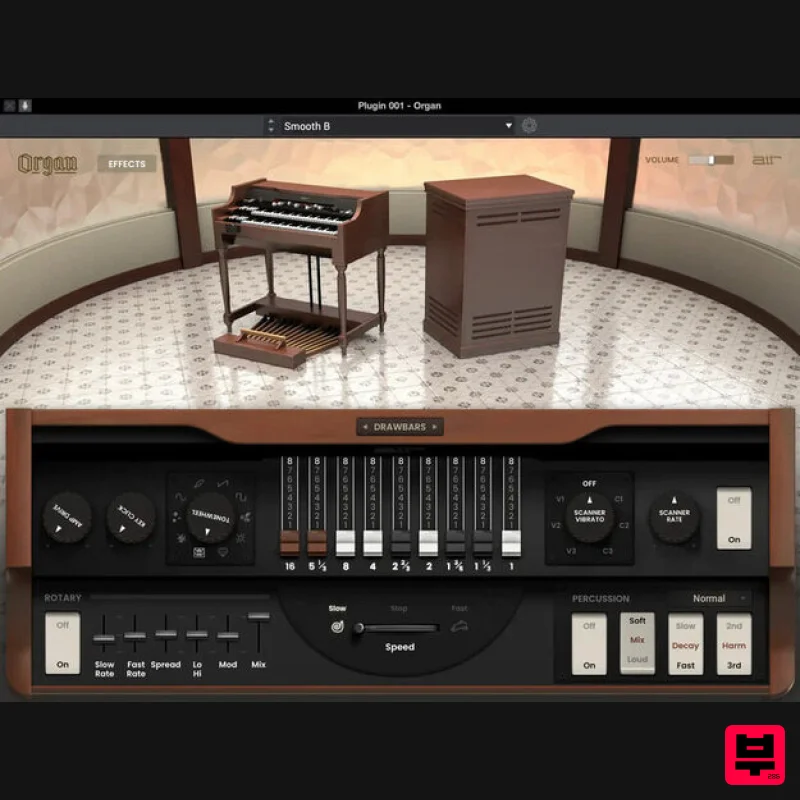
- the Organ plugin adds the perfect warmth and tone to your tracks. With nine drawbars
- ten incredible tonewheel sets
- and built-in effects like scanner vibrato
- rotary speaker simulators
- and drive settings
- the Organ plugin will have you making brilliant music in minutes. Sculpt the Perfect Organ Tone The AIR Organ instrument brings you a rich
- expressive experience built inside a stunning user interface. Adjust Amp Drive
- Key Clicks
- and choose from 10 tone-wheel settings to dial in your favorite organ sounds. 9 Drawbars for Authentic Tones Classic organs are the original “Additive Synthesis”—by using the drawbars
- you can add various harmonics to your tone to expand it and give it more fullness and color. Stylize Your Organ Sound with Built-in Effects Organ includes multiple effects like rich reverbs
- delays
- and EQ. Create deep and warm organ patches with tons of life and realism by using the built-in effects included with the instrument. Delay effects allow you to adjust time
- ratio
- feedback
- and resonance filtering. Reverb models include Soft
- Bright
- Studio
- Chamber
- Hall
- and Ambient
- all with feedback and mix controls. The Ultimate Rotary Emulation The swirling speaker effects of Organ come from AIR Music Technology’s award-winning rotary emulation engine
- allowing you to dial in an authentic organ sound. Adjust slow and fast rate
- stereo spread
- hi/lo tone
- modulation
- and the overall wet/dry mix. You can then adjust the speed of the rotary to get that modulated organ sound! Unlock these sounds in Akai MPC/FORCE for FREE Purchase this plugin and you’ll get the ability to unlock it within your Akai Professional MPC / FORCE Standalone hardware as well as using within your favorite DAW. Seamlessly move productions from standalone hardware to your DAW with the same great sounds. Features Ten tonewheel sets including Real
- Dirty
- Clean
- Rich
- Bright
- Buzz
- Square
- Soft
- and Sine Nine traditional organ drawbars for sculpting tone Add scanner vibrato and Leslie rotary speaker emulation for a classic organ sound Built-in effects including EQ
- delay
- and reverb Purchase unlocks plug-in on three devices including PC
- MAC (VST
- AAX) and Standalone (MPC & FORCE) System Requirements Mac macOS 12
- 15 (Intel & Apple Silicon) 2GB free disk space (20GB for all content) 4GB RAM (8GB recommended) Dual-core 2.5GHz CPU VST 2/3 Plugin compatible host AAX plugin compatible host AU plugin compatible host Windows Windows 10 - Windows 11 2GB free disk space (20GB for all content recommended) 4GB RAM (8GB recommended) Dual-core 2.5GHz CPU VST 2/3 compatible host AAX plugin compatible host Important notes: An internet connection is required to authorise this software. Mac Installation 1. Click the 'DOWNLOAD' button in your Plugin Boutique account. 2. Open the .pkg file > click 'Continue' to begin the installation process. 3. Select your installation destination > click 'Continue'. 4. Choose your preferred installation location > click 'Install'. 5. Click 'Close' to complete the installation process. Activation 1. Open your DAW
- launch Hype > click 'SIGN IN'. 2. Click 'CREATE ACCOUNT' (If you already have an account
- enter your details > click 'SIGN IN' and skip to Step 6.) 3. Enter your personal details > click 'NEXT STEP'. 4. Select the brands you are interested in > click 'I agree' > click 'CREATE Account'. 5. Please close the browser window and check the link sent to your email to confirm your account. 6. Re-open Hype within your DAW > click 'ACTIVATE'. 7. Enter the serial number found in your Plugin Boutique account > click 'ACTIVATE'. 8. Click 'CONTINUE' to close the activation window. Your software is now activated and ready to use! Windows Installation 1. Click the 'DOWNLOAD' button in your Plugin Boutique account. 2. Extract the .zip file and open the .exe file to begin the installation process. 3. Select which plugin components you would like to install > click 'Next'. 4. Choose whether you would like to 'Create a desktop shortcut' > click 'Next'. 5. Click 'Install' to close the installation window. Activation 1. Open your DAW
- launch Hype > click 'SIGN IN'. 2. Click 'CREATE ACCOUNT' (If you already have an account
- enter your details > click 'SIGN IN' and skip to Step 6.) 3. Enter your personal details > click 'NEXT STEP'. 4. Select the brands you are interested in > click 'I agree' > click 'CREATE Account'. 5. Please close the browser window and check the link sent to your email to confirm your account. 6. Re-open Hype within your DAW > click 'ACTIVATE'. 7. Enter the serial number found in your Plugin Boutique account > click 'ACTIVATE'. 8. Click 'CONTINUE' to close the activation window. Your software is now activated and ready to use!
Additional Information
About the AIR Music Technology Organ
The AIR Music Technology Organ represents excellent craftsmanship in the Virtual Instruments category.
Why Choose the AIR Music Technology Organ?
- •Authentic AIR Music Technology craftsmanship and design
- •Versatile sound suitable for multiple musical genres
- •Professional build quality and reliable performance
- •Part of AIR Music Technology's respected Virtual Instruments lineup
Compare & Explore
Browse our complete selection of AIR Music Technology instruments or explore other Virtual Instruments options. Use our comparison tools to find the perfect match for your musical style and budget.
Similar Products

UJAM BEAUTYFLUTE Pro
Virtual Instruments

MNTRA Instruments Nagual
Virtual Instruments

MeldaProduction Electric Keys - Tines
Virtual Instruments

Safari Audio Cubby
Virtual Instruments

Boom SWAMPS - 3D Surround
Virtual Instruments

ZAK Sound Lyra
Virtual Instruments

Audiomodern Opacity 2: Soundbox Instrument
Virtual Instruments

ZAK Sound Asteroid
Virtual Instruments

