
AIR Music Technology Drum Synth
Professional music gear - detailed information and where to buy
AIR Music Technology
Drum Synth
Product Info
* Prices may vary. Check retailer for current pricing and availability.
Product Description
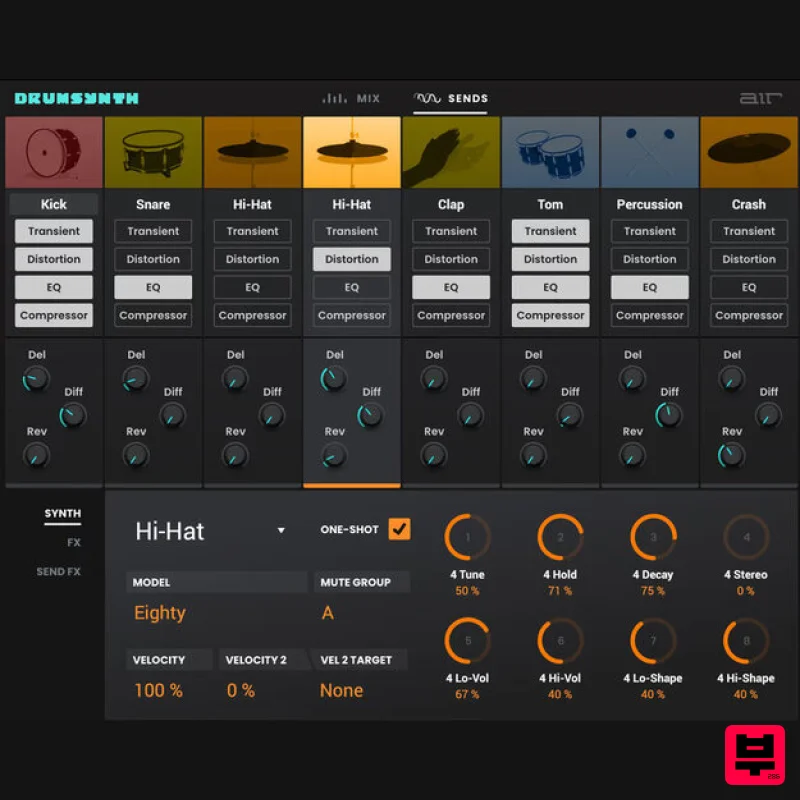
- DrumSynth is a revolutionary synthesizer drum machine plugin instrument for powerful drum sound design. Enjoy the power to create and sculpt amazing drum sounds from the ground up
- run them through a multitude of sound-shaping and audio effects processors then save to your collection of custom user presets
- empowering you to quickly build your personal collection of customized percussive textures. Cutting-Edge Sound Generation At the heart of the DrumSynth drum designer is its advanced multi-synth sound generator. This next-level architecture combines FM synthesis
- analog modeling synthesis and physical modeling synthesis algorithms to power 8 individual sound engines; Kick
- Snare
- Clap
- Hi-Hat
- Percussion
- Crash and Ride. The result is a versatile arsenal of adaptable sonic tools ready for any creative sound application you can think of. Simply create the sounds you want to hear. Get Creative With Advanced Processing Take your sonic ingenuity a step further with unparalleled sound manipulation and processing. DrumSynth includes a wide collection of audio effects including a transient shaper
- tuning
- compression
- reverb and delay. Store your unique creations for easy recall to the onboard user preset slots. Features Build and design any synthesized drum sound 52 inspiring preset kits from classics to new creations Powerful sound generators driven by completely new FM synthesis
- analog and physical modeling
- and sample-based algorithms 8 Individual Engines: Kick
- Snare
- Clap
- Percussion
- Crash
- Hi-Hat
- and Ride Sound-shaping FX including transient shaper
- tuning
- compression
- delay
- reverb and more Dedicated mixer with independent controls Classic ‘one-shot’ feature System Requirements Mac macOS 12
- 15 (Intel & Apple Silicon) 2GB free disk space (20GB for all content) 4GB RAM (8GB recommended) Dual-core 2.5GHz CPU VST 2/3 Plugin compatible host AAX plugin compatible host AU plugin compatible host Windows Windows 10 - Windows 11 2GB free disk space (20GB for all content recommended) 4GB RAM (8GB recommended) Dual-core 2.5GHz CPU VST 2/3 compatible host AAX plugin compatible host Important notes: An internet connection is required to authorise this software. Mac Installation 1. Click the 'DOWNLOAD' button in your Plugin Boutique account. 2. Open the .pkg file > click 'Continue' to begin the installation process. 3. Select your installation destination > click 'Continue'. 4. Choose your preferred installation location > click 'Install'. 5. Click 'Close' to complete the installation process. Activation 1. Open your DAW
- launch Hype > click 'SIGN IN'. 2. Click 'CREATE ACCOUNT' (If you already have an account
- enter your details > click 'SIGN IN' and skip to Step 6.) 3. Enter your personal details > click 'NEXT STEP'. 4. Select the brands you are interested in > click 'I agree' > click 'CREATE Account'. 5. Please close the browser window and check the link sent to your email to confirm your account. 6. Re-open Hype within your DAW > click 'ACTIVATE'. 7. Enter the serial number found in your Plugin Boutique account > click 'ACTIVATE'. 8. Click 'CONTINUE' to close the activation window. Your software is now activated and ready to use! Windows Installation 1. Click the 'DOWNLOAD' button in your Plugin Boutique account. 2. Extract the .zip file and open the .exe file to begin the installation process. 3. Select which plugin components you would like to install > click 'Next'. 4. Choose whether you would like to 'Create a desktop shortcut' > click 'Next'. 5. Click 'Install' to close the installation window. Activation 1. Open your DAW
- launch Hype > click 'SIGN IN'. 2. Click 'CREATE ACCOUNT' (If you already have an account
- enter your details > click 'SIGN IN' and skip to Step 6.) 3. Enter your personal details > click 'NEXT STEP'. 4. Select the brands you are interested in > click 'I agree' > click 'CREATE Account'. 5. Please close the browser window and check the link sent to your email to confirm your account. 6. Re-open Hype within your DAW > click 'ACTIVATE'. 7. Enter the serial number found in your Plugin Boutique account > click 'ACTIVATE'. 8. Click 'CONTINUE' to close the activation window. Your software is now activated and ready to use!
Additional Information
About the AIR Music Technology Drum Synth
The AIR Music Technology Drum Synth combines traditional design with modern performance for Virtual Instruments enthusiasts.
Why Choose the AIR Music Technology Drum Synth?
- •Authentic AIR Music Technology craftsmanship and design
- •Versatile sound suitable for multiple musical genres
- •Professional build quality and reliable performance
- •Part of AIR Music Technology's respected Virtual Instruments lineup
Compare & Explore
Browse our complete selection of AIR Music Technology instruments or explore other Virtual Instruments options. Use our comparison tools to find the perfect match for your musical style and budget.
Similar Products

Safari Audio Cubby
Virtual Instruments

Audiomodern Opacity 2: Soundbox Instrument
Virtual Instruments

Boom SWAMPS - 3D Surround
Virtual Instruments

MNTRA Instruments Nagual
Virtual Instruments

ZAK Sound Lyra
Virtual Instruments

UJAM BEAUTYFLUTE Pro
Virtual Instruments

MeldaProduction Electric Keys - Tines
Virtual Instruments

ZAK Sound Asteroid
Virtual Instruments

