
2Rule 2RuleSynth V3
Professional music gear - detailed information and where to buy
Product Description
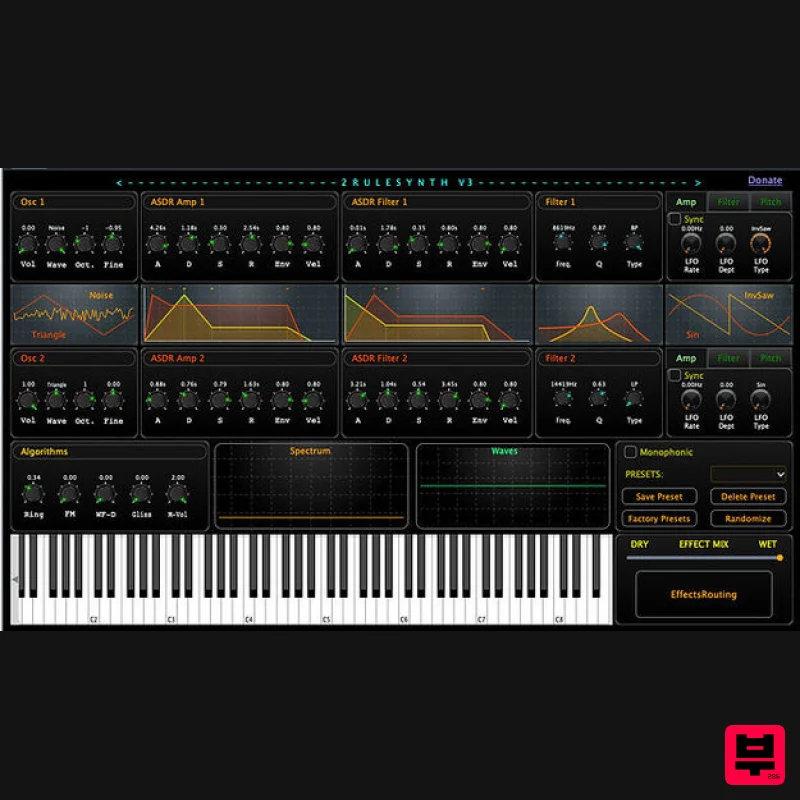
- 2RuleSynth is a software synthesizer developed using classic synthesis techniques – subtractive
- FM and Ring simultaneously. It has LFOs and ADSR for every two independent oscillators. It has its own characteristic soundscape that can go as far as concrete music. Besides the familiar classical analog sounds
- experimental sounds can be found using the randomize button. V3 Updates New effect layers added as a separate window. Each effect can be connected to any other effects: Reverb. Delay. Chorus. Phaser. Decimator. Distortion. PitchShifter. CombFilter. Vibrato. Tremolo. GUI refinemets. Features 2 Independent Oscillators Waveforms: Sine
- Triangle
- Square
- White Noise. Controls: Waveform
- Mode
- Fine-Tune
- Octave. Each Oscillators has its own filter
- amp and filter ADSR and LFOs ADSR Controls: Depth
- Attack
- Decay
- Sustain
- Release. LFOs for amp
- filter and pitch syncable to tempo Ring algorithm Osc1 x Osc2 FM modulator Oscillator 1 modulates Oscillator 2. Self resonance Moog type filter Low Pass
- High Pass
- Band Pass for each oscillator Mono/Polyphonic control. Spectrum and Wave Windows Reverb Delay syncable to tempo Chorus Waveshape distortion 8 note polyphonic operation. Preset randomize button 49 factory presets (some suitable for Musique concrète) System Requirements macOS 10.15 or higher Windows 10 or higher 64-bit only Available Formats: VST3 & AU Note: 2Rule TuGlicento is used as an example. Windows 1. Download the .zip file from within your Plugin Boutique User Account > Double-click it to extract the contents. 2. Select 'TuGlicento.vst3' and 'TuGlicentoPresets.json' > copy the necessary files. 4. Navigate to the file path C:\Program Files\Vstplugins > Paste the files into this folder. Your software is now installed and ready to use within your DAW. Mac 1. Download the .zip file from within your Plugin Boutique User Account > Double-click it to extract the contents. 2. Navigate to the contained AU and VST3 components > copy the necessary files. 3. Navigate to the file path Macintosh HD:/Library/Audio/Plug-Ins/Components/ > Paste the component in this folder. 4. Navigate to the file path Macintosh HD:/Library/Audio/Plug-Ins/VST 3 > Paste the .vst3 file in this folder. Your software is now installed and ready to use within your DAW. Additional Information for Mac Users In the case that your system/DAW prevents TuGlicento 2 from opening upon installation
- please complete the following steps. 1. Open the Apple menu
- and click System Preferences. 2. Click Security & Privacy. 3. Click the General tab. 4. Click the lock in the bottom corner of the window. 5. Enter your username and password when prompted
- and click Unlock. 6. Click the App Store and Identified Developers radial button. 7. Look for “(App Name) was blocked from opening because it is not from an identified developer” and click Open Anyway. (In older versions of macOS
- you could click Anywhere and then click Allow From Anywhere.) 8. Re-load your DAW.
Additional Information
About the 2Rule 2RuleSynth V3
Discover the distinctive sound and feel of the 2Rule 2RuleSynth V3, a standout choice among Synth.
Why Choose the 2Rule 2RuleSynth V3?
- •Authentic 2Rule craftsmanship and design
- •Versatile sound suitable for multiple musical genres
- •Professional build quality and reliable performance
- •Part of 2Rule's respected Synth lineup
Compare & Explore
Browse our complete selection of 2Rule instruments or explore other Synth options. Use our comparison tools to find the perfect match for your musical style and budget.
Similar Products

AngelicVibes ELITE PIANIST
Synth
$30
Your next go-to virtual instrument. Real piano recordings with unique sound and effects 50 high-quality presets for...

Reflekt Audio Xonex
Synth
$30
Xonex is a futuristic plugin that we have used time and time again to make a variety of beats. Xonex has offered me a...

discoDSP Discovery
Synth
$30
Discovery is a virtual analog Nord Lead 2 inspired synthesizer featuring multi-layering, a morphing engine, high...

Thenatan Audio Poizen VST
Synth
$30
Thenatan and Global Audio Tools have teamed up again to bring music makers across the globe a jam packed powerful tool...

discoDSP OB-Xd
Synth
$30
OB-Xd is based on the Oberheim OB-X. It attempts to recreate its sound and behavior, but as the original was very...

ThaLoops Templetone
Synth
$30
The Ultimate Hip-Hop Production Plugin – Featuring a Vast Collection of Hip-Hop Sounds. Choose between wild drums,...

discoDSP OPL
Synth
$30
The OPL is a digital sound synthesis chip developed by Yamaha in the mid 1980s. Among other products, it was used in...

discoDSP Discovery Pro
Synth
$30
discoDSP’s Discovery was one of the company’s first and finest efforts. Heavily inspired by Clavia’s Nord Lead...
Frequently Asked Questions
The 2Rule 2RuleSynth V3 stands out for its exceptional 2Rule craftsmanship and innovative design.
It's designed for intermediate to advanced players who appreciate professional-quality synth.
Browse the similar products section to see how it stacks up against other synth.

