
Behringer X-TOUCH ONE vs SSL UF1
Detailed comparison to help you choose the right DAW Controllers for your music.
Last updated: May 20, 2026 • Next update: May 27, 2026
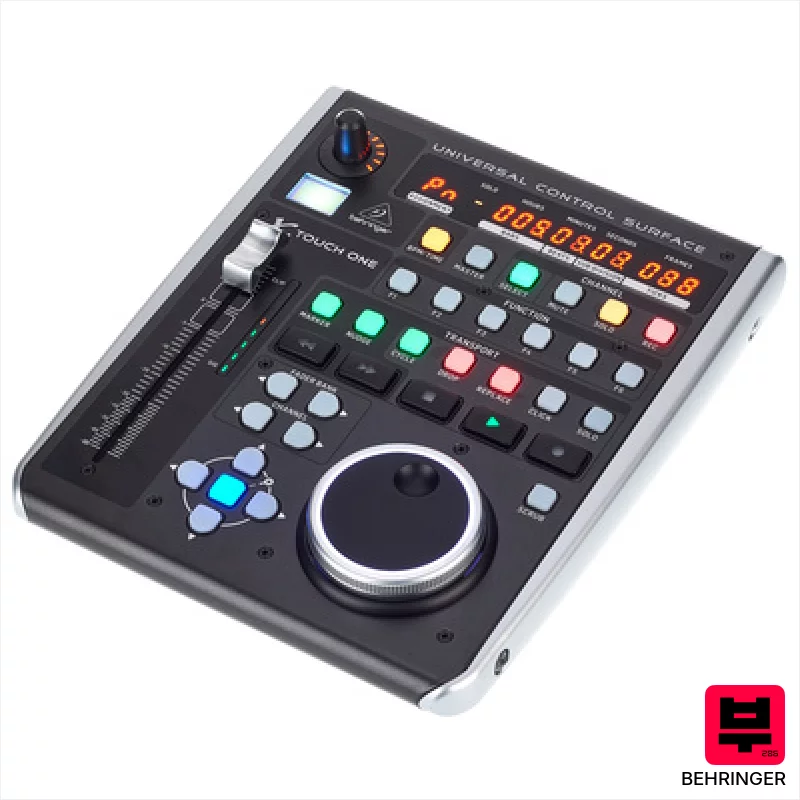
Behringer X-TOUCH ONE
⭐
4.8/5
Expert Rating
Sound:
8/10
Build:
7/10
Value:
8/10
The X-Touch One is a clever little controller, especially for those on a tight budget who need basic, recallable fader control. It's a great entry point for anyone looking to get tactile control over their DAW without a huge investment, but don’t expect premium materials or a ton of advanced features.
$142

SSL UF1
⭐
4.5/5
Expert Rating
Sound:
9/10
Build:
10/10
Value:
8/10
The SSL UF1 is a seriously well-made, compact controller that brings a slice of SSL’s workflow to your DAW. It's fantastic for producers and engineers wanting tactile control and SSL's metering, especially if space is at a premium – it's a great stepping stone into a more analog-style mixing experience.
$669
Detailed Comparison
| Feature | Behringer X-TOUCH ONE | SSL UF1 |
|---|---|---|
| Brand | Behringer | SSL |
| Model | X-TOUCH ONE | UF1 |
| Price | $141 | $668 |
| Expert Rating | ⭐ 4.8/5 | ⭐ 4.5/5 |
| Faders | 1 x 100 mm motorized | 1 motorized 100mm |
| Knobs | 1 assignable rotary potentiometer | 4 with push function |
| Pads | - | None |
| Motorized | Yes, fader | Yes, fader |
| Connections | Foot switch input, 9V DC power | 2x Footswitch, USB |
| Weight | 1.5 kg | Approximately 7.7 lbs |
| Pros | + Solid build for the price; feels surprisingly robust. | + Solid metal chassis feels exceptionally robust and well-built. |
| Pros | + Motorized fader offers precise, recallable level adjustments. | + Motorized fader offers smooth, accurate level adjustments with SSL's signature feel. |
| Pros | + Compact size makes it ideal for smaller studios or mobile setups. | + Intuitive knob functionality with push-function adds versatile parameter control. |
| Pros | + HUI/Mackie protocol support provides broad DAW compatibility. | + Compact size makes it ideal for smaller studios without sacrificing features. |
| Cons | - Plastic construction feels budget, though surprisingly durable. | - Limited number of knobs compared to larger console emulations. |
| Cons | - LC display is small and lacks detail for complex labeling. | - Programming via SSL 360° software can be initially complex for some users. |
| Cons | - Assignable rotary pot feels a bit cheap and lacks tactile feedback. | - Lack of dedicated transport buttons beyond the core set. |
| Category | DAW Controllers | DAW Controllers |
| Article Number | 448430 | 567897 |
| Check Price | Check Price |
You Might Also Compare



Frequently Asked Questions
It’s reasonably accurate, but occasional calibration might be needed for perfect recall, especially after extended use.
Yes, through HUI or Mackie Control, but mapping might require some manual configuration within Ableton's preferences.
It's assignable, so you can set it to mute/solo, play/pause, or other custom functions within your DAW.
The fader accurately follows automation data, offering a smooth and natural feel when editing or playback. It's responsive and avoids any jerky movements.
While HUI/MCU profiles cover major DAWs, custom mappings via SSL 360° software *may* enable use with others, but compatibility isn't guaranteed.
The TFT displays offer good brightness and contrast, but may require adjustment depending on ambient lighting conditions; they’re generally usable in most studio environments.

